Page 1 of 1

Boeing 777-300ER Air France Package Doesn't work

PostPosted: Mon Mar 30, 2015 12:50 pm
by XcentY
Hello,

I've just downloaded the file (see topic) and extracted the content to my FSX/SimObjects/Airplanes.
The airplane is available in FSX but all textures are missing.

I tried "Boeing 777-300ER American Airlines". Same Problem. Seems these packages (same author) doesn't work on FSX Steam Edition

Help please.

Re: Boeing 777-300ER Air France Package Doesn't work

PostPosted: Mon Mar 30, 2015 3:22 pm
by Capt_Cronic
when I open up the MDL file, I see it's an FS8 (FS2002) model, not fsx.
that may be the problem

Re: Boeing 777-300ER Air France Package Doesn't work

PostPosted: Mon Mar 30, 2015 4:53 pm
by garymbuska
Capt_Cronic wrote:when I open up the MDL file, I see it's an FS8 (FS2002) model, not fsx.
that may be the problem

Ther is no matbe about it. some one goofed and put the aircraft in the wrong catagory. This plane was meant fro FS2002 Which is why the textures are not showing up. I would recomend you delete this and any other aircraft with the same problem
<<s

Re: Boeing 777-300ER Air France Package Doesn't work

PostPosted: Tue Mar 31, 2015 1:24 am
by pete
Can you tell us what aircraft you are laking about?

No point in making assessments without know the aircraft. I would be VERY surprised to see FS2002 B777 a/c in our FSX section

Re: Boeing 777-300ER Air France Package Doesn't work

PostPosted: Tue Mar 31, 2015 2:25 am
by Hagar
pete wrote:Can you tell us what aircraft you are laking about?

No point in making assessments without know the aircraft. I would be VERY surprised to see FS2002 B777 a/c in our FSX section

I presume it's this one Pete -->http://simviation.com/1/search?submit=1&keywords=airfrance777-300er_fsx.zip&categoryId=

It's a Posky model which usually work well in FSX. The usual fix for texture display problems is to disable DX10 Preview from FSX Settings. I haven't got FSX SE so can't check it out.

*NOTE. The file description says FSX Native model.

Re: Boeing 777-300ER Air France Package Doesn't work

PostPosted: Tue Mar 31, 2015 4:25 am
by pete
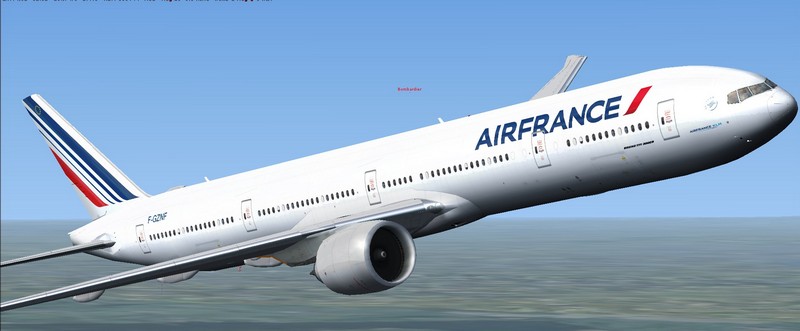
Well that one works fine in FSX

Image


I also don't have Steam .... but I'd be surprised if it didn't work OK ....

Re: Boeing 777-300ER Air France Package Doesn't work

PostPosted: Tue Mar 31, 2015 8:44 am
by pete
XcentY wrote:Hello,

I've just downloaded the file (see topic) and extracted the content to my FSX/SimObjects/Airplanes.
The airplane is available in FSX but all textures are missing.

I tried "Boeing 777-300ER American Airlines". Same Problem. Seems these packages (same author) doesn't work on FSX Steam Edition

Help please.


Have you tried, as Doug suggested, disabling DX10 preview? (Under Settings - Display)

Re: Boeing 777-300ER Air France Package Doesn't work

PostPosted: Tue Mar 31, 2015 9:10 am
by garymbuska
pete wrote:
XcentY wrote:Hello,

I've just downloaded the file (see topic) and extracted the content to my FSX/SimObjects/Airplanes.
The airplane is available in FSX but all textures are missing.

I tried "Boeing 777-300ER American Airlines". Same Problem. Seems these packages (same author) doesn't work on FSX Steam Edition

Help please.


Have you tried, as Doug suggested, disabling DX10 preview? (Under Settings - Display)[/quote
I suggest you get in touch with Steam Support. I was one of the Beta testers for the steam edition and there were a few problems with some addon aircraft and scenery not working. This could be a server problem. Steam had to take some things away to get this game to run using there servers, This could be one of those cases. But Steam support is probably were you need to look. <<s

Re: Boeing 777-300ER Air France Package Doesn't work

PostPosted: Tue Mar 31, 2015 9:47 am
by XcentY
I've read what you suggested. It seems that textures are not compatible with DX10.
This come with models made for old versions of Flight Simulator.
However, I'll not turn it back to DX9. I've set my FSX to work on DX10. I've 60fps constant in DX10 while it drops to 20fps in DX9
==> Author has to provide correct info "FSX DX9 compatible" by example.