Main Panel not showing up

FSX including FSX Steam version.

Main Panel not showing up

Postby garymbuska » Thu Feb 05, 2015 8:45 am

After my last question about view change I realized I worded it wrong. What I am trying to do is to get FSX to show the main panel instead of the VC.
I have tried removing any thing in the panel cfg file about the VC and when I go into the cockpit I still see in the upper left hand corner window 00 Virtual cockpit and you do not see the main panel I than use Shift 1 to display the main panel but if I go into spot view when I go back int the cockpit the main panel is hidden and I have to once again press shift1. It does not matter what aircraft I use it does the same thing.
I have also used FSPANEL STUDIO to edit the panels completely removing any window that said VC with no luck.
I found a entry in the FSX CFG file that reads Default View=1 I tried to change this to read Default View =0 but FSX changed it back Not sure why.
So am I stuck with this? I mean it is of a matter of life and death if I have to keep doing the same thing than so be it. But it is a real pain.
I am looking at the default Money Bravo and what I see may be just a bitmap not sure to be honest with you. But I do see window 00 Virtual Cockpit in the upper left hand corner :?:
Gary M Buska
SYSTEM Specs ASUS P8Z68 V/GEN 3 mother board: INTELL I7 2600k 3.48 ghz Quad core CPU with Sandy bridge: 12 Gigs of 1800hz ram:
GTX 950 OVER CLOCKED: 2 Gigs Ram Windows 10 Home 64 bit Operating system. 750W Dedicated modular power supply. Two Internal 1TB hard drives 1 External 1TB 3.2 USB hard drive. SAITEK Cessna flight Yoke with throttles.
CH Rudder Peddles 27 inch Wide screen Monitor
User avatar
garymbuska
Major
Major
 
Posts: 4415
Joined: Tue Dec 30, 2003 11:10 am
Location: Jacksonville, Florida

Re: Main Panel not showing up

Postby Hagar » Thu Feb 05, 2015 9:40 am

Gary. I'm not sure I understand your problem. I suspect you're using the wrong key commands. F9 & F10 select the VC & 2D views.

I than use Shift 1 to display the main panel

Shift + 1 toggles the 2D main panel window [window00] on & off. This displays in both 2D & VC mode just like the GPS, radio stack & other Shift + 2, 3, 4 commands.

I found a entry in the FSX CFG file that reads Default View=1 I tried to change this to read Default View =0 but FSX changed it back Not sure why.

DEFAULT_VIEW=1 is the 2D main panel view. DEFAULT_VIEW=0 is the VC view.

I am looking at the default Money Bravo and what I see may be just a bitmap not sure to be honest with you. But I do see window 00 Virtual Cockpit in the upper left hand corner

Try pressing F10.
Image

Founder & Sole Member - Grumpy's Over the Hill Club for Veteran Virtual Aviators
Member of the Fox Four Group
My Google Photos albums
My Flickr albums
User avatar
Hagar
Colonel
Colonel
 
Posts: 30868
Joined: Wed Jun 19, 2002 7:15 am
Location: Costa Geriatrica

Re: Main Panel not showing up

Postby garymbuska » Thu Feb 05, 2015 10:46 am

Hagar wrote:Gary. I'm not sure I understand your problem. I suspect you're using the wrong key commands. F9 & F10 select the VC & 2D views.

I than use Shift 1 to display the main panel

Shift + 1 toggles the 2D main panel window [window00] on & off. This displays in both 2D & VC mode just like the GPS, radio stack & other Shift + 2, 3, 4 commands.

I found a entry in the FSX CFG file that reads Default View=1 I tried to change this to read Default View =0 but FSX changed it back Not sure why.

DEFAULT_VIEW=1 is the 2D main panel view. DEFAULT_VIEW=0 is the VC view.

I am looking at the default Money Bravo and what I see may be just a bitmap not sure to be honest with you. But I do see window 00 Virtual Cockpit in the upper left hand corner

Try pressing F10.


Hagar
Exactly and that is what I want to show up when I go into cockpit view but the main panel is not displayed and I have to press the SHIFT + 1 key in order to bring up the main panel
As you know every window in a aircraft panel cfg fie has a number assigned to starting with number 00 and in every case I have seen this is the Main panel view and if you use the SHIFT key and the numbers 1 - 5 for instance it will open up a different window like the GPS gauge the Throttle gauge the Radio stack and so forth. This is quicker than using the View mode than select instrument panel than the appropriate window.
It is just a matter of knowing what number is assigned to each window, but you can bring up any window this way.

I have never used the f9 and f10 keys to do this I will see if that will make it stay put.

<<q
Gary M Buska
SYSTEM Specs ASUS P8Z68 V/GEN 3 mother board: INTELL I7 2600k 3.48 ghz Quad core CPU with Sandy bridge: 12 Gigs of 1800hz ram:
GTX 950 OVER CLOCKED: 2 Gigs Ram Windows 10 Home 64 bit Operating system. 750W Dedicated modular power supply. Two Internal 1TB hard drives 1 External 1TB 3.2 USB hard drive. SAITEK Cessna flight Yoke with throttles.
CH Rudder Peddles 27 inch Wide screen Monitor
User avatar
garymbuska
Major
Major
 
Posts: 4415
Joined: Tue Dec 30, 2003 11:10 am
Location: Jacksonville, Florida

Re: Main Panel not showing up

Postby Hagar » Thu Feb 05, 2015 11:00 am

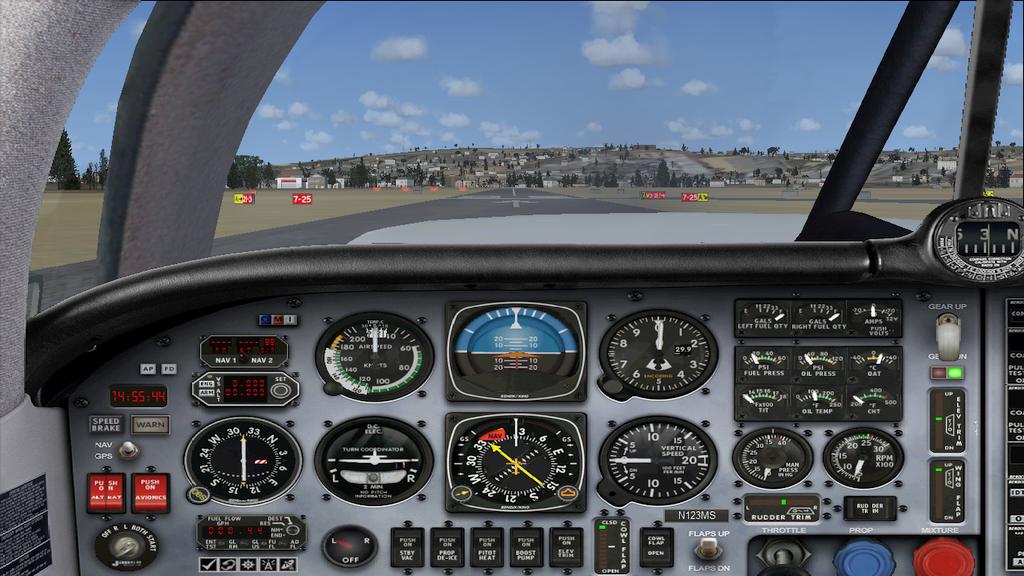
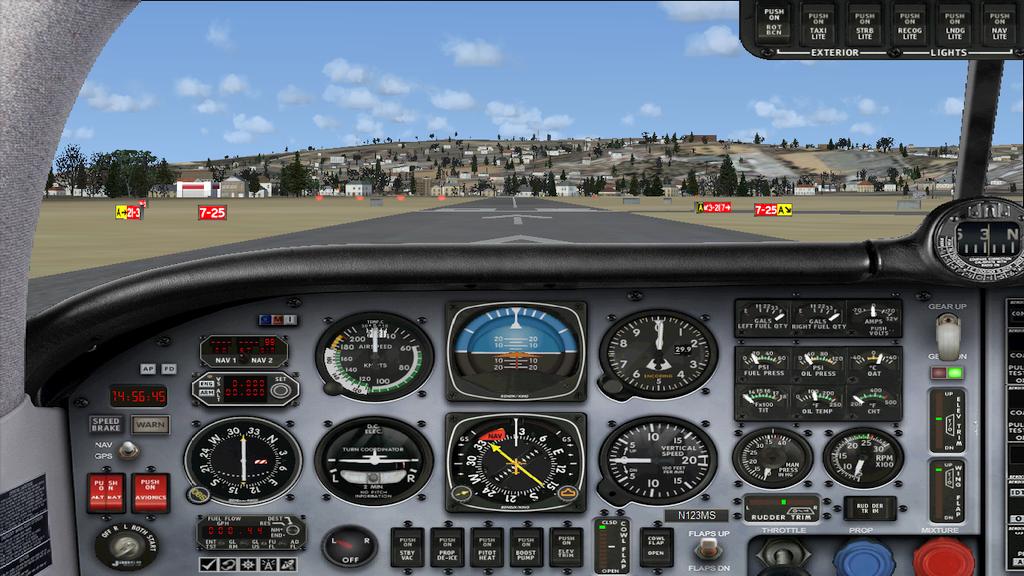
Mooney Bravo in VC view with 2D main panel selected (Shift +1). This overlays the 2D main panel window on the VC.
Image

Press F10 to select 2D Cockpit view.
Image
Image

Founder & Sole Member - Grumpy's Over the Hill Club for Veteran Virtual Aviators
Member of the Fox Four Group
My Google Photos albums
My Flickr albums
User avatar
Hagar
Colonel
Colonel
 
Posts: 30868
Joined: Wed Jun 19, 2002 7:15 am
Location: Costa Geriatrica

Re: Main Panel not showing up

Postby garymbuska » Thu Feb 05, 2015 3:30 pm

Thanks Hagar I knew you could help me out.
<<v
Gary M Buska
SYSTEM Specs ASUS P8Z68 V/GEN 3 mother board: INTELL I7 2600k 3.48 ghz Quad core CPU with Sandy bridge: 12 Gigs of 1800hz ram:
GTX 950 OVER CLOCKED: 2 Gigs Ram Windows 10 Home 64 bit Operating system. 750W Dedicated modular power supply. Two Internal 1TB hard drives 1 External 1TB 3.2 USB hard drive. SAITEK Cessna flight Yoke with throttles.
CH Rudder Peddles 27 inch Wide screen Monitor
User avatar
garymbuska
Major
Major
 
Posts: 4415
Joined: Tue Dec 30, 2003 11:10 am
Location: Jacksonville, Florida

Re: Main Panel not showing up

Postby jandjfrench » Tue Feb 10, 2015 7:05 pm

Hi,
I apologize if I'm missing something here. In Settings - Display on the AIRCRAFT tab the option to select The Default cockpit view of either the 3D virtual cockpit or the 2D instrument panel is available. Was this simply overlooked or is this setting ineffective?
Jim F.
jandjfrench
2nd Lieutenant
2nd Lieutenant
 
Posts: 106
Joined: Fri Dec 31, 2010 10:13 pm
Location: Salinas, CA  USA


Return to Flight Simulator X (FSX) and Steam

Who is online

Users browsing this forum: No registered users and 725 guests