Page 1 of 2
aircraft adding problems

Posted:
Mon Jan 05, 2015 12:33 pmby Vjtto
hello, i wanted to add new aircrafts to my msx, i followed some tutorials and i think i've understood everything. there is just one problem, i haven't got the folder:"microsoft games"
anyone would help me? thank you
Vjtto
Re: aircraft adding problems
Posted:
Mon Jan 05, 2015 1:36 pmby Hagar
If you have a 64-bit OS & your FSX is in the default location the Microsoft Games folder will be in the C:\Program Files (x86) directory.
Re: aircraft adding problems
Posted:
Mon Jan 05, 2015 2:09 pmby Vjtto
hi hagar, thank you for your help, i know where normaly the folder "microsoft games" will be but in "programs files (86x)" there isn't
Re: aircraft adding problems
Posted:
Mon Jan 05, 2015 3:02 pmby Hagar
Make sure your Folder Options are set to 'Show Hidden Files & Folders'.
http://windows.microsoft.com/en-gb/windows7/change-folder-optionsYou could try this. Right-click on the FSX desktop shortcut & click Properties. (Note that my FSX is not in the default location.)
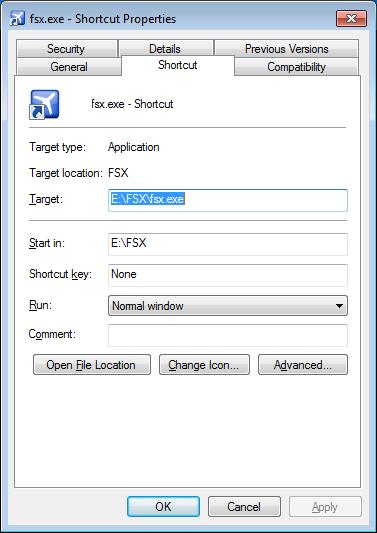
Click the
Open File Location button to open the FSX root directory folder in Windows Explorer.
Once you've located it you can create a Desktop shortcut to it for future convenience.
Re: aircraft adding problems
Posted:
Mon Jan 05, 2015 4:52 pmby Vjtto
yes, i have, but it doesn't appear yet

Re: aircraft adding problems
Posted:
Mon Jan 05, 2015 4:59 pmby Vjtto
in my shortcut properties, there is not the same screen, maybe because it's in italian
Re: aircraft adding problems
Posted:
Mon Jan 05, 2015 5:06 pmby Vjtto
ive got security, details, old versions, general, and web document, not the shortcut
Re: aircraft adding problems
Posted:
Mon Jan 05, 2015 5:08 pmby Hagar
Which OS are you using?
Re: aircraft adding problems
Posted:
Mon Jan 05, 2015 5:44 pmby Vjtto
windows
Re: aircraft adding problems
Posted:
Mon Jan 05, 2015 5:46 pmby Hagar
Vjtto wrote:windows
Yes but I mean WinXP, Vista, Win7 or Win8?
Re: aircraft adding problems
Posted:
Mon Jan 05, 2015 5:55 pmby Vjtto
7
Re: aircraft adding problems
Posted:
Mon Jan 05, 2015 6:05 pmby Hagar
Click Start & type Flight Simulator in the Search box.
Re: aircraft adding problems
Posted:
Mon Jan 05, 2015 6:06 pmby Vjtto
ok now?
Re: aircraft adding problems
Posted:
Mon Jan 05, 2015 6:09 pmby Hagar
Microsoft Flight Simulator X should be listed in the results. Click on it to open the folder.
I don't know if it will have the same name in the Italian version.
Re: aircraft adding problems
Posted:
Mon Jan 05, 2015 6:10 pmby Vjtto
there is the .exe (steam edition) , and the documents of the game (just a folder with some airport files)
I have to put the files there?