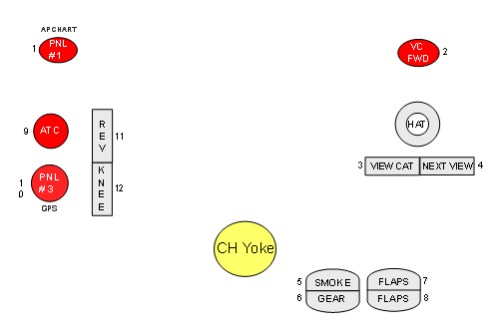
CH Yoke & FSX, n00b needs help assigning buttons
 Posted: Wed Dec 17, 2014 1:26 pm
My brother bought my nephew the CH Flight Sim Yoke & Pedals. He flies Flight Simulator X on Windows 7.
And then he asked me to set it up. I've never used Flight Simulator X before.
So it was pretty easy to get the elevator and ailerons to work.
I was able to google and figure out throttle, prop, and mixture.
I do have a question about the prop setting. I've only flown fixed pitch propeller aircraft, so um, how do I tell Flight Sim X to ignore the propeller setting and/or what is the right neutral propeller setting?
Mostly, I have questions about assigning and using the other buttons and controls. I have read how people map these buttons to change views out the window and things like that, but how is that done? Is that done using FSX itself from some menu? Or is it done with a different program altogether that creates different configurations, and if so, what is that program and where can I find it?
Thanks for the help in advance!
And then he asked me to set it up. I've never used Flight Simulator X before.
So it was pretty easy to get the elevator and ailerons to work.
I was able to google and figure out throttle, prop, and mixture.
I do have a question about the prop setting. I've only flown fixed pitch propeller aircraft, so um, how do I tell Flight Sim X to ignore the propeller setting and/or what is the right neutral propeller setting?
Mostly, I have questions about assigning and using the other buttons and controls. I have read how people map these buttons to change views out the window and things like that, but how is that done? Is that done using FSX itself from some menu? Or is it done with a different program altogether that creates different configurations, and if so, what is that program and where can I find it?
Thanks for the help in advance!