Page 1 of 1

How to upload a screenshot,In simple terms.

PostPosted: Sat Nov 22, 2014 8:38 pm
by Anthindelahunt
Ahoy There.

Can some kind soul tell me in simple terms,how to upload a
screenshot. I may not be the oldest here but the grey matter
has slowed down a tad.

Waiting in trepidation.

Anthin. :pray:
Re: How to upload a screenshot,In simple terms.

PostPosted: Sat Nov 22, 2014 9:10 pm
by jandjfrench
Hi,
I just figured it out last week. It involves clicking on the "Upload Images" at the top of the page. Just to make sure I don't steer you astray I'll try to include one here. I'll first click Upload...
When I did I selected a file and then clicked on upload and was told to copy and paste. I copied, now I'll paste.
https://www.simviation.com/phpupload/upl ... 719302.jpg
Okay. Let's see what happens.
I previwed and just see the link I posted. Now I'll click on "Img" at the top of the box I'm typing in.
Image
Okay a couple of [img]s popped up and I pasted the link between them and that worked. At least in Preview. I'll post now.
Jim F.

Re: How to upload a screenshot,In simple terms.

PostPosted: Sun Nov 23, 2014 4:01 am
by Fozzer
Any Pics, etc, that I want to post, I stick onto my desktop, to be easy to locate when searching for the particular Pic to "Upload", as describe by Jan above.
"Copy" the details presented...and then post the details within the post!

I like Sim V's method of storage...it is secure...unlike "Photobucket", etc!... ;) ...!

Paul.... :mrgreen: ...!

Re: How to upload a screenshot,In simple terms.

PostPosted: Sun Nov 23, 2014 5:28 am
by Hagar
You will need a basic knowledge of image editing. Screenshots taken using the FSX default V key will be saved in BMP format & the same size as your monitor. Images uploaded to Simv must be in JPEG (.jpg) format & conform to the forum size limits (Maximum 250kb & 1800 pixel width). Most image editing software can be used to resize & convert the shots to the correct format. My trusty favourite is Irfanview. http://www.irfanview.com/

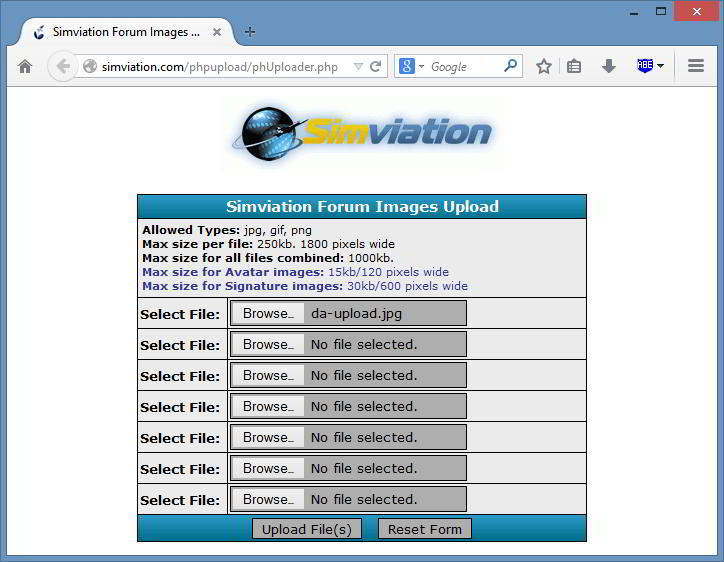
Once that's done you can upload the image from the Image Upload link. Browse & select the image from wherever you saved it on your PC.
Image

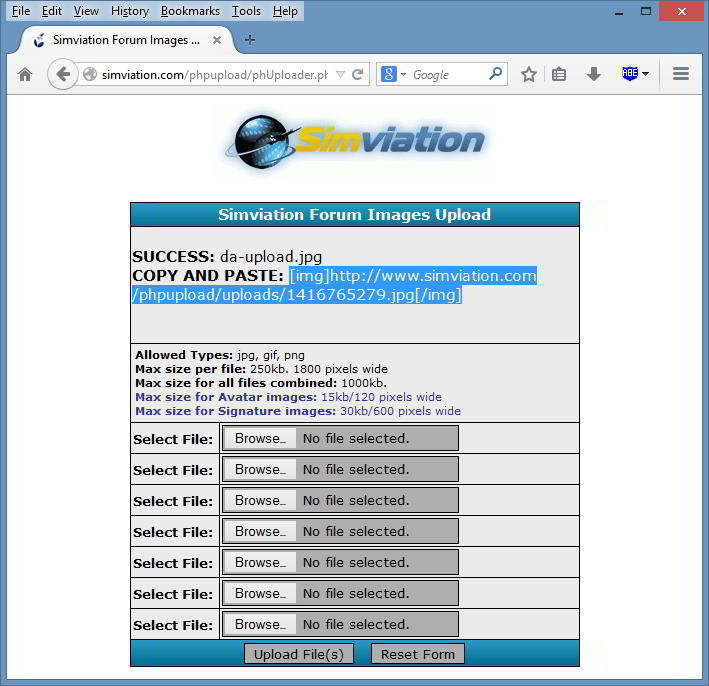
Click the Upload File(s) button. When the upload is successful you will see this.
Image

To post the image on the forum highlight the path exactly shown in my shot & copy it. Then paste it into your post. It's much quicker & easier than it sounds.

Re: How to upload a screenshot,In simple terms.

PostPosted: Sun Nov 23, 2014 6:03 am
by Hagar
You might find my walk-through useful --> Resizing screenshots - with IrfanView

Note that it was written before the forum size limits were increased.

Re: How to upload a screenshot,In simple terms.

PostPosted: Wed Nov 26, 2014 3:16 am
by Hagar
It would be nice to get some feedback on this. :think:

Re: How to upload a screenshot,In simple terms.

PostPosted: Wed Nov 26, 2014 4:27 am
by Fozzer
Hagar wrote:It would be nice to get some feedback on this. :think:


Anthin.....Like most of us, we got used to the method Doug described a long time ago....

Its easy-peasy when you know how!

...and like Doug, I use my trusty, default, "Irfanview" for all my picture re-sizing, etc.

All of my various pictures are stored in the wonderful Sim V Library...where they are very safe from unwanted prying eyes!
(They are stored under an undecipherable reference number!)... :lol: ...!

Paul.... :mrgreen: ...!

Re: How to upload a screenshot,In simple terms.

PostPosted: Wed Nov 26, 2014 1:04 pm
by Anthindelahunt
Sorry Hagar for not getting back to you but I have been
unwell and am in very bad pain. Hopefully I will be able
to concentrate a bit better soon.

Anthin.

Re: How to upload a screenshot,In simple terms.

PostPosted: Wed Nov 26, 2014 6:37 pm
by Hagar
Ah, that explains it. I hope you feel better soon.

Re: How to upload a screenshot,In simple terms.

PostPosted: Wed Nov 26, 2014 8:34 pm
by Anthindelahunt
Once again sorry. hopefully I will be able to sit a bit longer
and concentrate.

Thank you Hagar for the consideration.

Regards Anthin.

Re: How to upload a screenshot,In simple terms.

PostPosted: Thu Nov 27, 2014 3:32 am
by pete
(They are stored under an undecipherable reference number!).


Yes - renamed. It prevents those nice hackers uploading programs disguised as images. If they know the name of the file they can run it ....... :violence-guntoting:

Re: How to upload a screenshot,In simple terms.

PostPosted: Sat Nov 29, 2014 9:31 pm
by Anthindelahunt
Sorry Doug. Your post was very straight forward and I thank you for it.
I am still in much the same situation but am pushing myself.

I have uploaded my first screen shoy to Sim V.

With Thanks Anthin. 8-)