Do-335 Help Please

FSX including FSX Steam version.

Do-335 Help Please

Postby BobF » Tue Nov 04, 2014 8:35 pm

Hi. I downloaded the_Do-335.zip here at Simviation.

I can view the panel with FSStudio. I can see the model with FSRepaint.

When I try to load the plane in FSX Acceleration I can see the thumbnail. When I get to the details window it shows the Do-335 info but no model picture. If I press OK I get an error "Failed to Startup the flight model sim-tech_Do-335". I looked at the model with Model Converter X and it shows up OK. I looked at the mdl file with a hex editor and it shows that it is an FS9 model so it should load.

I have hundreds of planes installed and never have seen this error.

The downloaded size is 97,357,790 and the size on disk is 97,357,824.

What is my problem and how can I fix it? It looks like a great plane. Thanks for it.

Thanks, best regards, Bob.
BobF
2nd Lieutenant
2nd Lieutenant
 
Posts: 91
Joined: Thu May 26, 2005 10:20 pm
Location: So. CA.

Re: Do-335 Help Please

Postby pete » Wed Nov 05, 2014 2:47 am

Hi Bob

I couldn't find the zip name you mentioned. The only FSX version I could find is this

http://simviation.com/1/search?submit=1 ... p&x=17&y=9


Is this the one you are trying to install?

Thanks
Simplicity is the ultimate sophistication. – Leonardo da Vinci
User avatar
pete
Administrator
Administrator
 
Posts: 10243
Joined: Mon Jan 01, 2001 2:01 am
Location: Cloud Cuckoo Land

Re: Do-335 Help Please

Postby papituwall » Wed Nov 05, 2014 3:03 am

It looks like a problem with aircraft.cfg descriptions, more precisely the line/s sim:

For instance this is the default Cessna

[fltsim.0]
title=Cessna Skyhawk 172SP Paint1
sim=Cessna172SP >>>>>>>>>>>>>>>> This text must be the same as the name of the air file: cessna172sp.air and also model: cessna172sp.mdl

model=""
panel=""
sound=""
texture=1
kb_checklists=Cessna172SP_check
kb_reference=Cessna172SP_ref
atc_id=G-BAFM
ui_manufacturer=Cessna
ui_type=C172SP Skyhawk
ui_variation=" Azul, dorado"
ui_typerole=Monomotor de hélice
ui_createdby=Microsoft Corporation
description=Es poco frecuente encontrar algún piloto que no haya volado al menos algunas horas en el Cessna 172, un avión estable y confiable, habitual en las flotas de alquiler y la mayoría de las escuelas de vuelo. Desde que se terminó el primer prototipo en 1955, se han producido más de 35000 aparatos C172, lo que lo convierte en el monomotor más popular del mundo. Uno de los primeros aviones de Cessna con tren de aterrizaje triciclo, el 172 se convirtió rápidamente en el favorito de un número creciente de pilotos comerciales. Su confiabilidad y fácil manejo (sumados a su excelente diseño y características estructurales) le han valido una popularidad continua durante décadas.

[fltsim.1]
... etc.
User avatar
papituwall
Captain
Captain
 
Posts: 833
Joined: Thu Sep 19, 2013 1:42 pm
Location: LEZG

Re: Do-335 Help Please

Postby BobF » Wed Nov 05, 2014 11:42 am

Thanks all. My mistake it was the FSX_Do335.zip here at Simviation. The aircraft.cfg says:

[fltsim.0]
title=simTECH_Do335
sim=simTECH_Do335

which are the model and .air file correct names. (I had already checked that)

Any help?

Best regards to all, Bob.
BobF
2nd Lieutenant
2nd Lieutenant
 
Posts: 91
Joined: Thu May 26, 2005 10:20 pm
Location: So. CA.

Re: Do-335 Help Please

Postby EVVFCX » Wed Nov 05, 2014 5:18 pm

Hi,

Have you tried applying the patch after you installed the original files?

Read the txt file this maybe what you haven't done?

regards

Steve
User avatar
EVVFCX
Captain
Captain
 
Posts: 751
Joined: Tue Nov 27, 2007 8:32 am
Location: Pontefract, West Yorkshire

Re: Do-335 Help Please

Postby BobF » Wed Nov 05, 2014 8:37 pm

Thaks. The patch is for another download on page 1. The FSX_Do335.zip on page 22 of the Vintage Airplanes is supposedly a standalone version. It was uploaded in 2008. The update for the other version was dated earlier. Regards, Bob.
BobF
2nd Lieutenant
2nd Lieutenant
 
Posts: 91
Joined: Thu May 26, 2005 10:20 pm
Location: So. CA.

Re: Do-335 Help Please

Postby Hagar » Thu Nov 06, 2014 6:08 am

BobF wrote:Thaks. The patch is for another download on page 1. The FSX_Do335.zip on page 22 of the Vintage Airplanes is supposedly a standalone version. It was uploaded in 2008. The update for the other version was dated earlier. Regards, Bob.

I presume you mean this one. http://simviation.com/1/search?submit=1&keywords=FSX_Do335.zip&categoryId=

It's all very odd. To be honest the whole thing is a mess & the file size could be considerably reduced. I've tried everything I can think of to fix this problem without success. However, according to the Readme the only thing changed from the original SimTech FS9 version is thumbnails in the Texture folders.
No modifications made from original creation by simTECH


This is the final release version of the SimTech model --> http://simviation.com/1/search?submit=1&keywords=FinalDo335releaseEdition.zip&categoryId=54
It works well for me in FSX Gold + Acceleration with the official patch applied. I noticed a small bug with the strobe lights but that should be easy enough to fix.
Image

Founder & Sole Member - Grumpy's Over the Hill Club for Veteran Virtual Aviators
Member of the Fox Four Group
My Google Photos albums
My Flickr albums
User avatar
Hagar
Colonel
Colonel
 
Posts: 30868
Joined: Wed Jun 19, 2002 7:15 am
Location: Costa Geriatrica

Re: Do-335 Help Please

Postby BobF » Thu Nov 06, 2014 11:59 am

Hi. Thanks. Yes that's the one. The FSX_Do335.zip has multiple textures that are not called out in the aircraft.cfg. That model does not visualize. There are 5 extra texture sets that are not enabled in the aircraft.cfg, the console (Window01) has no gauges, there is a CFS2 version 28.8 Mb included (why?).

The other package is much better. It does not have the extra textures and has a fix for the missing console gauges in Window01.

It's a real shame that the FSX_Do335.zip model does not show up in FSX. I looked at it with FSRepaint and I Like it a lot better than the other package.

Regards, Bob.

P.S. I wrote to the author with no reply yet.
BobF
2nd Lieutenant
2nd Lieutenant
 
Posts: 91
Joined: Thu May 26, 2005 10:20 pm
Location: So. CA.

Re: Do-335 Help Please

Postby BobF » Thu Nov 06, 2014 12:06 pm

I just noticed that the fix for the console does not work in FSX as the gauges are for FS98. That's why it is not in the other package. Bob.
BobF
2nd Lieutenant
2nd Lieutenant
 
Posts: 91
Joined: Thu May 26, 2005 10:20 pm
Location: So. CA.

Re: Do-335 Help Please

Postby Hagar » Thu Nov 06, 2014 4:29 pm

BobF wrote:Hi. Thanks. Yes that's the one. The FSX_Do335.zip has multiple textures that are not called out in the aircraft.cfg. That model does not visualize. There are 5 extra texture sets that are not enabled in the aircraft.cfg, the console (Window01) has no gauges, there is a CFS2 version 28.8 Mb included (why?).

The CFS2 version is included with the original SimTech package. http://simviation.com/1/search?submit=1&keywords=simtech_do335.zip&categoryId=
This is the one that was "updated" for FSX. It probably works OK in the RTM version.

The other package is much better. It does not have the extra textures and has a fix for the missing console gauges in Window01.

It's a real shame that the FSX_Do335.zip model does not show up in FSX. I looked at it with FSRepaint and I Like it a lot better than the other package.


The FSX update simply adds thumbnails to the Texture folders. I don't know why the model won't load in FSX as the original FS9 version does. It also includes the Aircraft.cfg entries for the missing variations. Unfortunately the textures aren't fully FSX-compatible. However, it's not difficult to fix that if you're familiar with DXTBmp. If not, I can probably help. I've been playing around & added them to the Final Release version. (I haven't fixed the panel problem.)

This is the [fltsim.x] section of my modified Aircraft.cfg.

[fltsim.0]
title=simTECH_Do335
sim=simTECH_Do335
model=
panel=
sound=
texture=
kb_checklists=
kb_reference=
editable=0
atc_id=XDO335
atc_airline=WARBIRD
atc_flight_number=Do335
atc_heavy=0
ui_manufacturer=DORNIER
ui_type=DO-335
ui_variation=Pfeil
visual_damage=1
description=simTECH Dornier Late War Do-335

[fltsim.1]
title=simTECH_Do335 Escuadriila
sim=simTECH_Do335
model=
panel=
sound=
texture=1
kb_checklists=
kb_reference=
editable=0
atc_id=XDO335
atc_airline=WARBIRD
atc_flight_number=Do335
atc_heavy=0
ui_manufacturer=DORNIER
ui_type=DO-335
ui_variation=Escuadriila
visual_damage=1
description=simTECH Dornier Late War Do-335

[fltsim.2]
title=simTECH_Do335 Huckebien
sim=simTECH_Do335
model=
panel=
sound=
texture=2
kb_checklists=
kb_reference=
editable=0
atc_id=XDO335
atc_airline=WARBIRD
atc_flight_number=Do335
atc_heavy=0
ui_manufacturer=DORNIER
ui_type=DO-335
ui_variation=Huckebien
visual_damage=1
description=simTECH Dornier Late War Do-335

[fltsim.3]
title=simTECH_Do335 I Gruppe
sim=simTECH_Do335
model=
panel=
sound=
texture=3
kb_checklists=
kb_reference=
editable=0
atc_id=XDO335
atc_airline=WARBIRD
atc_flight_number=Do335
atc_heavy=0
ui_manufacturer=DORNIER
ui_type=DO-335
ui_variation=I Gruppe
visual_damage=1
description=simTECH Dornier Late War Do-335

[fltsim.4]
title=simTECH_Do335 JG 52
sim=simTECH_Do335
model=
panel=
sound=
texture=4
kb_checklists=
kb_reference=
editable=0
atc_id=XDO335
atc_airline=WARBIRD
atc_flight_number=Do335
atc_heavy=0
ui_manufacturer=DORNIER
ui_type=DO-335
ui_variation=JG 52
visual_damage=1
description=simTECH Dornier Late War Do-335

[fltsim.5]
title=simTECH_Do335 JG23 Africa
sim=simTECH_Do335
model=
panel=
sound=
texture=5
kb_checklists=
kb_reference=
editable=0
atc_id=XDO335
atc_airline=WARBIRD
atc_flight_number=Do335
atc_heavy=0
ui_manufacturer=DORNIER
ui_type=DO-335
ui_variation=JG23 Africa
visual_damage=1
description=simTECH Dornier Late War Do-335

P.S. I wrote to the author with no reply yet.

I wouldn't hold your breath. ;)
Image

Founder & Sole Member - Grumpy's Over the Hill Club for Veteran Virtual Aviators
Member of the Fox Four Group
My Google Photos albums
My Flickr albums
User avatar
Hagar
Colonel
Colonel
 
Posts: 30868
Joined: Wed Jun 19, 2002 7:15 am
Location: Costa Geriatrica

Re: Do-335 Help Please

Postby BobF » Thu Nov 06, 2014 5:47 pm

Hi. OK. I guess I'll have to live with the other package. It's not worth spending all this time to fix a flawed other package. Thanks to all that answered my request for help. Bob.
BobF
2nd Lieutenant
2nd Lieutenant
 
Posts: 91
Joined: Thu May 26, 2005 10:20 pm
Location: So. CA.

Re: Do-335 Help Please

Postby jandjfrench » Fri Nov 07, 2014 8:03 pm

Hi,
In case anyone is still interested I made a few changes to at least get the plane to partially display. I wasn't familiar with the aircraft but it sounded interesting and I kind of like puzzles. I downloaded and installed the plane and when I started FSX I got a warning that the flight model could not be loaded. I do have the DEBUG section about reporting load errors in my FSX.cfg. The SDK says this indicates a problem with the .air file. I found the CFS version of the plane somewhere in the download and I installed it to a dummy folder and used that .air file. The plane loaded but only a few parts could be seen. I opened one of the major fuselage textures with DXTBmp and saw a solid black alpha channel. That would seem to account for the transparency. I decided to create an all black alpha channel and when I clicked that, the existing alpha channel displayed in the upper right, turned white with various sections remaining black. I didn't know what was happening but I decided to save the texture and see what happened. More parts appeared. I modified another texture and after loading still more parts were visible. Rather than proceeding I might just download the additional textures available and see what happens. It's a pain to try to post an image here and most of the time I can't get them to display so I haven't included one.
Jim F.
jandjfrench
2nd Lieutenant
2nd Lieutenant
 
Posts: 106
Joined: Fri Dec 31, 2010 10:13 pm
Location: Salinas, CA  USA

Re: Do-335 Help Please

Postby BobF » Fri Nov 07, 2014 9:01 pm

Hi Jim. Thanks. I am glad you had the same error as I did. I put the model file in another D0335 here at SimViation and used the other .air file modified to show the model.. I too got a partial display. Parts ere missing but it did partially appear. I did not check the textures. Some Administrator should take the package off the site until someone can fix it so other downloaders don't go through all this.

If you did get it to work I'd sure like a PM from you. The model that does not show is much better in my mind than the other model. I can see it OK with FSRepaint.

Best regards, Bob.
BobF
2nd Lieutenant
2nd Lieutenant
 
Posts: 91
Joined: Thu May 26, 2005 10:20 pm
Location: So. CA.

Re: Do-335 Help Please

Postby jandjfrench » Fri Nov 07, 2014 9:22 pm

Hi Hagar et al,
I downloaded one of the texture packs and have the same transparency problem. Not sure how I'm going to proceed. And Hagar, how did you determine the ui_variation names used in your Aircraft.cfg modification?
Jim F.
jandjfrench
2nd Lieutenant
2nd Lieutenant
 
Posts: 106
Joined: Fri Dec 31, 2010 10:13 pm
Location: Salinas, CA  USA

Re: Do-335 Help Please

Postby Hagar » Sat Nov 08, 2014 4:42 am

jandjfrench wrote:Hi Hagar et al,
I downloaded one of the texture packs and have the same transparency problem. Not sure how I'm going to proceed. And Hagar, how did you determine the ui_variation names used in your Aircraft.cfg modification?
Jim F.


I spent a long time trying different versions of this aircraft & settled on the Final Release version I mentioned earlier. http://simviation.com/1/search?submit=1&keywords=simtech_do335.zip&categoryId=
Part 1 contains the textures & Aircraft.cfg entries I posted in my last reply. I assume these are the same textures you already have in the original problem download.

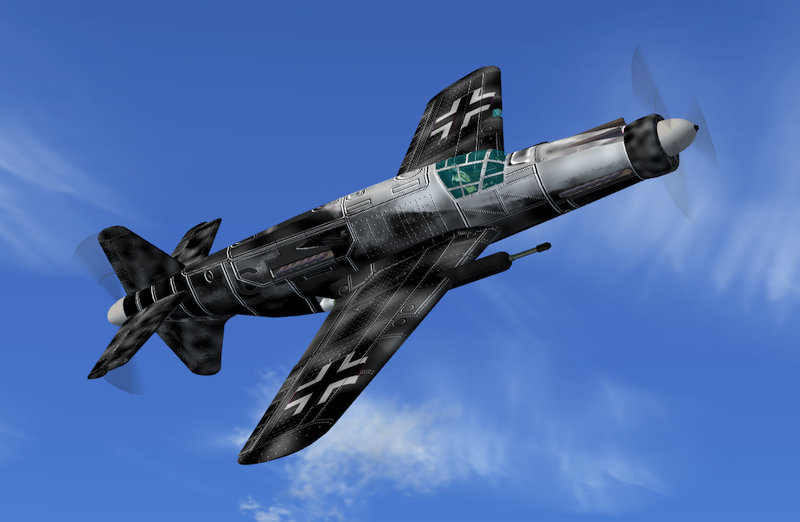
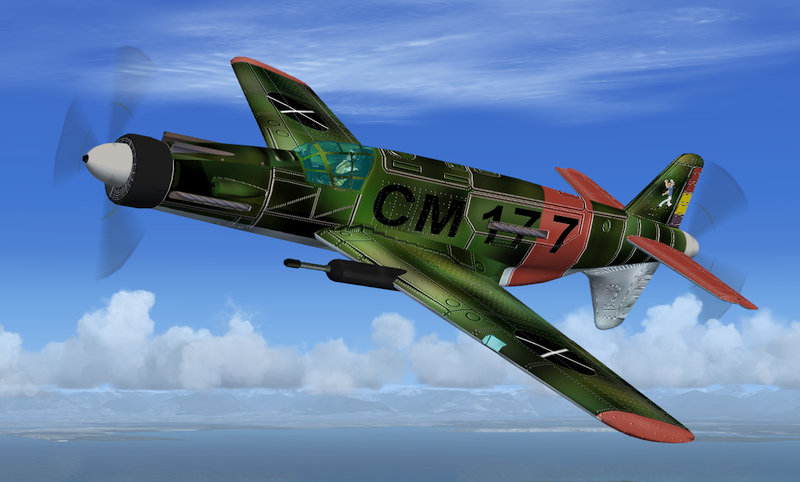
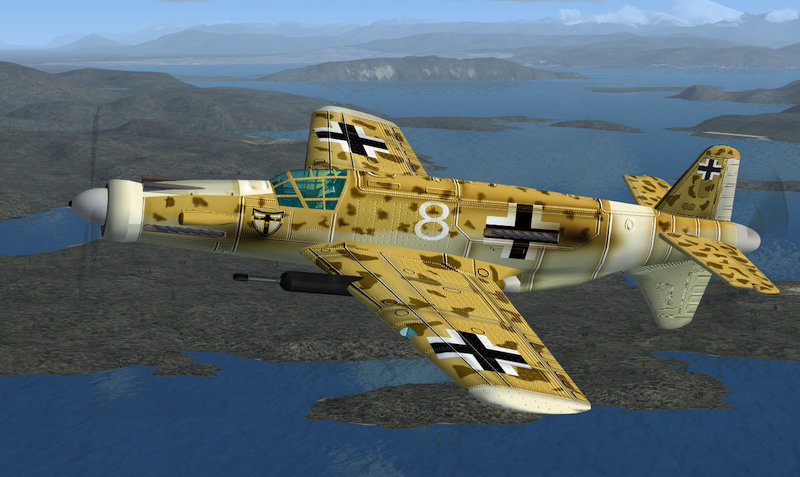
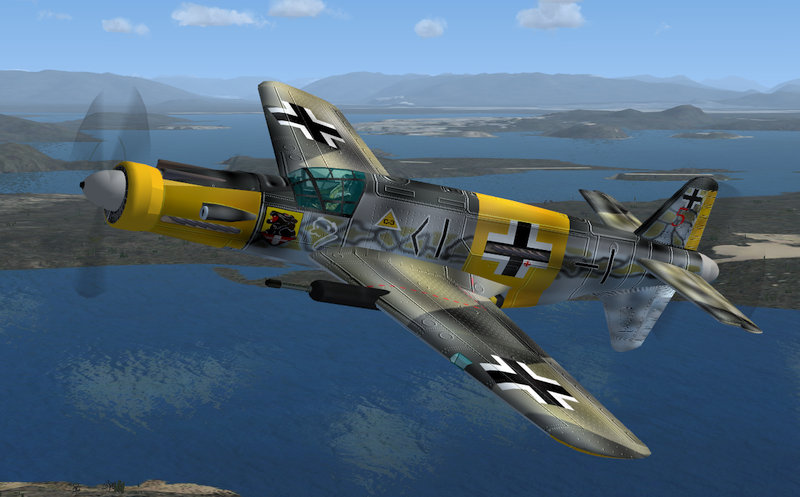
The transparency is due to the Alpha Channel of the 4 main textures in each variation being black. This is easily fixed by inverting the Alpha in DXTBmp. Alpha > Invert Alpha.
I modified the ones in the Aircraft.cfg I posted earlier. This is what they look like.

Image

Image

Image

Image

I can mail you my modified textures if you wish (17.3 mb). I don't intend uploading them as there are still a few little bugs like the incompatible gauges to sort out.
Image

Founder & Sole Member - Grumpy's Over the Hill Club for Veteran Virtual Aviators
Member of the Fox Four Group
My Google Photos albums
My Flickr albums
User avatar
Hagar
Colonel
Colonel
 
Posts: 30868
Joined: Wed Jun 19, 2002 7:15 am
Location: Costa Geriatrica

Next

Return to Flight Simulator X (FSX) and Steam

Who is online

Users browsing this forum: No registered users and 450 guests