Page 1 of 1

FSX & Windows 8.1 graphic glitch

PostPosted: Sun Jul 13, 2014 8:27 pm
by wifesaysno
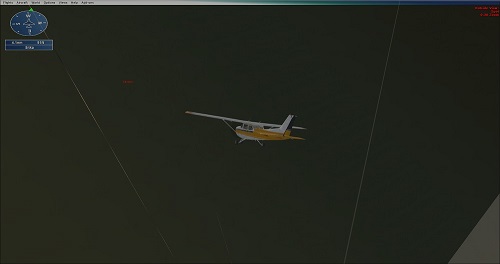
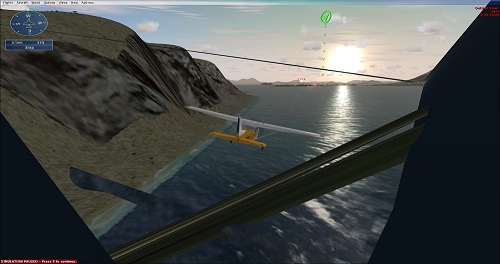
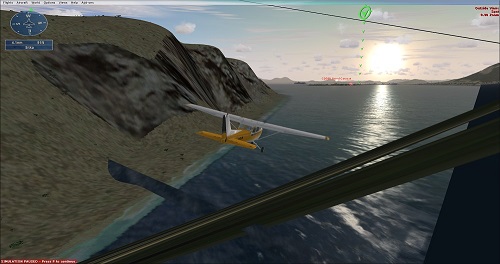
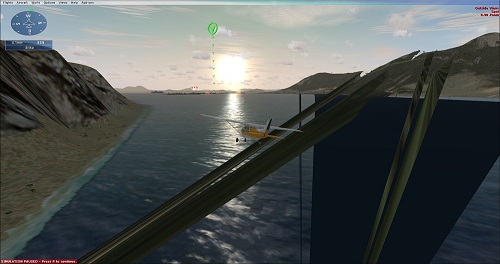
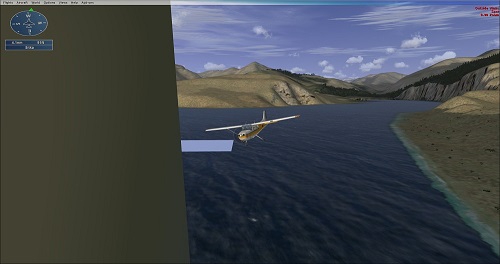
Alrighty gents, if I update FSX past stock (pre SP1) this is what I get for graphics. Note that this is after turning on DX10 preview (otherwise it CTDs), after much fiddling with the compatibility settings, and trying many re-installs and install location moves.
Image

Image

Image

Image

Image

Image

AMD FX(tm)-6300 Six-Core Processor 3.50GHz
8gb RAM
64bit Windows 8.1
AMD Radeon HD 7700 series


Any thoughts? I have been digging through 8.1 & FSX forums and having trouble coming up with a solution.

Re: FSX & Windows 8.1 graphic glitch

PostPosted: Mon Jul 14, 2014 6:28 am
by Fozzer
..... :shock: ....!

Only since moving from gentle Michigan to the wilds and dangers of Central Oregon, Adam?.... :shock: ..!

A DX10/Location culture shock!

Paul... :D ...!

Re: FSX & Windows 8.1 graphic glitch

PostPosted: Mon Jul 14, 2014 4:00 pm
by Steve M
I had some of that until I set up an FSX profile with Nvidea inspector and I also downloaded game booster. But with an AMD Radeon card I don't know what to say. Maybe you could just check how many running processes you have, right out of the box my Win 8.1 was running over 35 processes. (NEW)

Don't know if this helps any but it's what I do..
viewtopic.php?f=21&t=170339

Re: FSX & Windows 8.1 graphic glitch

PostPosted: Mon Jul 14, 2014 4:40 pm
by Mech45
Unfortunately there is no fix for that. It's the ATI driver what causes that, and there is no sign that they would want to fix that. No DX10 for ATI users in FSX. Funny thing, with the older drivers there was no such problem, but there is no old driver for Win 8.1...so, thats it. If you want to use DX10, you need Nvidia card.

Re: FSX & Windows 8.1 graphic glitch

PostPosted: Mon Jul 14, 2014 7:35 pm
by wifesaysno
I honestly do not want DX10, I just had to turn it on because FSX would CTD upon loading a flight or changing planes.

I always run it as administrator.

Really frustrating, my PC runs the pure stock no SP or accel FSX well (except for the lack of multi core) and CAN run accel very well...except for this graphic glitch.

So I guess the other option is any thoughts on how to fix the Acceleration CTDs without activating DX10?

Re: FSX & Windows 8.1 graphic glitch

PostPosted: Mon Jul 14, 2014 8:37 pm
by wifesaysno
Okay gents, after 4 months of fighting I think I got something...*knock on wood* it has run great now WITHOUT DX10..with DX10 it still gets the above graphics glitch (remember activating DX10 was previously the only solution to CTD problems).

Here is what I did.
I added this to the FSX.CFG file
[BufferPools]
PoolSize=4000


And changed this value:
TEXTURE_BANDWIDTH_MULT=40

to this:
TEXTURE_BANDWIDTH_MULT=90

Now it APPEARS to be stable with out CTD....for now...but we all know FSX is more sensitive than our old ladies at THAT time of the month.... :cry:

Tailwinds all,
Adam

Re: FSX & Windows 8.1 graphic glitch

PostPosted: Tue Jul 15, 2014 1:25 am
by Mech45
Good that you managed to fix it. Mind you, win 8.1 is maniac about the "latest" drivers, so check those and update if needed. Also make sure that you have the latest version of FSUIPC. In my case that was causing the CTD-s, when i jumped into Win 8.1. After installing the last version, no issues with FSX. Its running great. DX9, that is.

Happy landings!

Re: FSX & Windows 8.1 graphic glitch

PostPosted: Tue Jul 15, 2014 8:03 am
by Modlerbob
I get an occasional glitch on the screen but I just figured it went with the territory. they only flash for one or two frames. I have an AMD card but I have Win 7 pro as my OS.

Re: FSX & Windows 8.1 graphic glitch

PostPosted: Wed Jul 16, 2014 9:03 am
by garymbuska
Modlerbob wrote:I get an occasional glitch on the screen but I just figured it went with the territory. they only flash for one or two frames. I have an AMD card but I have Win 7 pro as my OS.


This is one of the reasons I use nothing but NVIDIA cards. I had heard nothing but problems from others using Other cards with any version of flight simulator.
Now I have no idea as to why these problems exist except for the possibility of driver issues. It could be a Direct X issue as well as these cards seem to have issues with direct X for one reason or the other.

<<u