Where has this weird file come from?

FSX including FSX Steam version.

Where has this weird file come from?

Postby Eagle eye » Wed Jun 25, 2014 4:05 pm

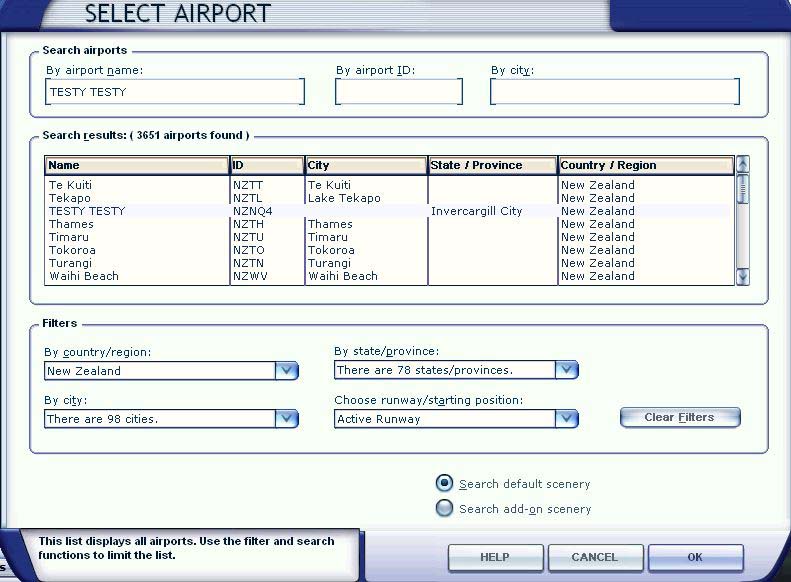
Well guys I have a bit of a head scratcher for you. Over the past couple of weeks I have been adding AVSim and VLC scenery & airports around New Zealand to my scenery library. The other day I notice a strange entry 'TESTY TESTY' in my FSX 'Select Airport' page. If I go to it, it places the aircraft amongst trees on sloping ground. The really strange thing is I can't see this entry either in my FSX 'Scenery Library' or in my FSX directory on my SSD. It says 'Invercargill City' in the State/Provence field I cant recognise that either. I don't know where it came from or how to get rid of it. How do you edit the 'Select Airport' lists??
https://www.simviation.com/phpupload/upl ... 771802.jpg

User avatar
Eagle eye
Ground hog
Ground hog
 
Posts: 47
Joined: Wed Jul 10, 2013 5:19 pm
Location: New Zealand

Re: Where has this weird file come from?

Postby garymbuska » Wed Jun 25, 2014 6:20 pm

Eagle eye wrote:Well guys I have a bit of a head scratcher for you. Over the past couple of weeks I have been adding AVSim and VLC scenery & airports around New Zealand to my scenery library. The other day I notice a strange entry 'TESTY TESTY' in my FSX 'Select Airport' page. If I go to it, it places the aircraft amongst trees on sloping ground. The really strange thing is I can't see this entry either in my FSX 'Scenery Library' or in my FSX directory on my SSD. It says 'Invercargill City' in the State/Provence field I cant recognise that either. I don't know where it came from or how to get rid of it. How do you edit the 'Select Airport' lists??
https://www.simviation.com/phpupload/upl ... 771802.jpg


Trust me this entry is in your FSX scenery.cfg file either at the very bottom or at the top. it has to be in this file or it would not show up. As to where it came from if any of the scenery you downloaded had a self installer I would be willing to bet that is where it came from.
My advice is to stay away from any download that has a self installer because you have no idea as to what and where it is adding things. My only exception to this rule is if I know the person who made the upload.
I know that AVSIM has library editors but they do mot install any of the files they just look for certain things a upload must have. I used to do this some time ago.
The FSX scenery cfg file is located in the root directory if default location that would be C:programfiles/microsoftgames/setup/fsxcache.


<<s
Gary M Buska
SYSTEM Specs ASUS P8Z68 V/GEN 3 mother board: INTELL I7 2600k 3.48 ghz Quad core CPU with Sandy bridge: 12 Gigs of 1800hz ram:
GTX 950 OVER CLOCKED: 2 Gigs Ram Windows 10 Home 64 bit Operating system. 750W Dedicated modular power supply. Two Internal 1TB hard drives 1 External 1TB 3.2 USB hard drive. SAITEK Cessna flight Yoke with throttles.
CH Rudder Peddles 27 inch Wide screen Monitor
User avatar
garymbuska
Major
Major
 
Posts: 4415
Joined: Tue Dec 30, 2003 11:10 am
Location: Jacksonville, Florida

Re: Where has this weird file come from?

Postby Hagar » Thu Jun 26, 2014 2:13 am

Eagle eye wrote:Well guys I have a bit of a head scratcher for you. Over the past couple of weeks I have been adding AVSim and VLC scenery & airports around New Zealand to my scenery library. The other day I notice a strange entry 'TESTY TESTY' in my FSX 'Select Airport' page. If I go to it, it places the aircraft amongst trees on sloping ground. The really strange thing is I can't see this entry either in my FSX 'Scenery Library' or in my FSX directory on my SSD. It says 'Invercargill City' in the State/Provence field I cant recognise that either. I don't know where it came from or how to get rid of it. How do you edit the 'Select Airport' lists??
https://www.simviation.com/phpupload/upl ... 771802.jpg

There are two possibilities here. The most likely being that the 'Invercargill City' scenery BGL is included with another area. In this case the easiest way to trace the rogue BGL is to go to the Scenery Library & temporarily disable each of your new scenery areas in turn until the Testy Testy entry disappears from the Select Airport menu. This can be done while FSX is running. Once you know the area it should be a simple matter to locate the offending BGL file & remove it.

If you used an auto-installer to install any of your new scenery files it's possible that the 'Invercargill City' BGL was placed in a default location that is already activated. For example: the FSX\Addon Scenery\Scenery folder.

Please tell me if this helps.
Image

Founder & Sole Member - Grumpy's Over the Hill Club for Veteran Virtual Aviators
Member of the Fox Four Group
My Google Photos albums
My Flickr albums
User avatar
Hagar
Colonel
Colonel
 
Posts: 30868
Joined: Wed Jun 19, 2002 7:15 am
Location: Costa Geriatrica

Re: Where has this weird file come from?

Postby Eagle eye » Thu Jun 26, 2014 6:56 pm

Thanks for your inputs all. The answer was supplied by'Toprob' on New Zealand flight sim forum http://nzff.org/forum/index.php?showtopic=22682. Take a look and all will be explained. Cheers.
User avatar
Eagle eye
Ground hog
Ground hog
 
Posts: 47
Joined: Wed Jul 10, 2013 5:19 pm
Location: New Zealand


Return to Flight Simulator X (FSX) and Steam

Who is online

Users browsing this forum: No registered users and 255 guests