Page 1 of 1
Helicopter Autopilot

Posted:
Fri Jun 20, 2014 2:44 amby fanton
Hi,
I have downloaded and installed the fixed version of Antti Pankonen's Hover/Auto Pilot as instructed. The A/P panel shows up, the little yellow triangular light lights up, but the screen above the controls stays dark and the A/P doesn't work. I tried to set it to another bus (from battery to avionics) to no avail, the screen stays dark.
Has any user of this gadget suggestions?
Fritz
Re: Helicopter Autopilot
Posted:
Fri Jun 20, 2014 5:48 amby Dieselpunk
Hi Fritz,
If the AP ist installed right it should work, I have used it in different helicopters and there never was a problem.
Maybe you missunderstood how it works: the yellow arrow does not mean the AP is active, it shows only that it is ready to be used. To activate the AP in flight you have to click on the yellow arrow and then on the functions you want to use.
To test it, put your heli on an airport, engines running, avionics on. now press HOV/HT, the yellow arrow should turn grey and the heli should lift and hover at the indicated height AGL and you should see the corresponding data on the annunciator.
The FS9 Download of the AP on Hovercontral (that works also in FSX) contains a very comprehensiv readme and userguide, that is sadly missing in the FSX version.
I hope I could help you!
Greetings from Germany
Dieselpunk
Re: Helicopter Autopilot
Posted:
Fri Jun 20, 2014 6:08 amby fanton
Hallo Dieselpunk,
I have clicked on every clickable spot including HOV/HT, the screen stays dark and nothing happens:
http://www.tg29.at/ap%20dead.jpgFritz
Re: Helicopter Autopilot
Posted:
Fri Jun 20, 2014 10:27 amby Dieselpunk
Hello Fritz,
Your Screenschot shows the AP ready, but not active. If it does not react to a click on the yellow arrow - meaning the yellow arrow turns grey - there is maybe an error in you installation or in the panel.cfg. Maybe you have called the hap gauge twice in your panel.cfg or there is a space in the hap line.
And the description of the FSX download is missing an important information: most higher function of the AP simply don't work under 200' AGL and 60 kts. So it's better to test the AP on the ground, and hovering. I made a screenshot to show the process, maybe it helps:
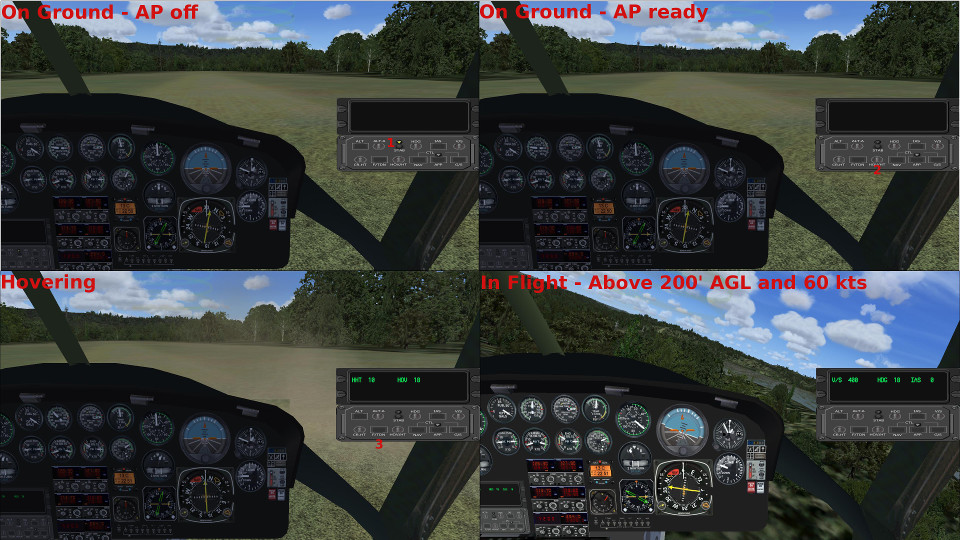
Regards
Dieselpunk
Re: Helicopter Autopilot
Posted:
Sat Jun 21, 2014 3:10 amby fanton
Dieselpunk, you are 'de man! Following your instructions for dummies I managed to give the a/p the kiss of life!
Many thanks and greetings from Vienna
Fritz
Re: Helicopter Autopilot
Posted:
Sat Jun 21, 2014 5:11 amby Dieselpunk
Thanks Fritz,
I'm glad I could help.
Dieselpunk
