Page 1 of 2
JBK Boeing 307 Stratoliner

Posted:
Tue Mar 11, 2014 5:38 pmby E.E.

Has anyone had a problem with JBK's B307 sim? I find there is no panelling on the nose and rear fuselage around the decal. Is there something missing from all of the textures or from my brain?
Re: JBK Boeing 307 Stratoliner
Posted:
Tue Mar 11, 2014 8:46 pmby jandjfrench
Hi,
I just re-installed FSX but recall that there is a FS9 and FSX version. Make sure you have the correct version installed.
Re: JBK Boeing 307 Stratoliner
Posted:
Wed Mar 12, 2014 12:52 amby Jetranger
You mean this 307 Stratoliner

I've got em' in my FSX Gold Acceleration edition,,, no problems as you can see from the video of mine.
307 stratoliner :
https://www.youtube.com/watch?v=ywMv39sLOuA
Re: JBK Boeing 307 Stratoliner
Posted:
Wed Mar 12, 2014 4:21 amby Hagar
This is the FSX version
http://simviation.com/1/search?submit=1&keywords=B307_v11.zip&categoryId= It works fine for me in FSX Gold + Acceleration.
It has an auto-installer* with various options depending on your version of FSX. I'm not sure what difference it makes but make sure you choose the correct option.
You can change the options if you run the Setup.exe file again.
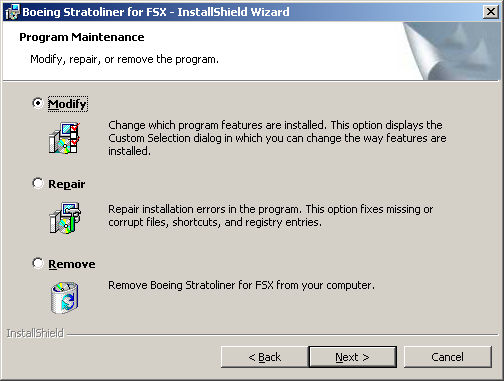
Also read the Readme instructions carefully.
*I hate auto-installers with a vengeance!
Re: JBK Boeing 307 Stratoliner
Posted:
Wed Mar 12, 2014 12:41 pmby jandjfrench
Hi,
I hope EE,s problem has been fixed.
I re-installed the 307 to check things out. From Jetranger's video I noticed the tail wheel was sunk into the ground. Mine also; so I changed the point from -1.75 to 2 and it looks better. It seemed to fly fine until landing. The recommended landing speed with full flaps is 70KTS. I found that below 120kts with full flaps the plane seems to fall from the sky. Anyone else have this problem? My realisms are all set to approx. 85%.
Jim F.
Re: JBK Boeing 307 Stratoliner
Posted:
Wed Mar 12, 2014 3:00 pmby E.E.
OK. I am aware of the two versions and am certain the one I downloaded is JBK's amended FSX version. I have SP2 so that isn't the reason although I seem to recall I did not have this problem before I added SP2! What would make me happy would be to see some reference to the problems I am experiencing - that is, missing panels around the fuselage and nose decals. The fault occurs in all textures viz; texture, texture.twa or texture.twa2. I thought perhaps the missing files could be found in 'texture' but it seems not.
Re: JBK Boeing 307 Stratoliner
Posted:
Wed Mar 12, 2014 3:31 pmby jandjfrench
Hi EE,
I think I see the problem. I attempted to run Setup again and chose to install to the desktop. During the install there is an option in which you indicate whether SP2 (or newer) has been installed or not and you choose accordingly. From your post it seems that SP2 was installed after the 307 installation resulting in your problem.
The new 307 folder is the only thing installed so it seems simply deleting your current install and then re-installing should fix the texture problem.
Now if I could just keep the damned thing from falling out of the sky.
Jim F.
Re: JBK Boeing 307 Stratoliner
Posted:
Thu Mar 13, 2014 10:45 amby E.E.
jandjfrench gets the orange. I should have seen that shouldn't I? Trouble is I'm getting long in the tooth and short on the brain cells! Thanks.

Re: JBK Boeing 307 Stratoliner
Posted:
Thu Mar 13, 2014 11:45 amby E.E.
I've just thought of another annoying little thing - probably to do with SP2. Why has the sim image of turning props gone black in place of the more convincing representation pre SP2?
Re: JBK Boeing 307 Stratoliner
Posted:
Thu Mar 13, 2014 11:49 amby jandjfrench
Hi EE,
It's apples and oranges here. I checked further and the option only selects the appropriate prop texture. I think it's likely that some common texture file was missing or corrupted. As no FSX files other than those in the aircraft folder are added or changed a simple delete and re-install should fix all.
I still can't figure out why I can't touchdown at the recommended 70 kts.
I just previewed and saw your latest post EE. You must have "chosen poorly" as someone once said.
Jim F.
Re: JBK Boeing 307 Stratoliner
Posted:
Fri Mar 14, 2014 7:40 amby E.E.
Chosen poorly? The story of my life! As for the props - I wasn't thinking of The B307 but of several aircraft downloaded after I upgraded with SP2 and especially of the BBMF Lancaster which has unconvincing black 'discs' (not solid 'though) instead of a more lifelike representation. I realise it doesn't matter much when 'you're in the cockpit' but I find it annoying nevertheless.
Now, another thing that niggles is the view of the ground. I accept that to generate actual scenery at any given spot would require a super computer with super memory but I have seen a download that claims to use Google maps. Does it work do you know? Does it make everything go jerky again like it did when I had Windows 3.5?
Re: JBK Boeing 307 Stratoliner
Posted:
Fri Mar 14, 2014 12:43 pmby jandjfrench
Hi EE,
I trust the 307 is working okay.
There's a program, whose name escapes me, that uses Google Earth data but I think I lost interest in it as the autogen trees and buildings are lost. If you like flying high I guess it's not a problem.
Google "FSX prop fix" and you'll find many answers to the black prop problem. Basically, using "DxtBMP" (free) you open the prop texture, create a new, near black alpha channel and save. As I don't care for the prop strobing effect, of even the default aircraft, I do this as a matter of course. Prop strobing is an artifact of recording and not something that's experienced first hand.
I think there are still problems with certain props as sometimes scenery elements, when viewed through the prop, are not displayed but I think this requires a modification to the underlying model.
Jim F.
Re: JBK Boeing 307 Stratoliner
Posted:
Fri Mar 14, 2014 1:04 pmby Hagar
E.E. wrote:Chosen poorly? The story of my life! As for the props - I wasn't thinking of The B307 but of several aircraft downloaded after I upgraded with SP2 and especially of the BBMF Lancaster which has unconvincing black 'discs' (not solid 'though) instead of a more lifelike representation. I realise it doesn't matter much when 'you're in the cockpit' but I find it annoying nevertheless.
I suspect that this aircraft was originally created for FS9 & therefore not fully compatible with FSX. The prop textures can sometimes be tweaked to look better although this won't fix typical display problems like prop discs disappearing behind clouds. If I knew which file you're talking about I could check it out for you.
Re: JBK Boeing 307 Stratoliner
Posted:
Fri Mar 14, 2014 9:40 pmby Jetranger
Make this easier and less frustrating,,, How about you message me - and send me your email, and i'll just send you the PROP Textures I use for my 307, and see if that works for you on your end,,,,
makes since to me,,, does it to you Ollie asks stan,,,,, Yup !!!!
Jetranger !!

Re: JBK Boeing 307 Stratoliner
Posted:
Sat Mar 15, 2014 1:28 amby Hagar
Jetranger wrote:Make this easier and less frustrating,,, How about you message me - and send me your email, and i'll just send you the PROP Textures I use for my 307, and see if that works for you on your end,,,,
makes since to me,,, does it to you Ollie asks stan,,,,, Yup !!!!
Jetranger !!
It's the Avro Lancaster prop discs he has problems with, not the 307.
the BBMF Lancaster which has unconvincing black 'discs' (not solid 'though) instead of a more lifelike representation.
FSX SP2 prop texture is included with the 307.