textures for 737-800 folder not showing up

FSX including FSX Steam version.

textures for 737-800 folder not showing up

Postby bombardier » Wed Feb 19, 2014 4:54 pm

hello to all:

I got 2 textures for the default folder 737-800 in fsx. for some reason I cannot get them to show up. I copyed the aircraft cfg into the 737-800 folder got the next number in sequence in flight simXX. went to check out the plane in the list and no plane. so it should have showed up.

the plane in questions are air asia indonishia 1.09 mbs and alitalia 2.15 mbs. textures for default 737-800

can someone tell me what Iam doing wrong. its always the textures I cannot get to show up.

bombardier

I'm sure I will be posting again with another set of 737-800 texture problems so stay tuned.
User avatar
bombardier
2nd Lieutenant
2nd Lieutenant
 
Posts: 288
Joined: Sat Sep 04, 2010 2:58 pm
Location: united states

Re: textures for 737-800 folder not showing up

Postby Hagar » Wed Feb 19, 2014 6:20 pm

It's probably something very simple. Copy the [fltsim.x] sections from your edited Aircraft.cfg & paste it here so we can check it out.
Image

Founder & Sole Member - Grumpy's Over the Hill Club for Veteran Virtual Aviators
Member of the Fox Four Group
My Google Photos albums
My Flickr albums
User avatar
Hagar
Colonel
Colonel
 
Posts: 30868
Joined: Wed Jun 19, 2002 7:15 am
Location: Costa Geriatrica

Re: textures for 737-800 folder not showing up

Postby Jetranger » Wed Feb 19, 2014 6:30 pm

Also, always check with any Download that the

SIM= whatever name { --------------- this "Sim" area needs to read exactly the same as the previous Aircraft above it / No Exceptions !!!
Model= "Same Name here" has to be the same as the aircraft above it previously !!! {----also very important !!!
Sound=
Texture= whatever name ??


is exactly the same as the aircraft above - previous,,, says , in the Aircraft CFG File of the Aircraft your trying to Install !!! / very important !!


Always check the Aircraft CFG File of the download to make sure it matches with the Aircraft your adding a livery / Paint to !!


I've caught a few mistakes in that particular area.
User avatar
Jetranger
Major
Major
 
Posts: 3232
Joined: Fri Sep 30, 2011 2:49 am
Location: Kansas City Missouri USA / KMKC

Re: textures for 737-800 folder not showing up

Postby Hagar » Thu Feb 20, 2014 4:56 am

I've figured out the problem with the Air Asia repaint. The new texture folder is named PK-SYL. Rename the folder to Texture.PK-SYL & it should show up on the menu.

The Alitalia repaint works fine for me.
Image

Founder & Sole Member - Grumpy's Over the Hill Club for Veteran Virtual Aviators
Member of the Fox Four Group
My Google Photos albums
My Flickr albums
User avatar
Hagar
Colonel
Colonel
 
Posts: 30868
Joined: Wed Jun 19, 2002 7:15 am
Location: Costa Geriatrica

Re: textures for 737-800 folder not showing up

Postby bombardier » Fri Feb 21, 2014 4:52 pm

hello hager and jetranger:

heres the [flightsim5] the defualt in fsx and my download [flightsim6]. the only thing I do see some differenances "not the same is the title" inflightsim>5 atc airplane is blank in flightsim6 atc airplane:air asia, variation in flight sim5 is variation: white and in flightsim 6 is variation: air aisia pk-syl. texture in flightsim5 is blank and texture in flightsim 6 is pk-syl. would that help any.

on a new folder let me see if I got this, make a new folder name it texture pk-syl then copy the plane folder into the texture folder and past it into the airplanes folder in fsx.

[fltsim.5]
title=Boeing 737-800
sim=Boeing737-800
model=
panel=
sound=
texture=
kb_checklists=Boeing737-800_check
kb_reference=Boeing737-800_ref
atc_id=N737Z
atc_airline=
atc_flight_number=
ui_manufacturer="Boeing"
ui_type="737-800"
ui_variation="White"
ui_typerole="Commercial Airliner"
ui_createdby="Microsoft Corporation"
description="One should hardly be surprised that the world's most prolific manufacturer of commercial aircraft is also the producer of the world's most popular jetliner. The 737 became the best-selling commercial jetliner worldwide when orders for it hit 1,831 in June 1987 (surpassing Boeing's own 727 as the previous champ). However, it wasn't always that way\s in the first few years of production, there were so few orders that Boeing considered canceling the program. They didn't, and the airplane has more than proven itself in over three decades of service."

[fltsim.6]
title=Boeing 737-800 Air Asia Indonesia PK-SYL
sim=Boeing737-800
model=
panel=
sound=
texture=PK-SYL
kb_checklists=Boeing737-800_check
kb_reference=Boeing737-800_ref
atc_id=PK-SYL
atc_airline=Air Asia
atc_flight_number=
ui_manufacturer="Boeing"
ui_type="737-800"
ui_variation="Air Asia PK-SYL"
ui_typerole="Commercial Airliner"
ui_createdby="realweb_id@yahoo.com"
description=
User avatar
bombardier
2nd Lieutenant
2nd Lieutenant
 
Posts: 288
Joined: Sat Sep 04, 2010 2:58 pm
Location: united states

Re: textures for 737-800 folder not showing up

Postby Hagar » Fri Feb 21, 2014 6:04 pm

bombardier. Your Aircraft.cfg entry is fine. Please read my previous reply carefully. Rename the PK-SYL folder to Texture.PK-SYL & it should show up on the selection menu.
Image

Founder & Sole Member - Grumpy's Over the Hill Club for Veteran Virtual Aviators
Member of the Fox Four Group
My Google Photos albums
My Flickr albums
User avatar
Hagar
Colonel
Colonel
 
Posts: 30868
Joined: Wed Jun 19, 2002 7:15 am
Location: Costa Geriatrica

Re: textures for 737-800 folder not showing up

Postby Jetranger » Fri Feb 21, 2014 6:23 pm

Also 1 very important LITTLE thing !!!!!!

LITTLE !!!!!!

when you make that new folder and title it Texture make sure you put a Period after Texture .................... {--------- Period !!!!!!!

forget that and it won't show up either :D

so it should look just like this ;

Texture. whatever name ????? / placing the . is very important :shock:
User avatar
Jetranger
Major
Major
 
Posts: 3232
Joined: Fri Sep 30, 2011 2:49 am
Location: Kansas City Missouri USA / KMKC

Re: textures for 737-800 folder not showing up

Postby bombardier » Sat Feb 22, 2014 8:12 am

hello hager and jetranger:

I got it flying thanks

bombardier
User avatar
bombardier
2nd Lieutenant
2nd Lieutenant
 
Posts: 288
Joined: Sat Sep 04, 2010 2:58 pm
Location: united states

Re: textures for 737-800 folder not showing up

Postby bombardier » Sat Feb 22, 2014 7:23 pm

hello to all:

as I sit in the pilots seat makeing preflight inspections I see there are no engine start up and shut off buttons in the over head panel or in the vc. did I miss something here. it seems like all the 737-800 has this . but then I could be wrong.

bombardier
User avatar
bombardier
2nd Lieutenant
2nd Lieutenant
 
Posts: 288
Joined: Sat Sep 04, 2010 2:58 pm
Location: united states

Re: textures for 737-800 folder not showing up

Postby bombardier » Sat Feb 22, 2014 8:26 pm

after downloading 6 737-800 planes and working fine. I dl one more egyptair. got the flight sim in the right place. I got the textures right I think, I do not know I will expain that. but in the planes list the egyptair is showing blue question mark. now for the textures I renamed the folder from EgyptairGDD to Textures.Egyptair. . now it gives me a blue question mark where the plane suppose to be. in the textures folder when ever I see the word egyptair it has 2 slashes like this egyptair // under variation,under atc airplane and under title and texture= I checked other flightsims and they do not have the 2 slashes //. see flightsim 12

[fltsim.12]
title=Boeing 737-800 Egyptair//................
sim=Boeing737-800
model=
panel=
sound=
texture=Egyptair//.............................
kb_checklists=Boeing737-800_check
kb_reference=Boeing737-800_ref
atc_id=
atc_airline=Egyptair//............................
atc_flight_number=
ui_manufacturer="Boeing"
ui_type="737-800"
ui_variation="Egyptair" //.........................
ui_typerole="Commercial Airliner"
ui_createdby="Microsoft Corporation"

bombardier
User avatar
bombardier
2nd Lieutenant
2nd Lieutenant
 
Posts: 288
Joined: Sat Sep 04, 2010 2:58 pm
Location: united states

Re: textures for 737-800 folder not showing up

Postby Jetranger » Sat Feb 22, 2014 8:45 pm

Don't know what version of simulator you have ,, or,, what version of aircraft your trying to download and Inject into your sim, but make sure whatever you download - its for the version of simulator you have !!

don't try and inject a 2002 or 2000 into FS2004 or FSX any edition - Deluxe - or - Gold/Acceleration

cause they probably won't work at all !!! :D
User avatar
Jetranger
Major
Major
 
Posts: 3232
Joined: Fri Sep 30, 2011 2:49 am
Location: Kansas City Missouri USA / KMKC

Re: textures for 737-800 folder not showing up

Postby Jetranger » Sat Feb 22, 2014 9:11 pm

Ewwwww, your trying to ADD & Change an Aircraft Default Texture ????

Be very careful there,,,, you can't change too much !!

other Default Aircraft heavily rely on the Default aircraft, especially some A.I. Aircraft.

IF - you just want the Texture to change a Default Aircraft,,,, what I did, was just slid the new Textures into the folder and changed the name of the Folder and the Texture name in the CFG file and left the rest alone.

I rarely fly Default aircraft anymore anymore !

but --- that doesn't mean you can Delete them either !!!! ( Don't ever do that) !!!!

again some other Aircraft rely heavily on the Default Textures and their gauges and componets to function properly !!!!

I learned that the hard way years agoooo !!!!! :shock: :D

Keep learnin and fiddling with it, you'll get it , keep askin questions too !!!

also Study some other Aircraft CFG Files from downloads and then compare those to the Default , you'll learn even more !

Pay attention to these most important

Title =

Sim=

Model=

Panel=

Texture=

UIManufacturer=

UI Variation=


Say someone changed the UI Manufactuer name , and typed in say for example - Joe Smore,

it'll show up in your Aircraft Menu Screen , when you start Flight Simulator somewhere in the "J" section , cause it starts with the letter J

So you'd re-name it to

UI Manufacturer= Boeing - or maybe Cessna - or Beechcraft so it'll show up with the rest of your Collection of Boeings, Cessnas or Beechs in the proper Order !!!

Caught a few like that, were re-named and showed up NOT where I thought they would but wayyyyyy down the list out of the Normal !!!

(I've got over 4,900 Aircraft installed in my Simulator - so sometimes my list can be rather large !!! ) if I haven't moved them to my Other Storage Hanger outside of FSX.

UI Variation= becareful there too,,, don't believe you can have 2 the same named Variation in the same aircraft folder

So what i'll do to separate and make a slight difference between the 2 varients is

UIVariation= Airborne

and maybe the next on down would read

UI Variation= Airborne II

or whatever ya wanna call em' that floats your boat and works for you !!!

Also - Can't have any 2 Aircraft with the same Name in the "Titles" section of the Aircraft CFG File

or you'll get a POP UP when you start your flight sim, little window pop up, letting you know you have 2 aircraft with the same name and it'll let you know that, YOUR Confusing the Hell out of it, and giving it a major Migrane Headache :D :D :D :D

Keep studing Aircraft CFG Files how their worded, laid out and soon you too can have a bunch of aircraft in your simulator too all Flyable !

after you catch on,,, you'll learn how to Tweak em' a little bit and so some Aircraft Parts Swapping from different aircraft to make 1 good Aircraft, that can be challenging sometimes !!

Don't get frustrated keep on learnin' :P :idea:
User avatar
Jetranger
Major
Major
 
Posts: 3232
Joined: Fri Sep 30, 2011 2:49 am
Location: Kansas City Missouri USA / KMKC

Re: textures for 737-800 folder not showing up

Postby Hestntonpms » Sat Feb 22, 2014 9:20 pm

LOL, made all of those same mistakes way back, I thought , "Hmmmmmm if could lighten the load of this program by simply deleting planes I'll never fly and delete areas I have no interest in flying in I could open up a lot of resources " WRONG ANSWER !! lol
Gigabyte X79 Chip set Mobo
Intel-i7 4820K CPU/Liquid cooled
Single GTX Titan 6gig GPU/ extreme air cooled
16 gig/1600 MHz quad channel DDR3
1 T/B -Raid-0 array,Risking it all for every ounce of performance until I go with SSD's
User avatar
Hestntonpms
2nd Lieutenant
2nd Lieutenant
 
Posts: 75
Joined: Thu Jan 30, 2014 4:41 pm
Location: Long Island NY

Re: textures for 737-800 folder not showing up

Postby Hagar » Sun Feb 23, 2014 4:59 am

bombardier wrote:after downloading 6 737-800 planes and working fine. I dl one more egyptair. got the flight sim in the right place. I got the textures right I think, I do not know I will expain that. but in the planes list the egyptair is showing blue question mark.

I found two Egyptair default B737-800 repaints, both by the same author. I assume you mean this one. http://simviation.com/1/search?submit=1&keywords=EgyptairGDD.zip&categoryId=&filename=Y

The question mark means that there is no thumbnail.jpg image in the relevant texture folder.

now for the textures I renamed the folder from EgyptairGDD to Textures.Egyptair. . now it gives me a blue question mark where the plane suppose to be.

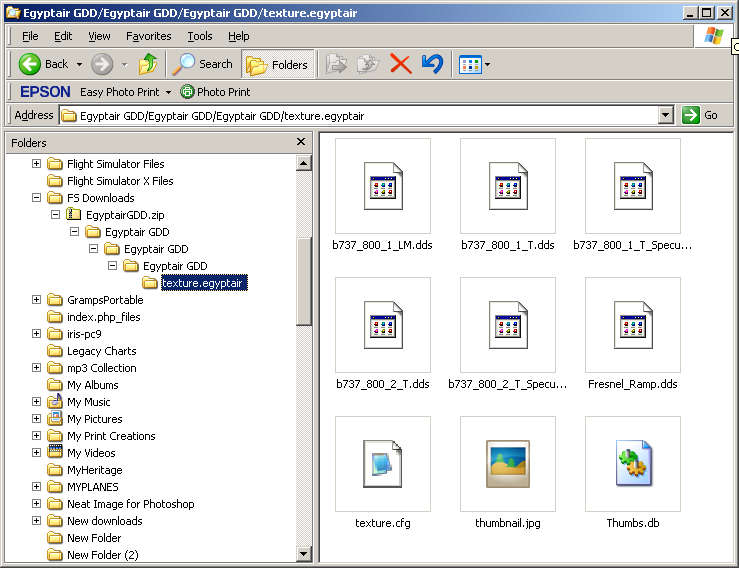
There is no need to rename any folders. You haven't gone far enough into the zip file*. Keep clicking on the Egyptair GDD folders until you find one named texture.egyptair. This is the one you paste into your B737_800 main folder.

This is what it looks like. Note the file named thumbnail.jpg inside it.
Image

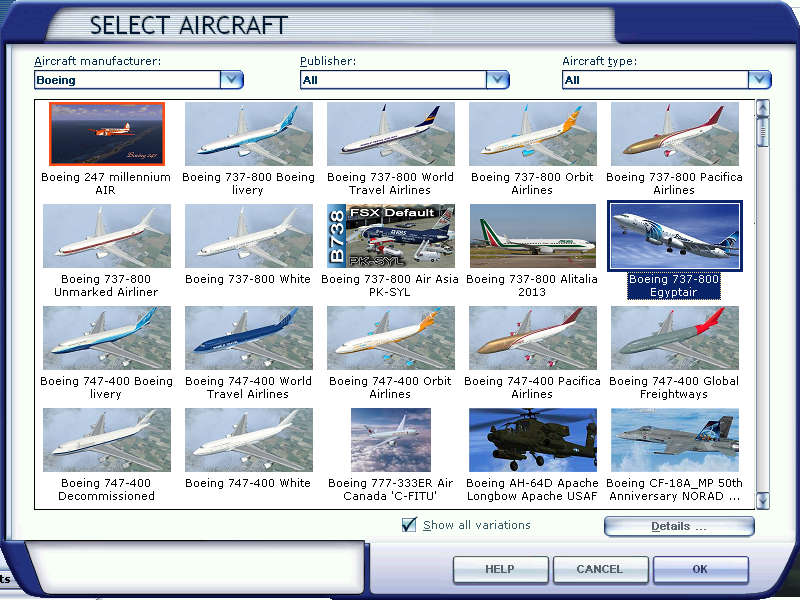
Here it is on the FSX selection menu.
Image

in the textures folder when ever I see the word egyptair it has 2 slashes like this egyptair // under variation,under atc airplane and under title and texture= I checked other flightsims and they do not have the 2 slashes //. see flightsim 12

[fltsim.12]
title=Boeing 737-800 Egyptair//................
sim=Boeing737-800
model=
panel=
sound=
texture=Egyptair//.............................
kb_checklists=Boeing737-800_check
kb_reference=Boeing737-800_ref
atc_id=
atc_airline=Egyptair//............................
atc_flight_number=
ui_manufacturer="Boeing"
ui_type="737-800"
ui_variation="Egyptair" //.........................
ui_typerole="Commercial Airliner"
ui_createdby="Microsoft Corporation"

The CFG entry is fine. Those double slashes are called comments or remarks. They are used to make comments in CFG files. Anything written on the same line after the // is not active & will not affect anything. Hope this explains it.

*Note: I don't know why the author configured it like this. Please remember this is freeware & many FS developers will not know the best way to configure their files for download.
Image

Founder & Sole Member - Grumpy's Over the Hill Club for Veteran Virtual Aviators
Member of the Fox Four Group
My Google Photos albums
My Flickr albums
User avatar
Hagar
Colonel
Colonel
 
Posts: 30868
Joined: Wed Jun 19, 2002 7:15 am
Location: Costa Geriatrica

Re: textures for 737-800 folder not showing up

Postby bombardier » Sun Feb 23, 2014 7:32 pm

hello hagar and jetranger:

my mistake: I got the egypt jet flying now,. I guess I went to fast through the folders and copy and paste the wrong folder. do not ask how I did that but I did. its flying now thats great.

ps: I normally fly A380,camsim, 777s, just got into the 737-800 its a little different handling


bombardier
User avatar
bombardier
2nd Lieutenant
2nd Lieutenant
 
Posts: 288
Joined: Sat Sep 04, 2010 2:58 pm
Location: united states


Return to Flight Simulator X (FSX) and Steam

Who is online

Users browsing this forum: No registered users and 758 guests