Page 1 of 1

FSX fails with "Error ID=25 (null)"

PostPosted: Tue Jan 07, 2014 1:59 pm
by nichos
Hi,

FSX was working OK since it came out & on present mobo. config, but sudenly now, after loading, on trying to fly it says "this program wants to close down" with " Error ID=25 (null)".

Tried Repair, uninstall & reinstall a couple of times even once deleted every trace of it in the registry but no luck.

Any help will be appreciated.


Home build, Asus P5K Premium WiFiiFi Intel,
Intel Core 2 Quad Pro Q6600 95W 2.4GHz, OCZ Vendetta Cpu Cooler, 2x2GB, 240-pin DIMM, DDR2 800 (400mhz) PC2-6400, EVGA GeForce 9800 GTX KO 512MB GDDR3 (PCI-E), Seagate Barracuda 500gb, Corsair TX750M Psu, X45, dual boot XPhome/win8

Re: FSX fails with "Error ID=25 (null)"

PostPosted: Wed Jan 08, 2014 8:24 am
by garymbuska
nichos wrote:Hi,

FSX was working OK since it came out & on present mobo. config, but sudenly now, after loading, on trying to fly it says "this program wants to close down" with " Error ID=25 (null)".

Tried Repair, uninstall & reinstall a couple of times even once deleted every trace of it in the registry but no luck.

Any help will be appreciated.


Home build, Asus P5K Premium WiFiiFi Intel,
Intel Core 2 Quad Pro Q6600 95W 2.4GHz, OCZ Vendetta Cpu Cooler, 2x2GB, 240-pin DIMM, DDR2 800 (400mhz) PC2-6400, EVGA GeForce 9800 GTX KO 512MB GDDR3 (PCI-E), Seagate Barracuda 500gb, Corsair TX750M Psu, X45, dual boot XPhome/win8


If you Google the error you got you will find a couple of ideas after reading a few you might want to try and uninstall SP2 and download a new copy it may have got corrupted.
When you uninstall something that usually removes any registry entries but in the case of FSX it does leave a few files out there such as flights and other little odd ball things. Just make sure you uninstall any service packs you installed before uninstalling fsx. Now if you have FSX Gold you will not have to worry about the service packs as they are part of the install. The one file you want to make sure is gone is the FScfg file which can be in different places depending on what version of windows you are using. I can not remember if a uninstall removes this file or not. But it does not remove any flight plans you have saved.

<<v

Re: FSX fails with "Error ID=25 (null)"

PostPosted: Wed Jan 08, 2014 1:46 pm
by nichos
Thanx Gary,

I went & installed SP1 then SP2 which uninstalled the old one & I installed again SP2 but, when I start FSX I get the error below:-

Image

Re: FSX fails with "Error ID=25 (null)"

PostPosted: Wed Jan 08, 2014 3:33 pm
by OldAirmail
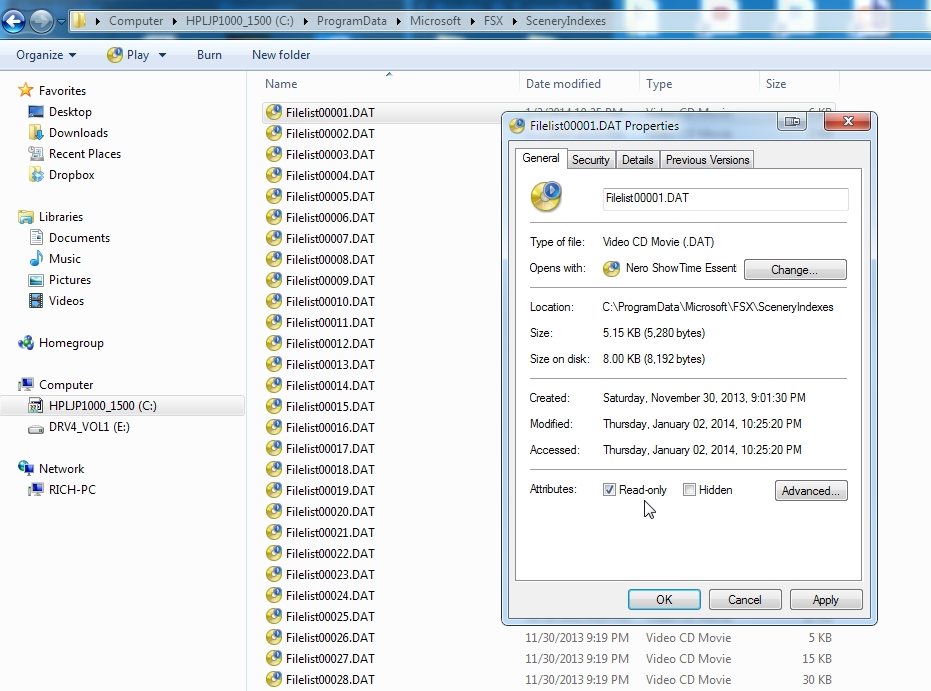
The first step is to navigate to the indicated file, whatever that may be.

Image

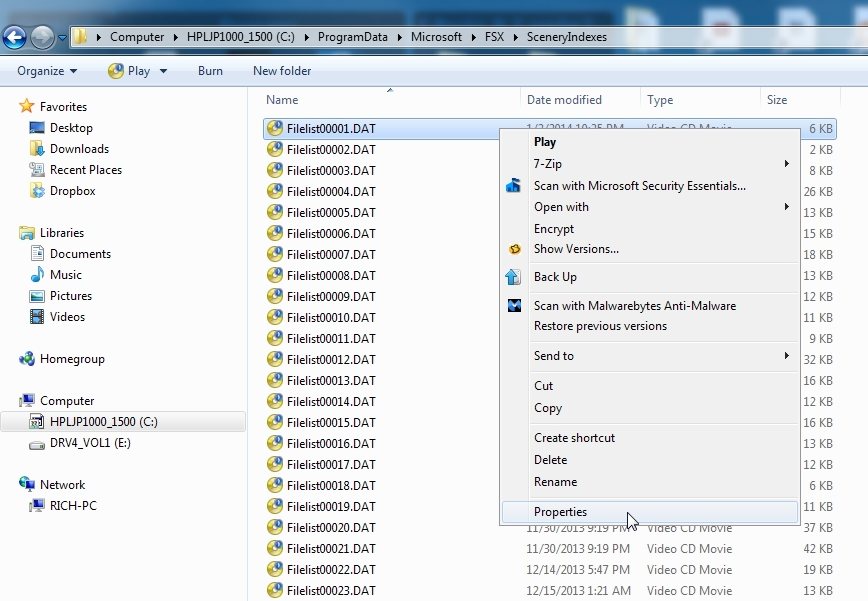
Right click on it, and select Properties. Is there a check mark in the Read-only box? If so, uncheck it, click "Apply" (You could probably simply click OK, but I don't always trust Windows to behave the way that it should). THEN click OK.

Image


If that doesn't work, you may have to take ownership. But there are other things before that.

Re: FSX fails with "Error ID=25 (null)"

PostPosted: Wed Jan 08, 2014 3:46 pm
by nichos
Thanx,

in there I have 114 "filelist" & none "fileli" ??? what to do?

Re: FSX fails with "Error ID=25 (null)"

PostPosted: Wed Jan 08, 2014 4:14 pm
by garymbuska
That is the kind of error you would get if the file is set up as a read only file like the post stated you need to right click on the program and than select properties and uncheck read only .
If you have uninstalled FSX you must run the FSX reset tool
check out the link http://support.microsoft.com/kb/928080


<<v

Re: FSX fails with "Error ID=25 (null)"

PostPosted: Wed Jan 08, 2014 4:27 pm
by nichos
I presume you mean to try all 114 "filelist" I have?

I will check on the link tomorrow as is geting late here, cheers.

Re: FSX fails with "Error ID=25 (null)"

PostPosted: Thu Jan 09, 2014 5:25 am
by nichos
1. I checked ramdonly the properties of a few of the 114 "filelist" & all "Read only" were Unticked. Shall I delete all of them & see if problem is solved?.

2. You said "....If that doesn't work, you may have to take ownership. But there are other things before that....", what other things?

How do I take ownership? I think I did this when I could not install FSX long ago when I had "error 1722" which I do not have now. Needed "Admin" status as per Heading on lower part of scan but never found out how I got to it, do you know?, please see this:-

Image

3. I had already that "c:\MicrosoftKB928080" in my C directory & I did the info in the link you gave me & all I get is this below whose Heading is not "Administrator", it says failed, maybe because is not Admin?:-

Image

Re: FSX fails with "Error ID=25 (null)"

PostPosted: Thu Jan 09, 2014 8:50 am
by garymbuska
nichos wrote:1. I checked ramdonly the properties of a few of the 114 "filelist" & all "Read only" were Unticked. Shall I delete all of them & see if problem is solved?.

2. You said "....If that doesn't work, you may have to take ownership. But there are other things before that....", what other things?

How do I take ownership? I think I did this when I could not install FSX long ago when I had "error 1722" which I do not have now. Needed "Admin" status as per Heading on lower part of scan but never found out how I got to it, do you know?, please see this:-

Image

3. I had already that "c:\MicrosoftKB928080" in my C directory & I did the info in the link you gave me & all I get is this below whose Heading is not "Administrator", it says failed, maybe because is not Admin?:-

Image


I am using Windows 8 64 bit and I have never had to go through what you suggest here.
What I did was first uninstall any third party software from FSX and to uninstall any service packs.
You have to uninstall FSX in the reverse order you installed it other wise things get left and it can get confused when reinstalling.
I think of it as a accounting term last in first out. So what ever you installed last is the first thing you uninstall and whatever you installed first is the last thing you uninstall failure to do this can create problems.
As for administrator rights you set that up at the time you set up your account
If you do things correctly when FSX is installed the ICON should have the Window Shield in it. If it does not than you did not install correctly. This is how you can tell if a program is set to run as administrator


<<v

Re: FSX fails with "Error ID=25 (null)"

PostPosted: Thu Jan 09, 2014 1:44 pm
by nichos
Thanx,

I did not add anything the past year or two & uninstalled/reinstalled FSX twice & applied "Repair" from the CD twice the last 3-4 days.

Re: FSX fails with "Error ID=25 (null)"

PostPosted: Thu Jan 09, 2014 4:07 pm
by garymbuska
nichos wrote:Thanx,

I did not add anything the past year or two & uninstalled/reinstalled FSX twice & applied "Repair" from the CD twice the last 3-4 days.


I was not talking about running repair but when you uninstall FSX you must run the rest tool before you can reinstall it. Unless you are using FSX Gold EDITION you should have installed two service packs SP1 and SP2 the Gold edition has both of these already in place so when you install every thing works they are ther <<s

Re: FSX fails with "Error ID=25 (null)"

PostPosted: Thu Jan 09, 2014 5:26 pm
by Hagar
garymbuska wrote:
nichos wrote:Unless you are using FSX Gold EDITION you should have installed two service packs SP1 and SP2 the Gold edition has both of these already in place so when you install every thing works they are ther <<s

This is not correct. FSX Gold Edition comprises FSX Deluxe & FSX Acceleration on two separate DVDs. It's Acceleration that includes SP1 & SP2.

Re: FSX fails with "Error ID=25 (null)"

PostPosted: Fri Jan 10, 2014 8:50 am
by garymbuska
Hagar wrote:
garymbuska wrote:
nichos wrote:Unless you are using FSX Gold EDITION you should have installed two service packs SP1 and SP2 the Gold edition has both of these already in place so when you install every thing works they are ther <<s

This is not correct. FSX Gold Edition comprises FSX Deluxe & FSX Acceleration on two separate DVDs. It's Acceleration that includes SP1 & SP2.


That is what I meant to say I forgot the Acceleration disk :oops:

Re: FSX fails with "Error ID=25 (null)"

PostPosted: Fri Jan 10, 2014 1:11 pm
by nichos
Thanx User,

".....must run the rest tool ...." should it have been TEST TOOL & where can I get it?

Also, I forgot to say that I reinstalled these two:- SP1 & SP2

Re: FSX fails with "Error ID=25 (null)"

PostPosted: Fri Jan 10, 2014 7:15 pm
by mjrhealth
If you have acceleration you just need install FSX run it once exit than install acceleration. If not, install FSX, run it exit, install SP1 run FSX exit than install SP2, some recommend you reboot in I have no idea why I have never had issues.