Page 1 of 1

Scenery.config file error after clean install.

PostPosted: Sat Jan 04, 2014 5:45 pm
by Eagle eye
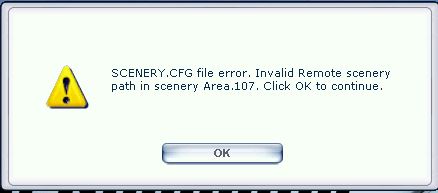
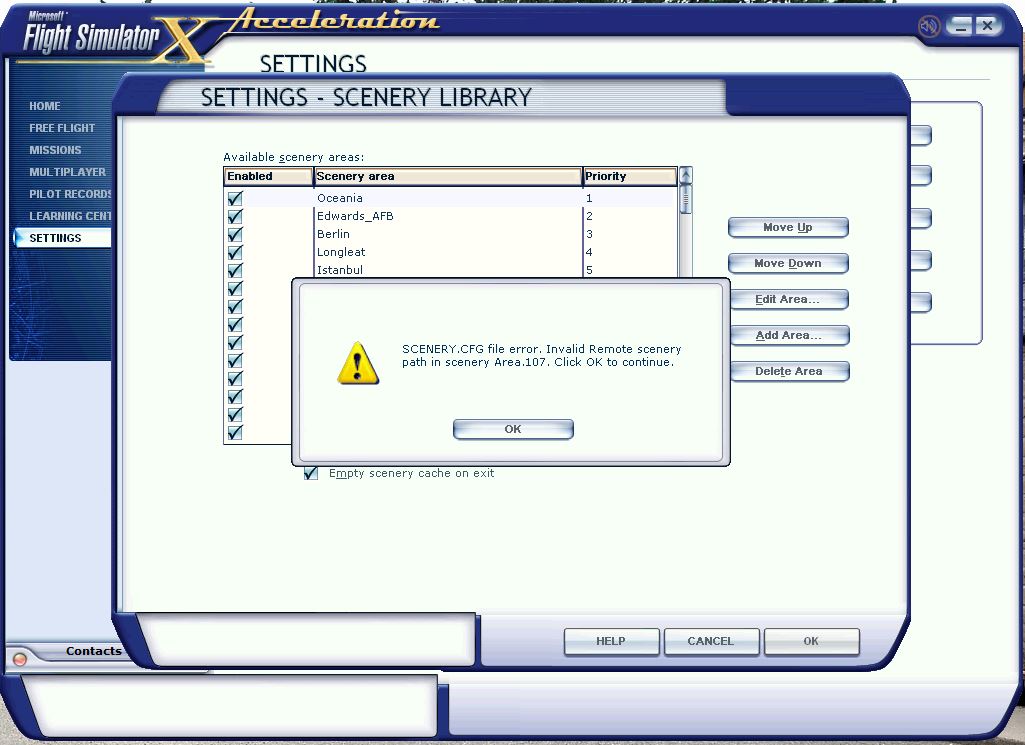
Hi guys, I know that there is a lot of info on the web about 'Scenery.config' file errors. I have read a lot but my problem is still a mystery. I had a major problem when I loaded the Saitek X52 SST software on my Win 7 64 bit system. Finally I found I could have done without the whole Saitek software parcel !! So I cleaned off my dedicated SSD all my FSX and scenery and addon aircraft so I could do a clean re-install of everything. Generally all is back to normal and the X52 seems to be operating OK. However I am dogged at every FSX startup with the attached Scenery.config error. Yes I have checked my FSX Addon Scenery folder and it has the Scenery & Texture folders which are empty. Just out of interest my C drive is an HDD. Can any member help a new guy with this one please?https://www.simviation.com/phpupload/uploads/1388921965.jpg

Re: Scenery.config file error after clean install.

PostPosted: Sun Jan 05, 2014 11:11 am
by garymbuska
Eagle eye wrote:Hi guys, I know that there is a lot of info on the web about 'Scenery.config' file errors. I have read a lot but my problem is still a mystery. I had a major problem when I loaded the Saitek X52 SST software on my Win 7 64 bit system. Finally I found I could have done without the whole Saitek software parcel !! So I cleaned off my dedicated SSD all my FSX and scenery and addon aircraft so I could do a clean re-install of everything. Generally all is back to normal and the X52 seems to be operating OK. However I am dogged at every FSX startup with the attached Scenery.config error. Yes I have checked my FSX Addon Scenery folder and it has the Scenery & Texture folders which are empty. Just out of interest my C drive is an HDD. Can any member help a new guy with this one please?https://www.simviation.com/phpupload/uploads/1388921965.jpg


I can not look at the link you provided as you did not place it correctly you need to copy the link from your browser than paste it in the post this way it shows it as a link. If you just type the info it will not work.
But if the file are in the proper place you might have to activate them again. But I am a little confused here if you did a complete uninstall it should have removed the scenery cfg file and it is quite obvious it did not. Your only options are to restore the scenery files in the place where the scenery cfg file is looking for them or to remove the entry from the scenery cfg file.

<<v

Re: Scenery.config file error after clean install.

PostPosted: Sun Jan 05, 2014 11:28 am
by Capt_Cronic
try deleteing your fsx.cfg and scenery.cfg files
restart fsx and fsx will rebuild them.
you will have to go back and reset your custom settings.

Re: Scenery.config file error after clean install.

PostPosted: Sun Jan 05, 2014 1:17 pm
by EVVFCX
Hi,

Have you recently installed vfr scenery for flying in Poland?

Try uninstalling and see if error goes away, I googled area 107 and it gave me Poland as the scenery.

regards

Steve

Re: Scenery.config file error after clean install.

PostPosted: Sun Jan 05, 2014 7:23 pm
by Eagle eye
Thanks for your responses. Yes I thought the way I uploaded the image was a little suspect. I hope it is better done this time. Yes I thought it strange that the scenery config file should corrupted when the SSD drive was empty and no file was detected left on the drive. I will try your suggestion of deleting the Scenery.config file and restarting FSX to generate a new copy. :D
https://www.simviation.com/phpupload/upl ... 020918.jpg

Re: Scenery.config file error after clean install.

PostPosted: Sun Jan 05, 2014 9:47 pm
by Eagle eye
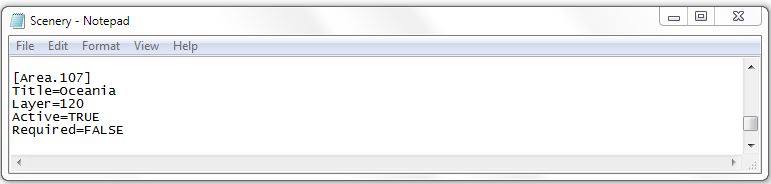
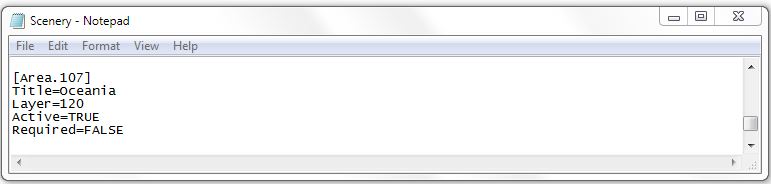
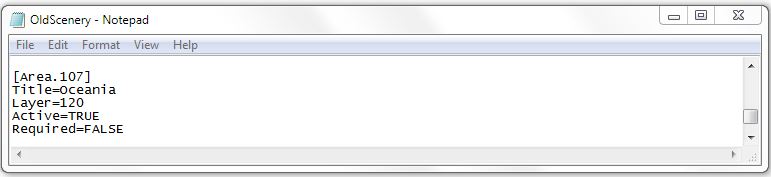
Back again, I was a bit confused, and not wanting to make a mistake after all the uninstall & install FSX work, I wanted to show you the following:- I have Win 7 64bit system and so I went to C drive, Program Data, Microsoft, FSX and found config files for 'Scenery' & Old 'scenery' the area 107 was identical in each as shown in the pic's. When I booted up FSX and bought up settings menu, 'scenery library ' the 'Oceania' which appears to be area 107 as seen in the config pic's from 'Notepad'. The only thing I remember doing after the install was to move Oceania up the list to priority one. This is only because I confine most of my flying to New Zealand. Finally I clicked the OK button which bought up this warning again. Should the 'Old Scenery' file be there?
https://www.simviation.com/phpupload/upl ... 042604.jpg
https://www.simviation.com/phpupload/upl ... 003832.jpg
https://www.simviation.com/phpupload/upl ... 003471.jpg

Re: Scenery.config file error after clean install.

PostPosted: Mon Jan 06, 2014 9:55 am
by garymbuska
Eagle eye wrote:Back again, I was a bit confused, and not wanting to make a mistake after all the uninstall & install FSX work, I wanted to show you the following:- I have Win 7 64bit system and so I went to C drive, Program Data, Microsoft, FSX and found config files for 'Scenery' & Old 'scenery' the area 107 was identical in each as shown in the pic's. When I booted up FSX and bought up settings menu, 'scenery library ' the 'Oceania' which appears to be area 107 as seen in the config pic's from 'Notepad'. The only thing I remember doing after the install was to move Oceania up the list to priority one. This is only because I confine most of my flying to New Zealand. Finally I clicked the OK button which bought up this warning again. Should the 'Old Scenery' file be there?
https://www.simviation.com/phpupload/upl ... 042604.jpg
https://www.simviation.com/phpupload/upl ... 003832.jpg
https://www.simviation.com/phpupload/upl ... 003471.jpg

For starters one has to remember the order in which scenery is placed in the cfg file is done at the time of the first running of FSX the files are put in the order they were read so the first file read will become the last entry in th e cfg file. What you have in any given area could be totally different from what others have, especially if you alter the placement by assigning a higher or lower priority.
I have noticed that when you add a new file it places that file at the bottom of the list which can be a problem if this is a addon file to a existing area.
Scenery is placed in a unique order the scenery with the highest priority will be displayed first and the scenery with the lowest priority last. Which can sometimes create undesirable effects such as a airplane buried in a hanger. One has to make sure you put the horse in front of the cart not the other way around. Some times scenery you download will advise you to make the file you downloaded lower or higher in priority to avoid such problems. But the problem is not every one does this so you have to make sure that the files are output in the correct order.
The files you are looking at are old files that were changed when you added something to the scenery
If you use one you will more than likely omit the last scenery you added because like I stated new files are put at the bottom of the list.


<<v

Re: Scenery.config file error after clean install.

PostPosted: Mon Jan 06, 2014 12:19 pm
by Hagar
Eagle eye wrote:Back again, I was a bit confused, and not wanting to make a mistake after all the uninstall & install FSX work, I wanted to show you the following:- I have Win 7 64bit system and so I went to C drive, Program Data, Microsoft, FSX and found config files for 'Scenery' & Old 'scenery' the area 107 was identical in each as shown in the pic's. When I booted up FSX and bought up settings menu, 'scenery library ' the 'Oceania' which appears to be area 107 as seen in the config pic's from 'Notepad'. The only thing I remember doing after the install was to move Oceania up the list to priority one. This is only because I confine most of my flying to New Zealand.

I suspect this is the cause of your problem. I would never advise changing the display priority of default scenery areas. This is no advantage & could easily mess up the way your scenery displays in FS.

From looking at your shot some entries are missing including the path to the scenery area.
Image

This is what mine looks like.

[Area.107]
Title=Oceania
Local=Scenery\OCEN
Layer=107
Active=TRUE
Required=FALSE
Remote=

Re: Scenery.config file error after clean install.

PostPosted: Mon Jan 06, 2014 3:30 pm
by Eagle eye
Thank-you 'Hagar' you had indeed the answer to my problem. You have no idea the time I spent and the headache I had after trying to solve in on my own. By the way I just want to point out that the initial movement of 'Oceania' to priority 1 was only done on the FSX software menu screen 'Settings' then 'Scenery' button not anything to do with accessing the scenery.config file. However you were spot on and I am very grateful. To all the other contributors to my novice posting, thank-you also, I have learnt a lot. :D

Re: Scenery.config file error after clean install.

PostPosted: Mon Jan 06, 2014 5:04 pm
by Hagar
Glad I could help. 8-)