Page 1 of 1

Add-On Aircraft Doesn't Appear

PostPosted: Tue Nov 12, 2013 4:39 am
by ThaddeusHWJ
When I download numerous add-on aircraft, and check my FSX Aircraft Menu, some of them do not appear, although everything seems to be correct.

For example, when I download a package of 5 aircraft, only about 3 of the aircraft is shown in the FSX menu. The other aircraft do not appear even after I have restarted FSX a few times. The model and .air files are all correctly put into the aircraft.cfg file, so there isn't any problem. What can be done about this? Please do help, thanks!

Re: Add-On Aircraft Doesn't Appear

PostPosted: Tue Nov 12, 2013 6:38 am
by Hagar
Which aircraft are you having this problem with? It's not easy to help without an example.

Re: Add-On Aircraft Doesn't Appear

PostPosted: Tue Nov 12, 2013 7:38 am
by ThaddeusHWJ
http://simviation.com/1/search?submit=1 ... filename=Y

That is the link for Thomas Ruth's A300 aircraft pack. In there there are 3 types of aircraft: The A300B1, A300B2 and A300B4.

Thing is, both my A300B1 aircraft can't be seen, both A300B2 aircraft can be seen, and only 3 out of the 5 liveries for the A300B4 aircraft can be see in the FSX Aircraft menu.

What do you think is the problem?

Thanks for trying to help by the way.

Re: Add-On Aircraft Doesn't Appear

PostPosted: Tue Nov 12, 2013 9:46 am
by garymbuska
Did you follow the instructions that came with the download?? Or did you not see them....
I am at work now so I can not download and install this aircraft to see if it shows up or not.


<<v

Re: Add-On Aircraft Doesn't Appear

PostPosted: Tue Nov 12, 2013 10:00 am
by Hagar
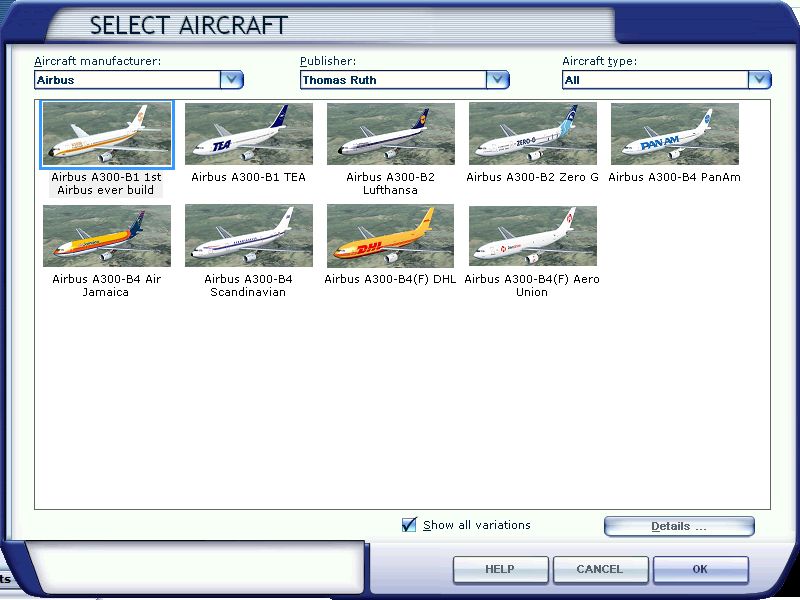
That's better. I downloaded the file & installed it to my own FSX to check it out. All 9 variations are listed on the menu. See my shot below.

Image

If you installed it correctly I can't think why it's not working for you. All I can suggest is to make sure the "Show all variations" box is checked.

Re: Add-On Aircraft Doesn't Appear

PostPosted: Tue Nov 12, 2013 5:40 pm
by ThaddeusHWJ
Thanks for your help. I'll try to see what I can do about it.

Re: Add-On Aircraft Doesn't Appear

PostPosted: Tue Nov 12, 2013 7:27 pm
by ThaddeusHWJ
Woo finally I fixed the problem. Thing is, the aircraft file is rather strange. The panel folder of different versions of A300 (e.g. A300B2 and A300B4) has been programmed to only the A300B4's panel. Thus, the aircraft that do not have an individual panel folder do not appear on the FSX Aircraft Menu. Also, virtual cockpit textures are missing as there are no "texture.white" texture folder in the A300B1 and A300B2 versions.

And the reason for this? I separated all 3 versions of the Airbus A300s into different folders for easier categorization.

:?

Thanks for your help anyway :D

Re: Add-On Aircraft Doesn't Appear

PostPosted: Wed Nov 13, 2013 3:04 am
by Hagar
Glad you figured it out.

There's nothing unusual about the file. No need to change anything. It's configured ready to install. If you follow the instructions it works fine.

1) unzip tom30b.zip folder to a suitable folder, your desktop for example.
2) Move the tom3b4 folder as it is into your FSX/Gauges subfolder.
3) Move the Tom_A300-B4, Tom_A300-B2 and the Tom_A300-B1 folders as they are into your
FSX/Simobjects/Aircrafts folder.
4) Copy all files from the lighteffects folder into your FSX/Effects folder.

THERES AN ILLUSTRATED STEP BY STEP INSTALATION MANUAL WITH PICTURES IN
PDF FORMAT IN THE MANUAL SUBFOLDER. LOOK FOR MaintenanceFacilityPlaning.PDF

Re: Add-On Aircraft Doesn't Appear

PostPosted: Wed Nov 13, 2013 4:38 am
by ThaddeusHWJ
Yup, but I get many messages saying that aircraft names are the same, hence I need to alter the names so I might have 2 of the same aircraft without FSX telling me :).

So I need to rename my aircraft haha

OCD much? Maybe :x

Re: Add-On Aircraft Doesn't Appear

PostPosted: Wed Nov 13, 2013 4:48 am
by Hagar
ThaddeusHWJ wrote:Yup, but I get many messages saying that aircraft names are the same,

I suspect this means you have duplicate installs of some variations.