Page 1 of 1

Can't see out of aircraft

PostPosted: Thu Oct 03, 2013 12:37 am
by echo62
I have fsx and have a problem seeing out the windows . it's like there painted and can't see out. It's just on my F\16 that I installed and a iris Tornado. Don't have any trouble with my other downloads. Thanks for help.

Re: Can't see out of aircraft

PostPosted: Thu Oct 03, 2013 3:09 am
by Fozzer
Were the aircraft that your have installed, designed for FSX, or are they models designed for FS '98, 2000, 2002, or 2004?
Models designed for the earlier Flight Sims are likely to give problems!
To avoid problems, ensure that the programs you are installing are fully designed for FSX!

Paul.... ;) ...!

Re: Can't see out of aircraft

PostPosted: Thu Oct 03, 2013 6:48 am
by Bass
As Paul said.
Tho, you could try to search > inglass.zip < .
That one worked for me back then with the Viper. Maybe also Tornado?!

Btw welcome in here ;)

Re: Can't see out of aircraft

PostPosted: Thu Oct 03, 2013 6:58 am
by garymbuska
I go along with Fozzer here. anything that is not specifically made for FSX will not work the way it is supposed to. Especially true on any thing visual such as aircraft and scenery . The general rule of thumb is you can usually go down but never up when it comes to different versions of software.
A good example is If you have a USB 2 port you can plug something in that is USB 1 but you can not plug a USB 2 device into a USB 1 port it will not work.
and USB 3 even uses a different cable they look the same and a USB 2 cable will plug into a USB 3 port but it will not work as a USB 3 port, as they are wired differently and the USB 3 has a BLUE plug.


<<r

Re: Can't see out of aircraft

PostPosted: Thu Oct 03, 2013 7:31 am
by Russell Irwin
I've had a similar problem with Tom Ruth's aircraft in the past. The main problem, I found, was that I didn't have the correct shaders installed, and therefore could not download SP2. The lack of these shaders also caused the cockpit glass to appear opaque.

Make sure that all of your drivers are up to date, you have SP2, and, like Fozzer and Gary said, make sure that compatibility isn't the problem.

Re: Can't see out of aircraft

PostPosted: Thu Oct 03, 2013 9:33 am
by echo62
Ok , I will look and see what the downloads were for. I haven't updated my drivers in awhile so I'll do that also. Thanks everyone for your help :D

Re: Can't see out of aircraft

PostPosted: Thu Oct 03, 2013 9:43 am
by Hagar
It's just on my F\16 that I installed and a iris Tornado.

As Fozzer points out I suspect these models were both created for FS9. Some of these bugs are easy enough to fix if you know what you're doing. Some will work & others won't. It also depends on which version of FSX you have.

I've converted many FS9 aircraft to display properly in FSX, purely for my own use. You might like to try my Tornado glass fix which I uploaded here --> vc_glass.zip
Extract the file & paste a copy into every Texture folder of the Tornado - overwriting existing files when prompted. It works fine for me in FSX Gold + Acceleration.

The fix for the F-16 should be posted somewhere if you have a search on Google.

Re: Can't see out of aircraft

PostPosted: Thu Oct 03, 2013 10:01 am
by pete
Don't be put off just because it was originally created for FS2004.

It depends on a lot of other things too and many FS2004 aircraft work fine in FSX.

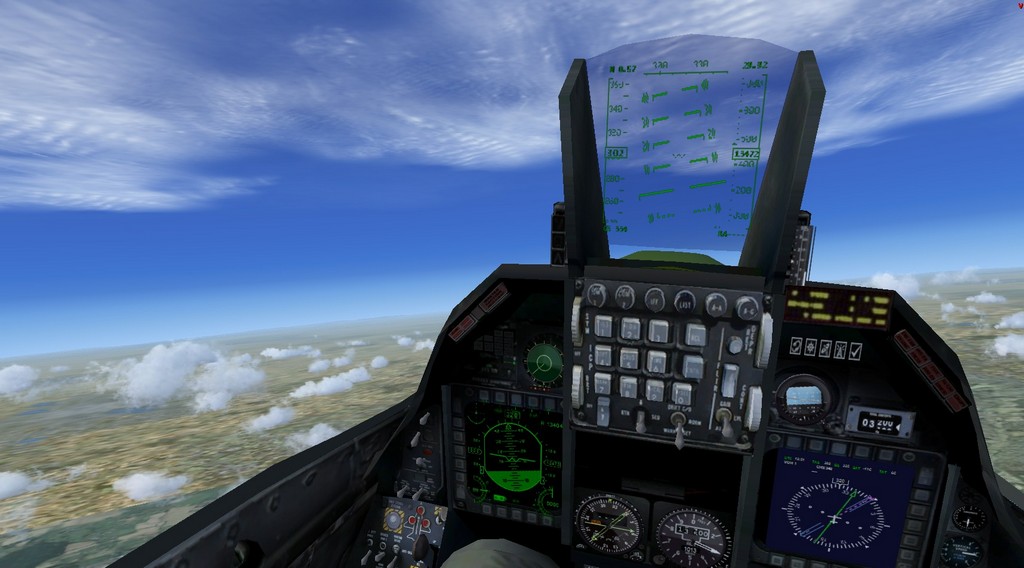
Here is Kirl Olssen F-16 - no black window (in FSX Accweleration or FSX with Service packs installed)

Image

This Iris Tornado is also OK for windows (but I notice 3 gauges are not showing)


I will check out the Iris Tornado base pack ....


EDIT: I am now re-uploading fixed versions of the iris Tornado GR4 and F3 - The F3 had black windows and the GR4 had missing gauges. I have swapped good files from both so now both are OK. Thanks for the feedback! O0

**Uploaded**

Re: Can't see out of aircraft

PostPosted: Sat Oct 05, 2013 12:48 am
by echo62
Thanks everyone for your help. Got both aircraft fixed today. Works great! :D