Need Help with Basic Software and Component Setup Sequencing

FSX including FSX Steam version.

Need Help with Basic Software and Component Setup Sequencing

Postby nickbozick » Sun Sep 29, 2013 11:59 am

I am relatively new at this simulator effort so I have a few questions that I need answered/help with.
I am running a Dell XPS 8500 Computer with Windows 8 and have two Hard Drives – the normal “C” and an “I” that I will load FSX and all the other simulator software on.
I plan to use SPAD as the software/drivers for most of the Saitek components less the Yoke and Rudder Pedals.
I am planning to use the C172 as my default aircraft and then convert over to the C162.
I am not very Computer literate so please bear with me.
Please look at my Component Software on-hand that I need to install.
What order should they be loaded onto my computer in?
I assume that I should load each software program one at a time, open FSX then shut it down and then do a computer restart and then load the next software, and follow the same process, is this correct?
When I have Drivers and Software for a Component (like the Yoke), which is load first?
Software On-Hand for Installation:
Microsoft FSX Deluxe (Licensed) w/
Microsoft FSX Accelerator
Microsoft FSX Weather
FSUIPC Software (Licensed)
FSPS – Xtreme FSX Booster v2 (Licensed)
SPAD 0.5.1
Saitek Pro Flight Yoke System Drivers
Saitek Pro Flight Yoke System Software
Saitek Pro Flight Rudder Pedals Drivers
Saitek Pro Flight Rudder Pedals Software
Saitek Pro Flight Cessna Trim Wheel Drivers
Saitek Pro Flight Cessna Trim Wheel Software
Flight One C162 Skycatcher (Licensed)
Please look at my Component Hardware that I need to install on my simulator.
What order should the Components be loaded onto my computer in?
Do I load the software for the item first or plug the USB for the individual Component in first?
Component Hardware for Installation:
Saitek Pro Flight Yoke System
Saitek Pro Flight Rudder Pedals
Saitek Switch Panel
Saitek Radio Panel
Saitek Throttle/Prop/Mixture Axis Panel
Saitek Pro Flight Cessna Trim Wheel

nickbozick
Ground hog
Ground hog
 
Posts: 2
Joined: Sun Feb 10, 2013 10:59 am
Location: Seminole, FL

Re: Need Help with Basic Software and Component Setup Sequen

Postby OldAirmail » Sun Sep 29, 2013 1:42 pm

Welcome to SimViation.


Saitek TPM! Great choice for a Cessna throttle. I also use mine for the Bonanza V35b from Carenado, along with other planes.


Some people say that you can run into problems by not installing FSX into its standard location.

And some say that you can run onto problems by installing FSX into its standard location.

I would normally say install FSX into its standard location, because the minor difficulties that can occur are easy to get around. Where as I did have it re-installed in another location, and ran into second party software problems.


Install the FSX programs first. Later you can install the planes, etc.


Then install FSUIPC, followed by SPAD.

With FSUIPC and SPAD installed you can start plugging in the other Saitek gear.

Just don't sit down expecting to get it all done at once. Install the yoke and throttle first. Play around with them, and make sure that they do what you want. The add something else.

But don't worry about getting EVERYTHING set up exactly right on the first try. As time goes by, you'll change some things around.


I don't have the Cessna Trim Wheel, but I think that control of that can be handled by FSX without drivers.

And speaking of the Saitek Pro Flight equipment, don't count on it being correctly set up in FSX.

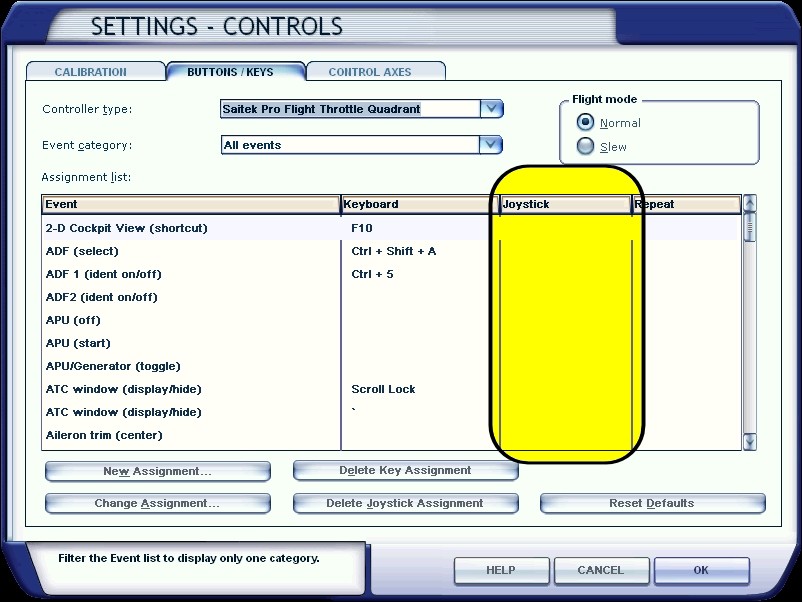
The last time I reinstalled FSX I went right down the "joystick" list noting the just what buttons are assigned to what, and unselecting the things that I knew were wrong.
Image

Especially the rudder peddles. They'll probably be set up to control your aileron and elevator. Personally, I would set up the rudders using your hands while they are set on top of a chair or table. There will be no mistakes that way.

Setting up your Pro Flight Rudder pedals in FSX


As to installing software/drivers and then starting FSX after each install, I don't know if that is better or not. I've installed a couple at a time. All that happens is that FSX wants you to confirm each instillation, one after another.

But it might not be a bad idea with Windows 8. That way you can more easily determine just what is, or isn't, compatible with Win 8.


Just have fun with each part before going to the next part.

There's a lot to learn, but have fun learning it. If you try to take it all in at once it can be a little too much.
User avatar
OldAirmail
Major
Major
 
Posts: 4814
Joined: Sun Feb 17, 2013 3:06 pm
Location: Concrete, WA ICAO - 3W5

Re: Need Help with Basic Software and Component Setup Sequen

Postby garymbuska » Tue Oct 01, 2013 2:30 pm

I have both CH peddles and a SAITEK Cessna flight yoke.
As for where to install FSX at unless you use Windows 7 or 8 it does not make a difference. The only reason for this has to do with permissions Windows 7 and 8 lock up the folder program files on your operating system hard drive.
Though as a rule of thumb FSX will run better if installed on a separate hard drive.
I have both FSX and FS9 installed on a different hard drive other than my operating system and installed both the yoke and the peddles to the same hard drive.
As for drivers they will install on your operating system hard drive as that is where they need to be.
And as you can see by my signature I use Windows 8 64 bit. and have no issues at all.


<<r
Gary M Buska
SYSTEM Specs ASUS P8Z68 V/GEN 3 mother board: INTELL I7 2600k 3.48 ghz Quad core CPU with Sandy bridge: 12 Gigs of 1800hz ram:
GTX 950 OVER CLOCKED: 2 Gigs Ram Windows 10 Home 64 bit Operating system. 750W Dedicated modular power supply. Two Internal 1TB hard drives 1 External 1TB 3.2 USB hard drive. SAITEK Cessna flight Yoke with throttles.
CH Rudder Peddles 27 inch Wide screen Monitor
User avatar
garymbuska
Major
Major
 
Posts: 4415
Joined: Tue Dec 30, 2003 11:10 am
Location: Jacksonville, Florida


Return to Flight Simulator X (FSX) and Steam

Who is online

Users browsing this forum: No registered users and 950 guests