Page 1 of 1

FSX Control Setting Presets

PostPosted: Sun Sep 22, 2013 2:43 am
by Russell Irwin
Is it possible to make presents for my FS controls, esp. my throttle quadrant? I want to make presets for different aircraft configurations (e.g. preset for four-engine aircraft, twin jet, variable-pitch prop, etc.)? And if so, is it possible to have these presets load automatically, i.e. when a 737 is selected in the aircraft menu, the twin jet setting is selected automatically? Any help is welcome.
Re: FSX Control Setting Presets

PostPosted: Sun Sep 22, 2013 6:57 am
by B0ikat
If I understand your question correctly, that's pretty much already controlled by the aircraft.cfg.

Re: FSX Control Setting Presets

PostPosted: Sun Sep 22, 2013 9:39 am
by OldAirmail
As far as I know that isn't a problem.

You do have the full version of FSUIPC, don't you?

Image

I've been telling people to get it for almost as long as I've been using FSX.


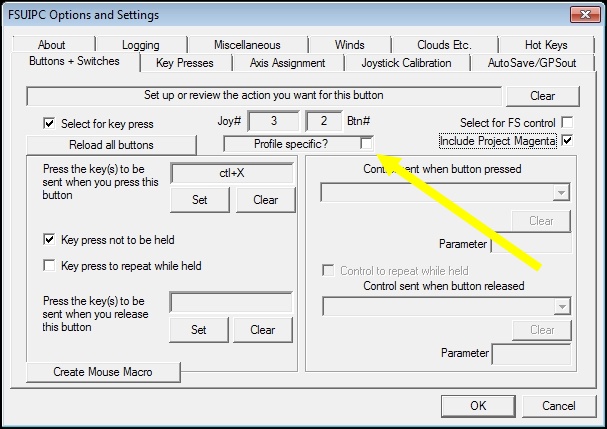
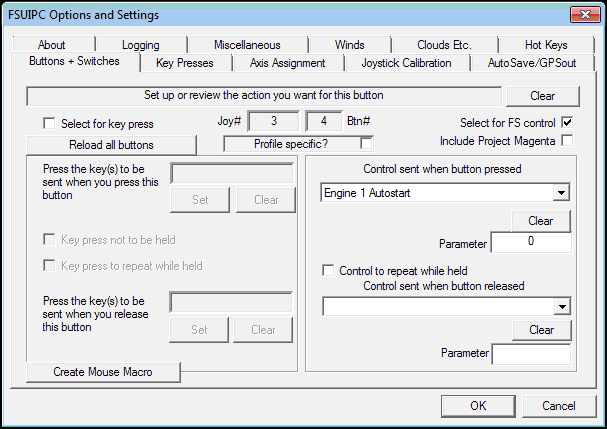
I use it with multiple switches to start engines one at a time, and a ton of other stuff.

Image

Among other things, you can use it to send multiple commands to FSX too.


So with 4 switches, normally set one for engine, I could reassign 2 of those switches if I were flying a 2 engine aircraft for some other purpose unique to that aircraft.

Once set up in FSUIPC, all you have to do, is to remember your switch assignments after selecting your plane.

Re: FSX Control Setting Presets

PostPosted: Mon Sep 23, 2013 9:35 am
by garymbuska
If you have a Yoke that has programmable switches such as the Saitek Cessna yoke with throttle quadrant you do not need the paid version of fsuipc.
I can even answer ATC with a push of a button on my yoke.
As long as there is an assignment for a function I can do it using my yoke.
If there is no assignment then you will need the paid version of Fsuipc.


<<r

Re: FSX Control Setting Presets

PostPosted: Mon Sep 23, 2013 7:56 pm
by OldAirmail
Now that is interesting!

I didn't know that the Saitek yoke had presets built in so when you changed aircraft, the buttons/switches assumed new functions.

It's to bad that they didn't make the other Saitek Pro Flight hardware more versatile!


At least with FSUIPC & SPAD you can custom program the other Saitek panels. And as I said, sending multiple commands with one click of a button/switch is ultra simple, and works great.
