installed jets then one disappeared

FSX including FSX Steam version.

installed jets then one disappeared

Postby bombardier » Sun Aug 11, 2013 11:09 am

hello to all:
I have manage to install 2 frontier jets made by the same creator mohammed al kahalifa. one is an orca and the other cougar. the orca frontier (the first one) showed up ok and then I installed the other cougar frontier. the cougar frontier showed up but the orca disappeared what happened. the only thing I did was both jets has the same effects folder so when I installed the other effects folder that came with the cougar it must over written the orca. I do not know just guessing.

how can I get the orca frontier back with out makeing the cougar frontier disappear.
any ideas?

bombardier
User avatar
bombardier
2nd Lieutenant
2nd Lieutenant
 
Posts: 288
Joined: Sat Sep 04, 2010 2:58 pm
Location: united states

Re: installed jets then one disappeared

Postby ThaddeusHWJ » Mon Aug 12, 2013 6:17 am

Hi there

I don't think the problem is about your effects folder. Check your aircraft.cfg file.

Did you edit your aircraft.cfg file? Or install any textures into the plane that makes you edit the aircraft.cfg file?

There are a few reasons your planes do not show up correctly.

1. The [fltsim.x] line are not consecutive.
In the aircraft.cfg file, at the start, there are certain "paragraphs" that begin with [fltsim.0], [fltsim.1], [fltsim.2] and so on. If these are not in running order, the textures after the mistake will not show up.

Example:
[fltsim.0]
[fltsim.1]
[fltsim.3]
[fltsim.4]

No texture below [fltsim.1] will show up in your Aircraft Menu, because [fltsim.2] is missing, and the system will not show any more textures below that.

2. You have too many planes in your Aircraft Menu.
Usually when you have a massive amount of planes in your Aircraft Menu, some of the older planes that were downloaded earlier will tend to vanish from the Aircraft Menu. The Aircraft file might still be in the disk drive but the planes will be gone from the Aircraft Menu. This is just a bug by Microsoft and the textures are not gone forever. You just need to restart FSX a few times for the planes to reappear.

3. The texture file does not correspond with the texture space in your aircraft cfg.
Did you recently rename your texture file?
Maybe you could have renamed the texture file of the cougar, but did not edit the aircraft.cfg file. Hence, the system would not be able to read it and the texture will not show up.

I believe the problem lies somewhere in your aircraft.cfg file. Please do a thorough check with your aircraft.cfg file. If you're not comfortable with editing your aircraft.cfg file, you can always reinstall those textures.

Thanks, hope I've managed to help a bit. :)

- ThaddeusHWJ.
ThaddeusHWJ
Ground hog
Ground hog
 
Posts: 34
Joined: Sun Aug 11, 2013 9:47 am
Location: Singapore

Re: installed jets then one disappeared

Postby garymbuska » Tue Aug 13, 2013 2:40 pm

One other note is that the file mentioned in the aircraft cfg file has to be the same name as the actual file and are case sensitive

<<v
Gary M Buska
SYSTEM Specs ASUS P8Z68 V/GEN 3 mother board: INTELL I7 2600k 3.48 ghz Quad core CPU with Sandy bridge: 12 Gigs of 1800hz ram:
GTX 950 OVER CLOCKED: 2 Gigs Ram Windows 10 Home 64 bit Operating system. 750W Dedicated modular power supply. Two Internal 1TB hard drives 1 External 1TB 3.2 USB hard drive. SAITEK Cessna flight Yoke with throttles.
CH Rudder Peddles 27 inch Wide screen Monitor
User avatar
garymbuska
Major
Major
 
Posts: 4415
Joined: Tue Dec 30, 2003 11:10 am
Location: Jacksonville, Florida

Re: installed jets then one disappeared

Postby bombardier » Tue Aug 13, 2013 5:26 pm

thanks for the responses:

I have tried all options that were mentioned still nothing. so I have deleted the orca frontier hoping to redownload it again but after looking under the search name " frontier" orca did not show up on any pages cougar did. so I guess I lost.

its funny, I can download any one camsim and install and show up in my planes list and fly. and btw I got 10 camsims and they all function.

so I do know how to download and install them.

bombardier
User avatar
bombardier
2nd Lieutenant
2nd Lieutenant
 
Posts: 288
Joined: Sat Sep 04, 2010 2:58 pm
Location: united states

Re: installed jets then one disappeared

Postby Huy753 » Mon Aug 19, 2013 12:10 pm

Do you mean the folder at the SimObjects folder has dissapeared? Or just the airplane from the menu/start?
Image
Huy753
2nd Lieutenant
2nd Lieutenant
 
Posts: 51
Joined: Mon Aug 19, 2013 8:43 am
Location: UK

Re: installed jets then one disappeared

Postby bombardier » Tue Aug 20, 2013 7:48 am

hello huy753

to answer your question just the plane from the menu start where the planes are listed in free flight.

its funny, the planes that I have downloaed and installed are listed in the simobjects-airplanes folder but they do not show up in the airplane list in free flight thats any plane I try to install. the camsims they install and able to fly no problem.

I only got 15 camsims and another 20 different planes and growing. so too many planes is not the aswer.

so what I'm i doing wrong not putting the aircraft cfg in aircraft folder?

bombardier
User avatar
bombardier
2nd Lieutenant
2nd Lieutenant
 
Posts: 288
Joined: Sat Sep 04, 2010 2:58 pm
Location: united states

Re: installed jets then one disappeared

Postby Bass » Tue Aug 20, 2013 8:04 am

bombardier wrote:hello huy753
..................

so what I'm i doing wrong not putting the aircraft cfg in aircraft folder?

bombardier


You need to explain this a little further :?
"Just try to be YOU"!............ Kurt 

System. GA-X58A-UD3R, i7-950QC, Corsair XMS3 18GB 2000, GTX 780 tf 3GB, Corsair CMPSU-850, 24 BenQ 120, TM Hotas cougar, win7 pro.
User avatar
Bass
Major
Major
 
Posts: 3043
Joined: Wed Feb 15, 2012 9:32 am
Location: Scandinavia

Re: installed jets then one disappeared

Postby Huy753 » Tue Aug 20, 2013 8:47 am

bombardier wrote:hello huy753

to answer your question just the plane from the menu start where the planes are listed in free flight.

its funny, the planes that I have downloaed and installed are listed in the simobjects-airplanes folder but they do not show up in the airplane list in free flight thats any plane I try to install. the camsims they install and able to fly no problem.

I only got 15 camsims and another 20 different planes and growing. so too many planes is not the aswer.

so what I'm i doing wrong not putting the aircraft cfg in aircraft folder?

bombardier

If you still have the folder of the dissapeared jet, but it doesn't display at the plane menu at free flights then the plane might is missing a file, or is not compatible, or might not be correctly setted up. I had sometimes the same problem, fixing the airplane in the sim-objects folder will let it display again in the menu list.
Make sure to check the aircraft.cfg, if its compatible, if the sound is correct etc.
Friendly greetings, Huy :)
Image
Huy753
2nd Lieutenant
2nd Lieutenant
 
Posts: 51
Joined: Mon Aug 19, 2013 8:43 am
Location: UK

Re: installed jets then one disappeared

Postby bombardier » Tue Aug 20, 2013 10:58 am

hello again: huy753: you said fixing the plane in the simsobjects folder how would I do that if thats the problem. I also read the help in simviation on" how to install jets in fsx".

I do not know if this helps but I got fsx gold I do not know if thats the problem or what. and also fsx gold is compatible for w7. and I run it under administrators rights. I also have it as compatibility mode for w7 it may need to change for compatibility mode for w xp service pack 3. maybe thats the problem. just shooting around ideas here.

bombardier

ps. I still have a few on my desk top that have not installed right . I'm doing what each one is asking as far as installing them.

I have downloaed the airplanes onto a flash drive from the public city library. do think thats one of the reasons its not showing up also.
User avatar
bombardier
2nd Lieutenant
2nd Lieutenant
 
Posts: 288
Joined: Sat Sep 04, 2010 2:58 pm
Location: united states

Re: installed jets then one disappeared

Postby Huy753 » Tue Aug 20, 2013 11:19 am

bombardier wrote:hello again: huy753: you said fixing the plane in the simsobjects folder how would I do that if thats the problem. I also read the help in simviation on" how to install jets in fsx".

I do not know if this helps but I got fsx gold I do not know if thats the problem or what. and also fsx gold is compatible for w7. and I run it under administrators rights. I also have it as compatibility mode for w7 it may need to change for compatibility mode for w xp service pack 3. maybe thats the problem. just shooting around ideas here.

bombardier

ps. I still have a few on my desk top that have not installed right . I'm doing what each one is asking as far as installing them.

I have downloaed the airplanes onto a flash drive from the public city library. do think thats one of the reasons its not showing up also.


Did you have modify the folder in anyway? If yes, try to re-install the airplane you wanted to have. Make a backup of the sound.cfg and try to copy a sound.cfg of a standart plane, such as the A320 and paste it in the dissapeared jet folder in simobjects. If this isn't the case and the sound replacement didn't work then put the old sound.cfg you've backed up back in your folder, and check the panel of your plane. Also as I said, try to open the aircraft.cfg and look if it's correctly, to do this compare it with the other aircraft cfg's.
Image
Huy753
2nd Lieutenant
2nd Lieutenant
 
Posts: 51
Joined: Mon Aug 19, 2013 8:43 am
Location: UK

Re: installed jets then one disappeared

Postby bombardier » Tue Aug 20, 2013 6:00 pm

hello huy753: thanks for trying to help me

I will look into your ideas soon. but for now I want to give you the step by step procedure of how i open a zip folder and see if you see if I'm doing any thing wrong.

first I got a a380 travel service I got the zip folder I click on "extract all" it aotomatically makes a new folder title "A380 travel service" next read the

"reademe installation" 1) unzip all files in a temporary folder it all ready did that for me folder "A380 travel service" see above so I did not do that.

2) then copy airbus A380-800 into airplanes I did that.

3) copy effects to effects folder I did that.

now the folder that says A380 travel service I opened that up and I see effects, model vc, panel , sound, textures travel service, pa380.air, aircraft cfg then close . copy and paste the folder A380 travel service into airplanes did not show up in free flight.

bombardier
User avatar
bombardier
2nd Lieutenant
2nd Lieutenant
 
Posts: 288
Joined: Sat Sep 04, 2010 2:58 pm
Location: united states

Re: installed jets then one disappeared

Postby Huy753 » Wed Aug 21, 2013 5:28 am

bombardier wrote:hello huy753: thanks for trying to help me

I will look into your ideas soon. but for now I want to give you the step by step procedure of how i open a zip folder and see if you see if I'm doing any thing wrong.

first I got a a380 travel service I got the zip folder I click on "extract all" it aotomatically makes a new folder title "A380 travel service" next read the

"reademe installation" 1) unzip all files in a temporary folder it all ready did that for me folder "A380 travel service" see above so I did not do that.

2) then copy airbus A380-800 into airplanes I did that.

3) copy effects to effects folder I did that.

now the folder that says A380 travel service I opened that up and I see effects, model vc, panel , sound, textures travel service, pa380.air, aircraft cfg then close . copy and paste the folder A380 travel service into airplanes did not show up in free flight.

bombardier


Are you sure you have copied and pasted the Effects folder in the Original Effects folder? Copying the files in the downloaded Effects folder will not work, make sure you have copied the Folder instead of the files in it. At SimObjects paste the downloaded folder you've downloaded, and not the ZIP. Make sure you follow every step. If it really didn't help, double click the pa380.air and see what happends. If it shows an error after opening/executing the pa380.air don't try it again. As I said, open the sounds folder, what do you see? only a sound.cfg? If yes, make a backup of it, and copy a sound.cfg or sound.mp3 etc and paste it in the A380 travel service folder, launch the exe and see if it worked. If not, put the sound.cfg back in the directory/folder of the A380 travel service. Then look at the panel, most A380 panels are not compatible or its corrupted. Try to download then a A380 panel here: http://flyawaysimulation.com/downloads/ ... 380-panel/. Don't try the sound and panel at once, do it step by step. Good luck, :)
Image
Huy753
2nd Lieutenant
2nd Lieutenant
 
Posts: 51
Joined: Mon Aug 19, 2013 8:43 am
Location: UK

Re: installed jets then one disappeared

Postby Hagar » Wed Aug 21, 2013 6:39 am

bombardier wrote:hello to all:
I have manage to install 2 frontier jets made by the same creator mohammed al kahalifa. one is an orca and the other cougar. the orca frontier (the first one) showed up ok and then I installed the other cougar frontier. the cougar frontier showed up but the orca disappeared what happened. the only thing I did was both jets has the same effects folder so when I installed the other effects folder that came with the cougar it must over written the orca. I do not know just guessing.

how can I get the orca frontier back with out makeing the cougar frontier disappear.
any ideas?

bombardier

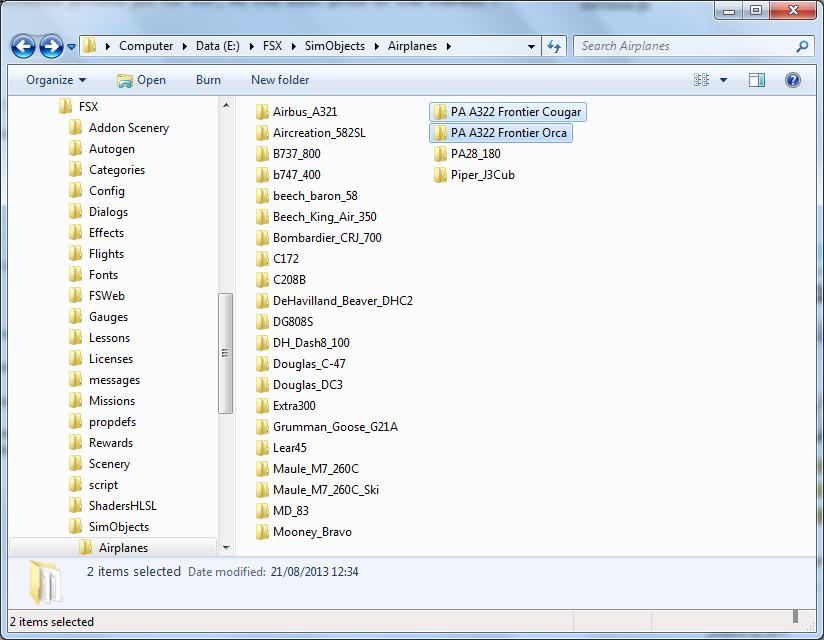
Going back to your original question I have managed to track down the two aircraft you mention.

http://simviation.com/1/search?submit=1&keywords=pa322_f9orca.zip&categoryId=

http://simviation.com/1/search?submit=1&keywords=pa322_f9cougar.zip&categoryId=&filename=Y

Although they are repaints they are both configured as complete aircraft so easy enough to install.

Image

The Effects files for both aircraft are identical so it's not necessary to install them more than once. Even if you did this (or did not install them at all) it should not affect the aircraft displaying on the FSX Aircraft selection menu.

Image

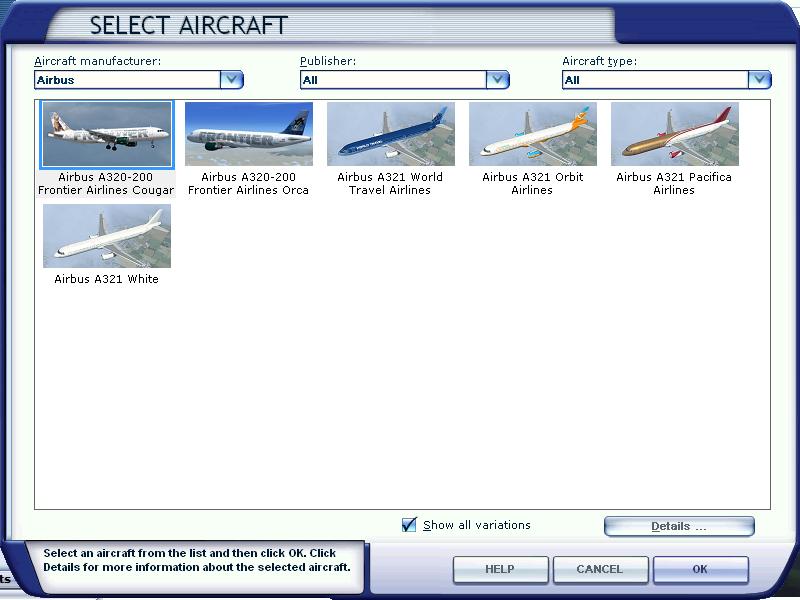
You might like to make sure the 'Show all variations' box is checked.
Image

Founder & Sole Member - Grumpy's Over the Hill Club for Veteran Virtual Aviators
Member of the Fox Four Group
My Google Photos albums
My Flickr albums
User avatar
Hagar
Colonel
Colonel
 
Posts: 30868
Joined: Wed Jun 19, 2002 7:15 am
Location: Costa Geriatrica

Re: installed jets then one disappeared

Postby Huy753 » Wed Aug 21, 2013 8:18 am

Hagar wrote:
bombardier wrote:hello to all:
I have manage to install 2 frontier jets made by the same creator mohammed al kahalifa. one is an orca and the other cougar. the orca frontier (the first one) showed up ok and then I installed the other cougar frontier. the cougar frontier showed up but the orca disappeared what happened. the only thing I did was both jets has the same effects folder so when I installed the other effects folder that came with the cougar it must over written the orca. I do not know just guessing.

how can I get the orca frontier back with out makeing the cougar frontier disappear.
any ideas?

bombardier

Going back to your original question I have managed to track down the two aircraft you mention.

http://simviation.com/1/search?submit=1&keywords=pa322_f9orca.zip&categoryId=

http://simviation.com/1/search?submit=1&keywords=pa322_f9cougar.zip&categoryId=&filename=Y

Although they are repaints they are both configured as complete aircraft so easy enough to install.

Image

The Effects files for both aircraft are identical so it's not necessary to install them more than once. Even if you did this (or did not install them at all) it should not affect the aircraft displaying on the FSX Aircraft selection menu.

Image

You might like to make sure the 'Show all variations' box is checked.


That is the problem.. Bombardier has followed the normal steps/instructions of installing a plane. As he said, he has installed 2 planes, and one of them did work with the same instructions of installing a plane. (Copying the folder, and pasting it into SimobJects/airplanes).
hello huy753: thanks for trying to help me

I will look into your ideas soon. but for now I want to give you the step by step procedure of how i open a zip folder and see if you see if I'm doing any thing wrong.

first I got a a380 travel service I got the zip folder I click on "extract all" it aotomatically makes a new folder title "A380 travel service" next read the

"reademe installation" 1) unzip all files in a temporary folder it all ready did that for me folder "A380 travel service" see above so I did not do that.

2) then copy airbus A380-800 into airplanes I did that.

3) copy effects to effects folder I did that.

now the folder that says A380 travel service I opened that up and I see effects, model vc, panel , sound, textures travel service, pa380.air, aircraft cfg then close . copy and paste the folder A380 travel service into airplanes did not show up in free flight.

bombardier


Even if it doesn't affect the displaying menu, he followed the same steps to install the plane.. So I'm pretty sure his second plane is incorrect. What is weird in this case, is that his first plane did work, but not his second plane.
Image
Huy753
2nd Lieutenant
2nd Lieutenant
 
Posts: 51
Joined: Mon Aug 19, 2013 8:43 am
Location: UK

Re: installed jets then one disappeared

Postby Hagar » Wed Aug 21, 2013 8:57 am

Huy753 wrote:That is the problem.. Bombardier has followed the normal steps/instructions of installing a plane. As he said, he has installed 2 planes, and one of them did work with the same instructions of installing a plane. (Copying the folder, and pasting it into SimobJects/airplanes).

Even if it doesn't affect the displaying menu, he followed the same steps to install the plane.. So I'm pretty sure his second plane is incorrect. What is weird in this case, is that his first plane did work, but not his second plane.

As both aircraft are configured in the same way I suspect that the 'Show all variations' option on the aircraft selection menu is disabled. That would explain why only one version of the aircraft is displayed.
Image

Founder & Sole Member - Grumpy's Over the Hill Club for Veteran Virtual Aviators
Member of the Fox Four Group
My Google Photos albums
My Flickr albums
User avatar
Hagar
Colonel
Colonel
 
Posts: 30868
Joined: Wed Jun 19, 2002 7:15 am
Location: Costa Geriatrica

Next

Return to Flight Simulator X (FSX) and Steam

Who is online

Users browsing this forum: No registered users and 1075 guests