Page 1 of 2
how to add jets to fsx with w7

Posted:
Mon Jul 22, 2013 5:25 pmby bombardier
hello everyone:
I got w7 ultimate and want to add some jets to my list in fsx. how and where can I find all the folders in fsx. for example airplanes folder and so on.
and if I need help to installing the jets I have can I post here so someone can point me in the right direction. and also if it does not show up at all. I'm sure it will be a matter of time before something like that will happen.
bombardier (jeff)
Re: how to add jets to fsx with w7
Posted:
Mon Jul 22, 2013 7:44 pmby alrot
Please take a look here
http://simviation.com/1/fsxinstallthe FSX folder has the same location just like Win Xp in the program folder /Microsoft/fsx

Alex
Re: how to add jets to fsx with w7
Posted:
Tue Jul 23, 2013 1:56 amby Hagar
The default location for FSX in 64-bit versions of Windows is C:\Program Files (x86)\Microsoft Games\Microsoft Flight Simulator X
Re: how to add jets to fsx with w7
Posted:
Wed Jul 24, 2013 4:32 pmby bombardier
hello hager:
after reading your post I went to look for it and it is not listed. I remember that fsx is a windows xp version and so be that I was told to install in a separate file system not file 86x. I installed it as c: microsoft flight simulator x. fsx.exe I think something like that. I have installed jets on w7 before about a year ago but forgot the process. its not under program files. is there a way to check on my old postings?
alot: i know your are right but I cannot find it I know its there because I just flown an 777 aa
w7 like to hide programs like this. xp was easy to install jets
any ideas??
bombardier
Re: how to add jets to fsx with w7
Posted:
Wed Jul 24, 2013 6:54 pmby bombardier
hello hager and alrot:
please disreguard the last post I typed. I found my fsx file it was under x86 file system. I thought I put the fsx into a different file system sorry to take up your time while you all could be flying. my mistake
bombardier
Re: how to add jets to fsx with w7
Posted:
Wed Jul 24, 2013 7:21 pmby alrot
bombardier wrote:hello hager and alrot:
please disreguard the last post I typed. I found my fsx file it was under x86 file system. I thought I put the fsx into a different file system sorry to take up your time while you all could be flying. my mistake
bombardier
No problem bombardier ,Glad you could find it

Re: how to add jets to fsx with w7
Posted:
Thu Jul 25, 2013 2:29 amby Hagar
bombardier wrote:hello hager and alrot:
please disreguard the last post I typed. I found my fsx file it was under x86 file system. I thought I put the fsx into a different file system sorry to take up your time while you all could be flying. my mistake
bombardier
No problem. Glad you fixed it.
Re: how to add jets to fsx with w7
Posted:
Fri Jul 26, 2013 5:20 pmby bombardier
helllo to all:
I think this would be my posts so if an jet does not show up I will post here and not start another 1,000 posts. but anyway I do have one problem my super-11 emirates is not showing up; its listed in the airplane folder but does not show up in list of planes. I did copy the aircraft cfg file into the aircraft folder. any ideas?? am I the only one who cannot get the jets flyable even though its listed in the airplane folder? answer, I think I'am. I even read the read me file and still cannot get them to fly.
bombardier
Re: how to add jets to fsx with w7
Posted:
Sat Jul 27, 2013 2:22 amby Hagar
Bombardier. I get no results from a search for 'super-11 emirates'. If you can give a file name and/or link to the page the file is posted on someone can download it & check it out for you.
Re: how to add jets to fsx with w7
Posted:
Sat Jul 27, 2013 6:00 amby bombardier
hello hager: about your post yeah I forgot to put in its a camsim super-11 emirates. sorry about that. I thought I saw something about "how to install jets in fsx" that someone wrote.
btw: I got the camsim super-11 britsh airways working but not this one and I did the same thing i did with this one the super-11 emirates as i did with the super11-britsh airways.
bombardier
Re: how to add jets to fsx with w7
Posted:
Sat Jul 27, 2013 6:36 amby Hagar
bombardier wrote:hello hager: about your post yeah I forgot to put in its a camsim super-11 emirates. sorry about that. I thought I saw something about "how to install jets in fsx" that someone wrote.
btw: I got the camsim super-11 britsh airways working but not this one and I did the same thing i did with this one the super-11 emirates as i did with the super11-britsh airways.
bombardier
First of all, make sure you have the FSX version. The Super-11 panel & sound are aliased to the FSX default Bombardier_CRJ_700 so that must be in the same folder for it to work. The Super-11 will be listed under CamSim as manufacturer.
I did copy the aircraft cfg file into the aircraft folder. any ideas??
Not sure what you mean by this. The aircraft comes ready to go.
Re: how to add jets to fsx with w7
Posted:
Sun Jul 28, 2013 6:59 amby bombardier
helllo to anyone:
its been a year since I downlload any jets so give me time to relearn every thing ok?
after download to a flash drive the a380 sa is now on my desk top after readeing installation it says
to copy and then install effects to the effects folder. ok I got 2 effects folders one under(1) simobjects airplane then effects (2) under a big list that contains addon, auto gen, charts, ext.,ext. and then effects. I have 2 options here I would think option 1 would be the answer but then again option 2 might also. when I try to install under effects I get a message do you want to over write the information I declined I might make the program to not to work thats what I'm thinking.
under option 2 under simobjects airplane and then effects; the effects folder is zipped should that be unzipped?
its been a year since I downlload any jets so give me time to relearn every thing ok?
bombardier
Re: how to add jets to fsx with w7
Posted:
Sun Jul 28, 2013 7:13 amby Hagar
You should have only one Effects folder. That's in the FSX root directory. See my shot below.
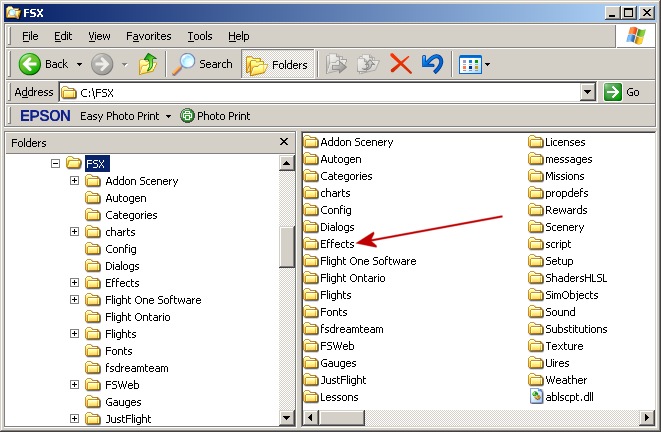
You must have put the one in the SimObjects folder yourself.
My advice would be not to overwrite existing files.
Re: how to add jets to fsx with w7
Posted:
Sun Jul 28, 2013 10:25 amby bombardier
hello hager: (i know this is a bit much hope you understand this post anyway)
you cleared that up for me and what I did is this I took the effects file from the a380-800 sa to the effects folder that you showed me and then it asks this" destination already contains folder named effects do you wish to merge this file effects date 7-15-12 to this file effects 7-28-13 "? I just clicked on effects folder and opened the exsisting effect folder and it shows this 787.taxi.fx; 787.wing.fx and 787.wing1.fx. I'm thinking it might be a built in so mergeing might not be a good idea. any thoughts on this? this is the folder that the merge operation is highlighting.
ps.
can I delete the 2 zipped-effects folder under simobjects-airplanes? ok, let me ask you this do you have effects folders under airplanes file if no I will delete them all.
bombardier
Re: how to add jets to fsx with w7
Posted:
Sun Jul 28, 2013 12:29 pmby Hagar
bombardier wrote:hello hager: (i know this is a bit much hope you understand this post anyway)
you cleared that up for me and what I did is this I took the effects file from the a380-800 sa to the effects folder that you showed me and then it asks this" destination already contains folder named effects do you wish to merge this file effects date 7-15-12 to this file effects 7-28-13 "? I just clicked on effects folder and opened the exsisting effect folder and it shows this 787.taxi.fx; 787.wing.fx and 787.wing1.fx. I'm thinking it might be a built in so mergeing might not be a good idea. any thoughts on this? this is the folder that the merge operation is highlighting.
ps.
can I delete the 2 zipped-effects folder under simobjects-airplanes? ok, let me ask you this do you have effects folders under airplanes file if no I will delete them all.
bombardier
I suggest installing effects like this;
Open the Effects folder in the download & select the contents. These will be the files named 787.taxi.fx; 787.wing.fx and 787.wing1.fx that you mentioned.
Copy/Paste these files into your FSX\Effects folder. Do NOT overwrite files if prompted.
You can safely delete any zipped files from your SimObjects\Airplanes folder.