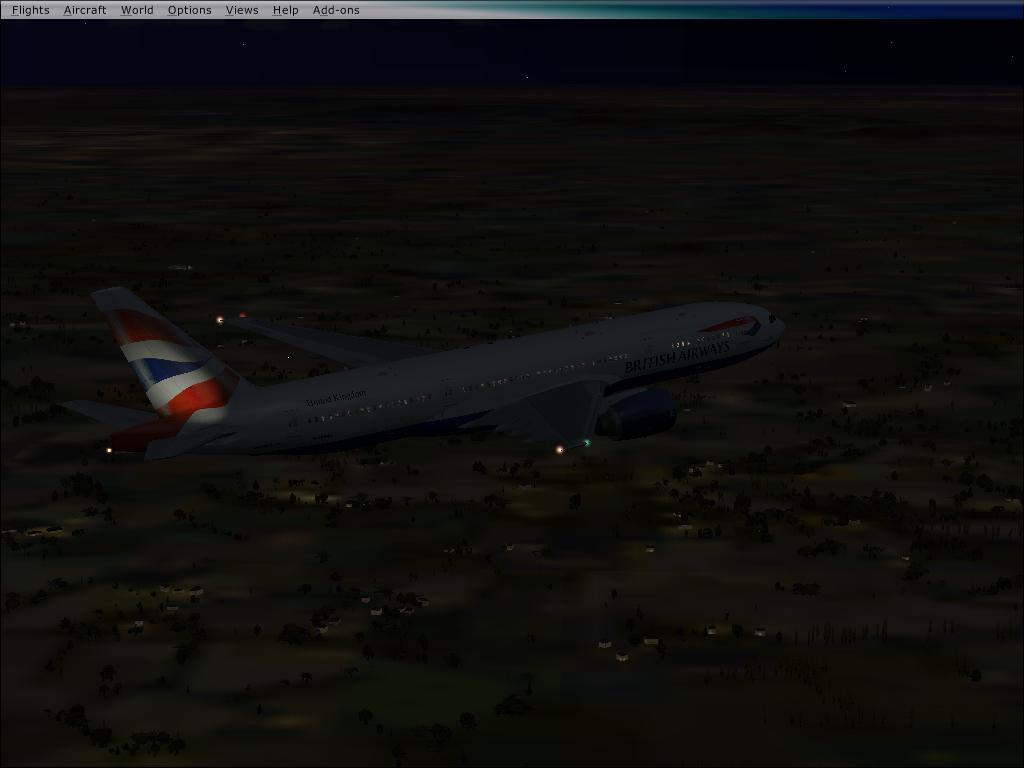
How to get your Posky 777 VC gauges working

FSX including FSX Steam version.

Re: How to get your Posky 777 VC gauges working

Postby kawasiri18 » Fri Sep 19, 2008 2:29 pm

ummm... it doesnt work... I dont understand because I used the POSKY continental airlines, and just put the .gau in the right place, but it doesnt work...


It does work, as I have tested it multiple times, in multiple 777's. Show exactly what files you have downloaded. Cant just go by, "it doesnt work" to offer any help.


well, u are right, I just didnt have time to post anything else...

Ok, anyway, i downloaded the OS772V2_GE90_L_CO file off of POSKY site, and installed it correctly. Should I just put the 777 .GAU file in there right now, or do I need to do another thing?
kawasiri18
Ground hog
Ground hog
 
Posts: 4
Joined: Wed Sep 17, 2008 11:29 pm

Re: How to get your Posky 777 VC gauges working

Postby gtirob01 » Fri Sep 19, 2008 11:25 pm

ummm... it doesnt work... I dont understand because I used the POSKY continental airlines, and just put the .gau in the right place, but it doesnt work...


It does work, as I have tested it multiple times, in multiple 777's. Show exactly what files you have downloaded. Cant just go by, "it doesnt work" to offer any help.


well, u are right, I just didnt have time to post anything else...

Ok, anyway, i downloaded the OS772V2_GE90_L_CO file off of POSKY site, and installed it correctly. Should I just put the 777 .GAU file in there right now, or do I need to do another thing?


No, you dont need to put the 777.gau file in the 777 folder. You put that in your main FSX gauges folder. Everything should work from there.
My specs... A hard drive, motherboard, graphics card, some memory, a keyboard, mouse, and monitor - in other words, nothing special.

Image

My Posky
User avatar
gtirob01
Major
Major
 
Posts: 3605
Joined: Fri Jul 20, 2007 11:10 pm
Location: Ft. Walton Beach, FL

Re: How to get your Posky 777 VC gauges working

Postby LuisCurtolo » Sat Sep 20, 2008 1:22 am

Is it possible that i still have problems with the 777-300.gau, and the VC panel [as i explained in my first post here] because i dont have the acceleration or another update packages?

thanks
LuisCurtolo
Ground hog
Ground hog
 
Posts: 7
Joined: Thu Sep 18, 2008 8:14 pm

Re: How to get your Posky 777 VC gauges working

Postby gtirob01 » Sat Sep 20, 2008 10:42 am

no, that shouldnt really matter, as the 777 isnt made for FSX anyways. What exactly are the problems you are having?
My specs... A hard drive, motherboard, graphics card, some memory, a keyboard, mouse, and monitor - in other words, nothing special.

Image

My Posky
User avatar
gtirob01
Major
Major
 
Posts: 3605
Joined: Fri Jul 20, 2007 11:10 pm
Location: Ft. Walton Beach, FL

Re: How to get your Posky 777 VC gauges working

Postby LuisCurtolo » Sat Sep 20, 2008 3:21 pm

well... i did everything that was told to do to make the VC work.. i got the VC textures, the model file from POSKY, the FSX recognized the 777-300.gau, it asked me if the boeing777-300.gau was a trustable application, i selected yes.. it asked me if it could consider that application always trustable, i said yes... everything normal.
but when i loaded the vc panel, there was still no gauges there.

i went to google.. i typed "boeing777-300.gau problems"... and in one forum it was told to copy a .dll file from FS9 that is responsable to make the 777's gauges IN the FS9 work. i copied the MSCRV70.dll file, from FS9 to main folder of FSX and it worked... the gauges worked perfectly

thats why i asked about the updates, maybe in one of them this .dll file comes because i beleve that by importing that file I got some senery problems.  

THIS IS THE PROBLEM i get when im using the 777 with the VC because i tryied getting rid of the VC flying with just the 2d, and there was no problems at all with the senery:

SORRY ABOUT THE IMAGE SIZE AS I HAVE NO IDEIA HOW TO MAKE IT SMALLER


Image


this problem reaches some buildings too... looks like problems with the loading.

thansk for the attention Rob.
hope you of somebody can help!  :)
LuisCurtolo
Ground hog
Ground hog
 
Posts: 7
Joined: Thu Sep 18, 2008 8:14 pm

Re: How to get your Posky 777 VC gauges working

Postby gtirob01 » Sat Sep 20, 2008 3:35 pm

Never heard of that dll part. Guess I never looked into it since it worked for me.

As for your scenery, I dont know. Havent seen that anywhere else. Then again, Im still not quite sure what the problem is. Im just trying to help get the gauges working.
My specs... A hard drive, motherboard, graphics card, some memory, a keyboard, mouse, and monitor - in other words, nothing special.

Image

My Posky
User avatar
gtirob01
Major
Major
 
Posts: 3605
Joined: Fri Jul 20, 2007 11:10 pm
Location: Ft. Walton Beach, FL

Re: How to get your Posky 777 VC gauges working

Postby LuisCurtolo » Sat Sep 20, 2008 4:45 pm

well.. thanks any ways...  :)
still think its a update problem as when i tryied to enter your panel.cfg the gauges in the middle of the panel didnt work. (all remaining gauges from default .cfg file worked)
i
LuisCurtolo
Ground hog
Ground hog
 
Posts: 7
Joined: Thu Sep 18, 2008 8:14 pm

Re: How to get your Posky 777 VC gauges working

Postby gtirob01 » Sat Sep 20, 2008 7:02 pm

maybe Im just not picturing what your problem is. Do me a favor.... take a screenshot of the panel to show what problem you are having and post it here. Also, pm me a copy of the panel.cfg you are using. Maybe something is just missing or entered wrong.

Oh, and your image size is right where it should be.
Last edited by gtirob01 on Sat Sep 20, 2008 7:04 pm, edited 1 time in total.
My specs... A hard drive, motherboard, graphics card, some memory, a keyboard, mouse, and monitor - in other words, nothing special.

Image

My Posky
User avatar
gtirob01
Major
Major
 
Posts: 3605
Joined: Fri Jul 20, 2007 11:10 pm
Location: Ft. Walton Beach, FL

Re: How to get your Posky 777 VC gauges working

Postby LuisCurtolo » Wed Sep 24, 2008 7:56 pm

maybe Im just not picturing what your problem is. Do me a favor.... take a screenshot of the panel to show what problem you are having and post it here. Also, pm me a copy of the panel.cfg you are using. Maybe something is just missing or entered wrong.

Oh, and your image size is right where it should be.


Rob,
As I don't know what you mean with 'pm', I will just copy the panel.cgf which i'm using.


//Project Opensky 777v2 Virtual Cockpit Panel cfg
//Built Friday, June 27, 2008 at 16:09 Jacob Kubique
//Fix by H.Igami 16AUG 2008

[Window Titles]
Window00=Main Panel
Window01=Radio Stack
Window02=GPS
Window03=Throttle Quadrant
Window04=Compass
Window05=Mini Panel
Window06=Posky_Debug
Window07=Posky_Util


//--------------------------------------------------------
[Window00]
file=Forward_640.bmp
file_1024=Forward_1024.bmp
size_mm=640
position=7
visible=1
ident=MAIN_PANEL

gauge00=Boeing777-300!Anti_Ice_Switch,  406,15,28
gauge01=Boeing777-300!Ignition_Left,  459,15,28
gauge02=Boeing777-300!Ignition_Right,  537,15,28
gauge03=Boeing777-300!Fuel_Selector,  588,15,28
gauge04=Boeing777-300!Autobrake,  554,404,46
gauge05=Boeing777-300!Gear_Lever,  602,380,37
gauge06=Boeing777-300!Pitch_Trim_Ind,  554,248,27
gauge07=Boeing777-300!Pitch_Trim_Knob,  558,345,18
gauge08=Boeing777-300!Rudder_Trim_Ind,  584,308,55
gauge09=Boeing777-300!Rudder_Trim_Knob,  597,339,31
gauge10=Boeing777-300!Aileron_Trim_Ind,  583,247,57
gauge11=Boeing777-300!Aileron_Trim_Switch,  595,276,31
gauge12=Boeing777-300!Beacon_Nav_Light_Switch,  9,380,58
gauge13=Boeing777-300!Nose_Light_Switch,  1,431,26
gauge14=Boeing777-300!Strobe_Light_Switch,  29,  431 ,21
gauge15=Boeing777-300!Taxi_Light_Switch,  49,431,21
gauge16=Boeing777-300!Clock,  0,282,72
gauge17=Boeing777-300!Autopilot,  255,182,385
gauge18=Boeing777-300!Backup_Attitude,  476,246,77
gauge19=Boeing777-300!Backup_Altimeter,  476,323,77
gauge20=Boeing777-300!Backup_Airspeed,  476,400,75
gauge21=Boeing777-300!PFD,  75,255,197
gauge22=Boeing777-300!MFD,  274,255,197
gauge23=Boeing777-300!Avionics_Switch,  21,244,21
gauge24=Boeing777-300!Master_Caution,  225,186,20
gauge25=Boeing777-300!Autostart,  500,17,25
gauge26=SimIcons!Kneeboard Icon,  156,457,12,12
gauge27=SimIcons!ATC Icon,  169,457,12,12
gauge28=SimIcons!Map Icon,  182,457,12,12
gauge29=SimIcons!Avionics Icon,  195,457,12,12
gauge30=SimIcons!GPS Icon,  208,457,12,12
gauge31=SimIcons!ECU Icon,  221,457,12,12
gauge32=SimIcons!Compass Icon,  234,457,12,12


//--------------------------------------------------------
[Window01]
Background_color=2,2,2
size_mm=127,347
position=8
visible=0
ident=RADIO_STACK_PANEL

gauge00=Boeing777-300!Comm 1,  0,0
gauge01=Boeing777-300!Comm 2,  0,54
gauge02=Boeing777-300!Nav 1,  0,108
gauge03=Boeing777-300!Nav 2,  0,162
gauge04=Boeing777-300!Transponder,  0,216
gauge05=Boeing777-300!ADF,  0,265
gauge06=Boeing777-300!Audio,  0,319


//--------------------------------------------------------
[Window02]
Background_color=0,0,0
size_mm=456,378
position=8
visible=0
ident=GPS_PANEL
window_size= 0.500, 1.000
window_pos= 0.000, 0.000

gauge00=fs9gps!gps_500,  0,0,456,378


//--------------------------------------------------------
[Window03]
Background_color=16,16,16
size_mm=201
position=0
visible=0
ident=THROTTLE_PANEL

gauge00=Boeing777-300!Throttle Quadrant,  0,0


//--------------------------------------------------------
[Window04]
Background_color=138,118,106
size_mm=70
position=2
visible=0
ident=COMPASS_PANEL

gauge00=Magnetic_Compass!Magnetic-Compass,  0,0


//--------------------------------------------------------
[Window05]
Background_color=0,0,0
size_mm=398,224
position=7
visible=1
ident=MINIPANEL
child_3d=1

gauge00=Boeing777-300!PFD,  0,0
gauge01=Boeing777-300!MFD,  201,1

//--------------------------------------------------------
[Window06]
VISIBLE=0
position=2
size_mm=350,200
child_3d=0
background_color=0,0,0
ident=POSKYDEBUG
gauge00=Posky777!POSKYDEBUG,   0, 0
gauge01=Posky777!POSKYDEBUG2,   0, 100

//--------------------------------------------------------
[Window07]
VISIBLE=0
position=2
size_mm=204,80
child_3d=0
background_color=0,0,0
ident=Posky Utility
gauge00=Pky_Util!Pky_Init, 0, 0
gauge01=Pky_Util!Pky_Timer, 0, 0
gauge02=Pky_util!Pky_Util, 0, 0


//--------------------------------------------------------
[Vcockpit01]
file=$vc_01.bmp
Background_color=0,0,0
size_mm=1024,1024
visible=0
pixel_size=1024,1024
texture=$vc_01

gauge00=Boeing777-300!PFD,  -1,5,432,482
gauge01=Boeing777-300!MFD,  431,3,428,483
gauge02=Boeing777-300!MFD,  431,488,428,483
gauge03=Boeing777-300!MFD,  2,488,428,483
gauge04=Boeing777-300!Pitch_Trim_Ind,  886,4,100,374
gauge05=Boeing777-300!Beacon_Nav_Light_Switch,  861,466,163,102
gauge06=Boeing777-300!Master_Caution,  883,909,117,112
gauge07=Boeing777-300!Autostart,  862,376,80,91
gauge08=Magnetic_Compass!Magnetic-Compass,  869,756,148,150


//--------------------------------------------------------
[Vcockpit02]
file=$vc_02.bmp
Background_color=0,0,0
size_mm=1024,1024
visible=0
pixel_size=1024,1024
texture=$vc_02

gauge00=Boeing777-300!Backup_Attitude,  441,848,174,174
gauge01=Boeing777-300!Clock,  619,854,170,168
gauge02=Boeing777-300!Autopilot,  332,528,689,78
gauge03=Boeing777-300!Rudder_Trim_Ind,  845,611,179,75
gauge04=fs9gps!gps_500,  386,-1,637,527
gauge05=Boeing777-300!Comm 1,  2,494,202,84
gauge06=Boeing777-300!Comm 2,  2,583,200,83
gauge07=Boeing777-300!Transponder,  1,841,200,76
gauge08=Boeing777-300!Nav 1,  3,670,200,82


//--------------------------------------------------------
[Vcockpit03]
file=$vc_03.bmp
Background_color=0,0,0
size_mm=1024,1024
visible=0
pixel_size=1024,1024
texture=$vc_03

//gauge00=Pky_glassdirt!Pky_glassdirt, 0,0,1024,1024


[VCockpit04]
size_mm=512,512
pixel_size=512,512
texture=$Posky_ACU
background_color=0,0,0


gauge00=Posky777!Pky_AdvInit, 140,80,140,80
gauge01=Posky777!PkyNosegearheight, 140,80,140,80
gauge02=Posky777!PkyLeftgearheight, 140,80,140,80
gauge03=Posky777!PkyLeftgearboggie, 140,80,140,80
gauge04=Posky777!PkyRightgearheight, 140,80,140,80
gauge05=Posky777!PkyRightgearboggie, 140,80,140,80
gauge06=Posky777!PkyCALC, 140,80,140,80
gauge07=Posky777!PkyWINGROOTFLEX, 140,80,140,80
gauge08=Posky777!PkyRWINGMIDFLEX, 140,80,140,80
gauge09=Posky777!PkyLWINGMIDFLEX, 140,80,140,80
gauge10=Posky777!PkyRWINGTIPFLEX, 140,80,140,80
gauge11=Posky777!PkyLWINGTIPFLEX, 140,80,140,80
gauge12=Posky777!PkyNosegearsteerling, 140,80,140,80
gauge13=Posky777!PkyRudder, 140,80,140,80
gauge14=Posky777!Pky2Rudder, 140,80,140,80
gauge15=Posky777!PkyflaperonL, 140,80,140,80
gauge16=Posky777!PkyflaperonR, 140,80,140,80
gauge17=Posky777!PkyLSAileronL, 140,80,140,80
gauge18=Posky777!PkyLSAileronR, 140,80,140,80
gauge19=Posky777!PkySpoiler, 140,80,140,80
gauge20=Posky777!PkyElev, 140,80,140,80
gauge21=Posky777!PkyAPUDoor, 140,80,140,80
gauge22=Posky777!PkyEngRev, 140,80,140,80


[Color]
Day=255,255,255
Night=16,10,10
Luminous=255,231,164

[Default View]
X=0
Y=0
SIZE_X=8192
SIZE_Y=3300

To make it work I followed instructions given by a guy in youtube:
get the respective model .mdl file (in case, for my BA777 it was this one: "OS772V2_TRENT800--L_VC.mdl")
this is the video url:  http://www.youtube.com/watch?v=bdG2RIR5Sgs

well, after i got everything (the .mdl file+the Panelsp1 [both from posky website] ) the gauges still didnt work. As i told you, i still didnt have the gauges working... and, I went to google, read about the mscrv70.dll file which was ment to be imported from fs9, i did it, and i got the gauges, HOWEVER i got some scenrey texture problems.

thats pretty much everything i did.

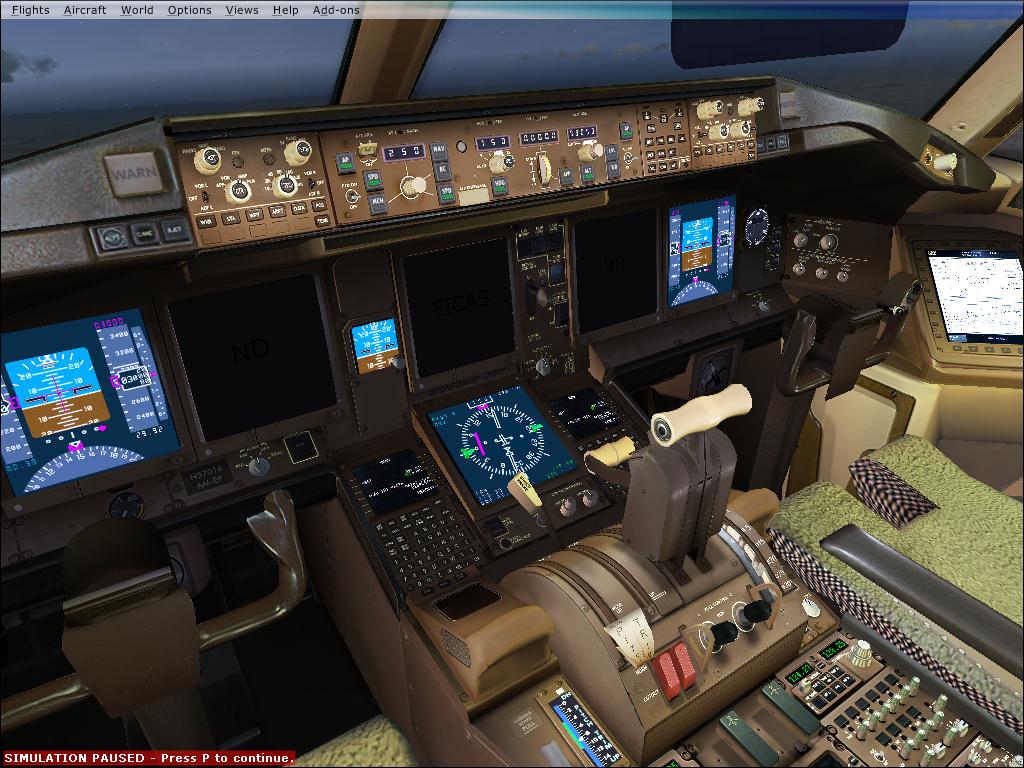
Regarding the problems when i use the panel.cgf which you suggested this is what i get.
Image


Still, I was wondering, if it is a problem with the .dll i imported from FS9, or the .mdl files which i downloaded directaly from POSKY website, since if I get rid of the VC panel (by deleting the mdl file i got from posky; in the 777's model folder) the secenry problem desapiers even if i use the 777's 2D panel with working gauges.

(to make gauges work = mscrv70.dll from FS9 ;
to make VC textures work = OS772V2_TRENT800--L_VC.mdl)

So is it possible that this mdl from POSKY may cause some collateral effects? Cuz in none of the directins from the forum it is said to download it directaly from POSKY.
where would the problem be??

Thanks Rob.

LuisCurtolo
Ground hog
Ground hog
 
Posts: 7
Joined: Thu Sep 18, 2008 8:14 pm

Re: How to get your Posky 777 VC gauges working

Postby thomass92 » Sat Oct 04, 2008 8:44 am

Hi

I still get the VC not working. I see al the screen's in the cockpit but they aren't working
I put the gauge file in the gauge folder. And i changed the .cfg in the panel. But it still don't work.
Can somebody help me? :'(

And how you guys get the posky thing? I don't have that in my panel!
Last edited by thomass92 on Sat Oct 04, 2008 9:02 am, edited 1 time in total.
thomass92
Ground hog
Ground hog
 
Posts: 3
Joined: Sat Oct 04, 2008 9:35 am
Location: The Netherlands

Re: How to get your Posky 777 VC gauges working

Postby ShaneG_old » Sat Oct 04, 2008 7:26 pm

Just a thought, but I think this should be a sticky. I've seen this thread linked all over the web. And I bet it has to have set some kind of record for views in such a short period of time! :o :o ;D ;)
ShaneG_old
Lieutenant Colonel
Lieutenant Colonel
 
Posts: 9700
Joined: Tue Mar 11, 2008 11:52 am

Re: How to get your Posky 777 VC gauges working

Postby gtirob01 » Sat Oct 04, 2008 10:40 pm

Just a thought, but I think this should be a sticky. I've seen this thread linked all over the web. And I bet it has to have set some kind of record for views in such a short period of time! :o :o ;D ;)


Already talked to the powers that be about it. They said its not necessary because when you download one of the Posky 777's from simv, it has the link to this thread. But yea.... over 14k views, nice!

Sorry if I dont get back to people on some of their questions. Between school and work, dont have a ton of time. But if anyone else has gotten theirs to work by all means share what you did, and/or how you did it. I just figured the simplest way, is the most recent update to the 1st post. If you dont get it, just keep trying. You may just be missing something.
My specs... A hard drive, motherboard, graphics card, some memory, a keyboard, mouse, and monitor - in other words, nothing special.

Image

My Posky
User avatar
gtirob01
Major
Major
 
Posts: 3605
Joined: Fri Jul 20, 2007 11:10 pm
Location: Ft. Walton Beach, FL

Re: How to get your Posky 777 VC gauges working

Postby gtirob01 » Sat Oct 04, 2008 10:53 pm

LuisCurtolo...

try making these changes in your panel.cfg

under the heading;

[Window00]
change gauge22 to B737_800!MFD

[Window05]
change gauge01 to B737_800!MFD

[Vcockpit01]
change gauge01 to B737_800!MFD
change gauge03 to B737_800!eicas

with those changes, you should have the same setup I do, and mine works, and does work in multiple 777's.
My specs... A hard drive, motherboard, graphics card, some memory, a keyboard, mouse, and monitor - in other words, nothing special.

Image

My Posky
User avatar
gtirob01
Major
Major
 
Posts: 3605
Joined: Fri Jul 20, 2007 11:10 pm
Location: Ft. Walton Beach, FL

Re: How to get your Posky 777 VC gauges working

Postby thomass92 » Sun Oct 05, 2008 5:27 am

Hi

I changed the setting but i still don't work very good. I see some things but i don't stay in the right screen

This is me panel.cfg mabye somebody see's a fault

// Panel Configuration File
// Boeing 777-300
// Copyright (c) 1999-2003 Microsoft Corporation.
Last edited by thomass92 on Sun Oct 05, 2008 5:28 am, edited 1 time in total.
thomass92
Ground hog
Ground hog
 
Posts: 3
Joined: Sat Oct 04, 2008 9:35 am
Location: The Netherlands

Re: How to get your Posky 777 VC gauges working

Postby gtirob01 » Sun Oct 05, 2008 8:07 am

Hi

I changed the setting but i still don't work very good. I see some things but i don't stay in the right screen

This is me panel.cfg mabye somebody see's a fault


I do see a problem with the gauges you changed, tho they are the ones I listed above, you removed the # coordinates for where the gauges go. Have a look at my config on the first page and add in the missing ones.

Yours looks like this;
gauge22=B737_800!MFD

it should be something like this;
gauge23=Boeing777-300!MFD,274,255

*Note*, this is just an example, and not the actual gauge and coordinates. Just giving you an idea of what the problem is. The bold and italic #s is what your missing.
My specs... A hard drive, motherboard, graphics card, some memory, a keyboard, mouse, and monitor - in other words, nothing special.

Image

My Posky
User avatar
gtirob01
Major
Major
 
Posts: 3605
Joined: Fri Jul 20, 2007 11:10 pm
Location: Ft. Walton Beach, FL

PreviousNext

Return to Flight Simulator X (FSX) and Steam

Who is online

Users browsing this forum: No registered users and 337 guests