

Simviation Forums
Flight Simulator and other chat
Flight Simulator and other chat
 by Boikat » Sun Sep 12, 2010 10:00 pm



by bombardier » Tue Sep 14, 2010 5:14 pm


by Hagar » Tue Sep 14, 2010 5:53 pm
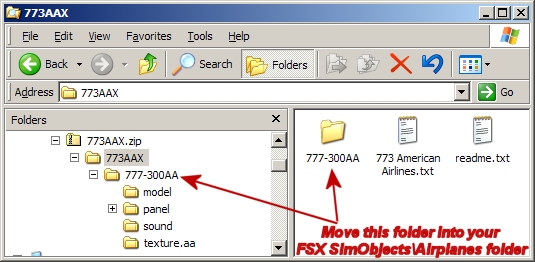
second I try my luck and download a 777-300 american airlines. all did ok but no plane shows up in the list of planes, but in objects, airplanes it has it listed. sound is ok 737-800 what I'm I missing here? is 777-300 a fs9 jet that will not work in fsx?
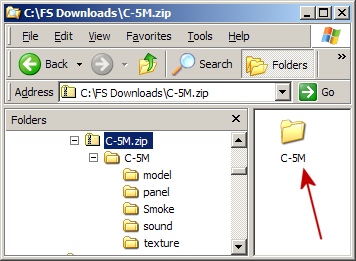
what happened to the c5m super galaxy from canadian air force I do not see it under downloads



by bombardier » Tue Sep 14, 2010 8:14 pm
by Hagar » Wed Sep 15, 2010 2:32 am
do not know how to post a link but here is a copy/paste I use to get this; its on page 129 in downloads under civilian jets.

the c5m super galaxy canadian air force is not in the military downloads for fsx.
by bombardier » Wed Sep 15, 2010 4:49 pm
by Boikat » Wed Sep 15, 2010 8:33 pm
by bombardier » Thu Sep 16, 2010 4:33 pm
by Boikat » Thu Sep 16, 2010 9:14 pm
by bombardier » Fri Sep 17, 2010 6:31 pm
by Boikat » Fri Sep 17, 2010 8:02 pm
by bombardier » Mon Sep 20, 2010 4:29 pm
by coalpedlar » Mon Sep 20, 2010 6:15 pm
by Boikat » Mon Sep 20, 2010 9:54 pm
to boikat:
thanks for the information it is fixed and it works fine.
Return to Flight Simulator X (FSX) and Steam
Users browsing this forum: No registered users and 503 guests