a newbe here want to dl a jet

FSX including FSX Steam version.

Re: a newbe here want to dl a jet

Postby olderndirt » Mon Sep 06, 2010 9:50 pm

Bombardier - whatever your problems as a 'getting started' guy in FlightSim, Hagar is one of the 'goto' men.
[img]http://www.simviation.com/yabbuploads/oldrt18.jpg
User avatar
olderndirt
Major
Major
 
Posts: 3495
Joined: Sat Dec 20, 2008 3:07 pm
Location: Rochester, WA

Re: a newbe here want to dl a jet

Postby Boikat » Mon Sep 06, 2010 9:58 pm

[quote]
hey hagar
Image
"I reject your reality, and substitute my own" Adam Savage, Mythbusters
User avatar
Boikat
Major
Major
 
Posts: 2974
Joined: Thu Mar 20, 2008 8:23 pm
Location: NW Loueezianner

Re: a newbe here want to dl a jet

Postby Hagar » Tue Sep 07, 2010 2:01 am

[quote]hello to all again:

the
Last edited by Hagar on Tue Sep 07, 2010 2:34 am, edited 1 time in total.
Image

Founder & Sole Member - Grumpy's Over the Hill Club for Veteran Virtual Aviators
Member of the Fox Four Group
My Google Photos albums
My Flickr albums
User avatar
Hagar
Colonel
Colonel
 
Posts: 30868
Joined: Wed Jun 19, 2002 7:15 am
Location: Costa Geriatrica

Re: a newbe here want to dl a jet

Postby bombardier » Thu Sep 09, 2010 5:10 pm

hello again: I know I'm sounding like a broken record but untill I can get a handle on this its going to be a little bumpy. I have been reading and rereading on posts and links for downloading and installing aricraft. i have given up on the c5 for now. but I did download a jet from simviation downloads area; posky 747-400 klm made for fsx extracted all the files moved them to a new folder them move the new folder to aircraft under simobjects, check to see if the jet is there in fsx but no jet. where should I go from here ? it may take me a while to figure this out. I really do not know where I am goofing up at. moving textures to textures folder; moving sound to sound folder and move effects to effects folder. I see under effects theres texture and just below substitutions theres a folder called textures. now theres 2 textures gee wiz.

sorry about the trouble I'm causeing here but theres something I'm not getting I do not know what.
User avatar
bombardier
2nd Lieutenant
2nd Lieutenant
 
Posts: 288
Joined: Sat Sep 04, 2010 2:58 pm
Location: united states

Re: a newbe here want to dl a jet

Postby Boikat » Thu Sep 09, 2010 9:50 pm

Unless the "Sound" folder is outside the folder of the aircraft folder, you leave the "sound" folder in the aircraft folder.
Image
"I reject your reality, and substitute my own" Adam Savage, Mythbusters
User avatar
Boikat
Major
Major
 
Posts: 2974
Joined: Thu Mar 20, 2008 8:23 pm
Location: NW Loueezianner

Re: a newbe here want to dl a jet

Postby Hagar » Sat Sep 11, 2010 1:44 am

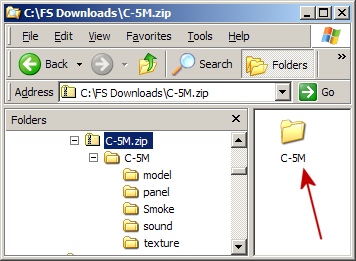
Hi bombardier. I'm not sure I can explain it any clearer than in my previous reply. If you follow my instructions for installing the C-5 it should work. The aircraft is configured ready to go. Let's try again. If you double-click on C-5M.zip this is what it looks like.
Image

To install the aircraft to FSX paste the C5M folder I've marked with a red arrow into your FSX\SimObjects\airplanes folder. That's all there is to it.

There's no extra gauges to worry about & no need to create folders or paste files to any other location for it to display on the selection menu. Once you have it working find the file named fx_smoke_f6.fx & move it into your FSX\Effects folder.

I found a Posky 747-400 KLM posted here. http://www.simviation.com/simviation/?ID=60&page=97&mark=10099
Downloading it now to check it out.

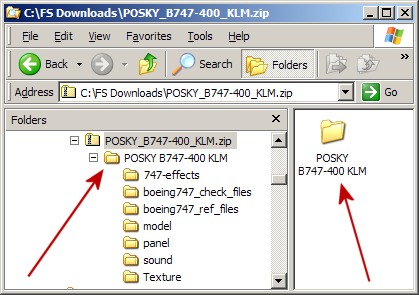
PS. The 747 is configured in the same way as the C-5.
Image

To install it paste the folder marked with the red arrow into FSX\SimObjects\airplanes. It doesn't get any easier. Once you get the hang of this you'll be kicking yourself.
Last edited by Hagar on Sat Sep 11, 2010 2:07 am, edited 1 time in total.
Image

Founder & Sole Member - Grumpy's Over the Hill Club for Veteran Virtual Aviators
Member of the Fox Four Group
My Google Photos albums
My Flickr albums
User avatar
Hagar
Colonel
Colonel
 
Posts: 30868
Joined: Wed Jun 19, 2002 7:15 am
Location: Costa Geriatrica

Re: a newbe here want to dl a jet

Postby bombardier » Sat Sep 11, 2010 7:07 pm

now I think I know what to do now I think.
to every one who helped me out for this jet download posky 747-400 klm thanks for the help. I have it in my list of planes and I flew it for the first time, but on the other hand  there is no sound how come do I need to look into the sound file and change anything?

hopfully I will not get stuck  again

bombardier
User avatar
bombardier
2nd Lieutenant
2nd Lieutenant
 
Posts: 288
Joined: Sat Sep 04, 2010 2:58 pm
Location: united states

Re: a newbe here want to dl a jet

Postby Boikat » Sat Sep 11, 2010 7:25 pm

[quote]now I think I know what to do now I think.
to every one who helped me out for this jet download posky 747-400 klm thanks for the help. I have it in my list of planes and I flew it for the first time, but on the other hand
Image
"I reject your reality, and substitute my own" Adam Savage, Mythbusters
User avatar
Boikat
Major
Major
 
Posts: 2974
Joined: Thu Mar 20, 2008 8:23 pm
Location: NW Loueezianner

Re: a newbe here want to dl a jet

Postby Hagar » Sun Sep 12, 2010 1:58 am

[quote][quote]now I think I know what to do now I think.
to every one who helped me out for this jet download posky 747-400 klm thanks for the help. I have it in my list of planes and I flew it for the first time, but on the other hand
Last edited by Hagar on Sun Sep 12, 2010 2:20 am, edited 1 time in total.
Image

Founder & Sole Member - Grumpy's Over the Hill Club for Veteran Virtual Aviators
Member of the Fox Four Group
My Google Photos albums
My Flickr albums
User avatar
Hagar
Colonel
Colonel
 
Posts: 30868
Joined: Wed Jun 19, 2002 7:15 am
Location: Costa Geriatrica

Re: a newbe here want to dl a jet

Postby bombardier » Sun Sep 12, 2010 9:35 am

yeah, sounds like I can do that; but only one thing how to access the note pad?
User avatar
bombardier
2nd Lieutenant
2nd Lieutenant
 
Posts: 288
Joined: Sat Sep 04, 2010 2:58 pm
Location: united states

Re: a newbe here want to dl a jet

Postby Tai-2 » Sun Sep 12, 2010 9:54 am

yeah, sounds like I can do that; but only one thing how to access the note pad?

If it does not open it by default, you right click it, go to Open With, select the program from a list, and use note pad,
User avatar
Tai-2
Captain
Captain
 
Posts: 699
Joined: Thu Apr 23, 2009 10:57 pm
Location: Georgia

Re: a newbe here want to dl a jet

Postby bombardier » Sun Sep 12, 2010 11:11 am

ok I checked that out and I do not have note pad I got sent to, cut, copy,create, delete,rename,properties but no note pad
User avatar
bombardier
2nd Lieutenant
2nd Lieutenant
 
Posts: 288
Joined: Sat Sep 04, 2010 2:58 pm
Location: united states

Re: a newbe here want to dl a jet

Postby Boikat » Sun Sep 12, 2010 12:06 pm

If you right click, you don't get an option for "Open" or "Open with"?
Image
"I reject your reality, and substitute my own" Adam Savage, Mythbusters
User avatar
Boikat
Major
Major
 
Posts: 2974
Joined: Thu Mar 20, 2008 8:23 pm
Location: NW Loueezianner

Re: a newbe here want to dl a jet

Postby Hagar » Sun Sep 12, 2010 12:16 pm

ok I checked that out and I do not have note pad I got sent to, cut, copy,create, delete,rename,properties but no note pad

Notepad is a Windows utility. Everyone should have it. Right-click (right mouse button) on the file named Sound.cfg & select Open With from the drop down menu. Notepad should be on the list of programs. Click on it to open the file.

To save you editing any files find Sound.cfg in the Sound folder of the default B747_400. Take a copy of this file & paste it into the Sound folder of the Posky 747. Overwrite files/folders when prompted.
Last edited by Hagar on Sun Sep 12, 2010 12:49 pm, edited 1 time in total.
Image

Founder & Sole Member - Grumpy's Over the Hill Club for Veteran Virtual Aviators
Member of the Fox Four Group
My Google Photos albums
My Flickr albums
User avatar
Hagar
Colonel
Colonel
 
Posts: 30868
Joined: Wed Jun 19, 2002 7:15 am
Location: Costa Geriatrica

Re: a newbe here want to dl a jet

Postby bombardier » Sun Sep 12, 2010 4:19 pm

hello to everyone:
for those who helped me out and me as beening a pain at times. just want to say thanks for the help. hagar,boikat,olderndirt,lrot,tai-2 and patchz. thanks for the help I got the plane  posky 747-400 klm in my list and now has sound from the engines. if it weren't for you guys I would still be stuck some place in the beginning," download". I'm sure this is not the last time I will get stuck on something like this. and now to enjoy my posky klm in flight with sound.
User avatar
bombardier
2nd Lieutenant
2nd Lieutenant
 
Posts: 288
Joined: Sat Sep 04, 2010 2:58 pm
Location: united states

PreviousNext

Return to Flight Simulator X (FSX) and Steam

Who is online

Users browsing this forum: No registered users and 780 guests