Trying to install and execute...

FSX including FSX Steam version.

Re: Trying to install and execute...

Postby Hagar » Sat Jul 10, 2010 3:45 am

If you ever need to reinstall FSX you might consider changing the location to somewhere like C:\FSX as suggested.

How do I do that? My technical expertise is limited to putting the CDs in the drive and clicking on that which it tells me to click at the appropriate time. I'm very reluctant to do things "outside the envelope."

All the time FSX is working I think it might be best to leave well alone.
Last edited by Hagar on Sat Jul 10, 2010 1:51 pm, edited 1 time in total.
Image

Founder & Sole Member - Grumpy's Over the Hill Club for Veteran Virtual Aviators
Member of the Fox Four Group
My Google Photos albums
My Flickr albums
User avatar
Hagar
Colonel
Colonel
 
Posts: 30868
Joined: Wed Jun 19, 2002 7:15 am
Location: Costa Geriatrica

Re: Trying to install and execute...

Postby Boikat » Sat Jul 10, 2010 6:46 am

...I cannot even physically touch the chassis without a spark blowing away the BIOS settings. I have to push the little button that opens the CD drive with the tip of a pencil and handle the CDs wearing surgical gloves, lest a finger touch the case. I am not kidding. I have had to reset the BIOS twice in the last two weeks. Once, I inadvertently touched the chrome trim, the second was when I put a USB plug into the receptacle on the top. The machine shut off and would not boot again. I had to take it to my computer guru and set everything back to where it was--twice. Very frustrating. before the board and chip upgrade, I never had this type of problem. My apologies for raving on, but it has been an extremely maddening night...


Power off your computer and un-plug it from the wall.  If it no longer "sparks" when you touch it, you have an electrical grounding problem or some other wireing problem.  If your guru is more than just a software guy, you might want him to check out the hardware, starting with the power cord to make sure it's ground wire is not open, then check the computer's power plug to make sure it's socket connections are good, and also make sure any internal power ground strapping is connected to the chassis.
Image
"I reject your reality, and substitute my own" Adam Savage, Mythbusters
User avatar
Boikat
Major
Major
 
Posts: 2974
Joined: Thu Mar 20, 2008 8:23 pm
Location: NW Loueezianner

Re: Trying to install and execute...

Postby hhomebrewer » Sun Jul 11, 2010 1:53 am

OK, so FSX is executing. I have trilinear filtering and anti-aliasing selected, and the target frame rate (whatever that is) set to 60. I gotta tell ya, the visual experience is AWESOME! The default airplanes look almost photographic. No jaggies. And I only have the program itself installed- no add-on scenery or nothing extra. Fabulous! Now, I need to learn the views. This FSX stuff is great!! Love it!! Are there any really good airplanes out there for it? Has the CORAL F-15 and the Stratojet Merlin been retrofitted for FSX? Those are my two fave airplanes. Gotta have 'em...
Last edited by hhomebrewer on Sun Jul 11, 2010 1:54 am, edited 1 time in total.
I am homebrewer. I had 633 posts when for some unknown reason, my account disappeared...
AMD Phenom II X4 940 (Deneb), Asus M3N72-D motherboard, 2 x nVidia 8800GTS @640MB RAM, 1 x Seagate Barracuda 500Gb HDD (storage), 1 x Western Digital Black 250Gb
User avatar
hhomebrewer
Captain
Captain
 
Posts: 600
Joined: Sat Aug 22, 2009 8:44 pm
Location: United States of Good Beer

Re: Trying to install and execute...

Postby Rocket_Bird » Sun Jul 11, 2010 2:03 am

Not sure about the Coral F-15, but you might try looking for the IRIS F-15 (formally payware), which I find looks pretty nice and flies pretty nice in FSX.  Just make sure you find one that is optimized for FSX; otherwise you might run into problems. 
Cheers,
RB

Image
User avatar
Rocket_Bird
Major
Major
 
Posts: 1222
Joined: Fri Aug 06, 2004 12:00 pm
Location: Canada

Re: Trying to install and execute...

Postby hhomebrewer » Sun Jul 11, 2010 2:43 am

I'm downloading the IRIS F-15 right now. It's a big one at 129Mb-- zipped...
Last edited by hhomebrewer on Sun Jul 11, 2010 2:44 am, edited 1 time in total.
I am homebrewer. I had 633 posts when for some unknown reason, my account disappeared...
AMD Phenom II X4 940 (Deneb), Asus M3N72-D motherboard, 2 x nVidia 8800GTS @640MB RAM, 1 x Seagate Barracuda 500Gb HDD (storage), 1 x Western Digital Black 250Gb
User avatar
hhomebrewer
Captain
Captain
 
Posts: 600
Joined: Sat Aug 22, 2009 8:44 pm
Location: United States of Good Beer

Re: Trying to install and execute...

Postby hhomebrewer » Sun Jul 11, 2010 2:56 am

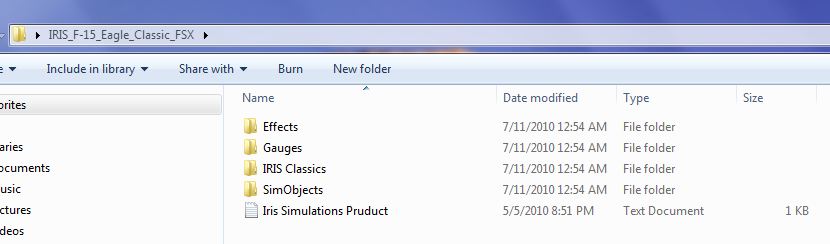
OK, I have the IRIS F-15 downloaded and unzipped. It's a monster at 389Mb. How do I install it?
Image
I am homebrewer. I had 633 posts when for some unknown reason, my account disappeared...
AMD Phenom II X4 940 (Deneb), Asus M3N72-D motherboard, 2 x nVidia 8800GTS @640MB RAM, 1 x Seagate Barracuda 500Gb HDD (storage), 1 x Western Digital Black 250Gb
User avatar
hhomebrewer
Captain
Captain
 
Posts: 600
Joined: Sat Aug 22, 2009 8:44 pm
Location: United States of Good Beer

Re: Trying to install and execute...

Postby pixelpro » Sun Jul 11, 2010 4:43 am

I'm sure FSX will run on Windows 7. From what you're saying I presume you have the 64 bit version. The default location for 32 bit software like FSX is C:\Program Files (x86). Installing it to this location can cause problems if you wish to edit or modify files. From advice I've seen on this forum it's a much better idea to install it to a different location like C:\FSX.

This Microsoft Knowledge Base article explains how to create a desktop shortcut in Windows 7. http://support.microsoft.com/kb/936828


FSX, does work on windows 7, prime example... its on my pc now. anyhow windows 7 comes with two folders: "program files/" and "program files (x86)/" go in "(x86)" where most programs (basically all are installed) and search for "microsoft games" click that folder... you should see "flight simulator X", click that, scroll down look for "FSX.exe" right click, create shortcut, DRAG it to your desktop (not copy or paste). Wala, worked for me, but i also made my fsx run from "windows xp service pack 3"
pixelpro
Ground hog
Ground hog
 
Posts: 1
Joined: Sun Jul 11, 2010 5:38 am

Re: Trying to install and execute...

Postby Boikat » Sun Jul 11, 2010 7:33 am

OK, I have the IRIS F-15 downloaded and unzipped. It's a monster at 389Mb. How do I install it?

Image


Exactly the same way as you installed the add-on's before.

Contents of effects folder copied into FSX\effects
Contents of gauges folder copied into FSX\Gauges (Though some install them in the aircraft "panel" folder)
open the folder "simobjects" should show "airplanes", open that, and you should have the F-15 aircraft folder, copy and paste that into FSX\Simobjects\Aircraft.

The thing about some of these releases that were FS9 add-ons is that they have a pile of Model (about 20) and textures (13).  That's why the IRIS DL was so large.

The Merlin works except for one thing:  From the *outside* the canopy is black, which I think looks kind of cool.  Other than tht, I don't think there were any gauge problems, and works just fine in FSX.

Image
"I reject your reality, and substitute my own" Adam Savage, Mythbusters
User avatar
Boikat
Major
Major
 
Posts: 2974
Joined: Thu Mar 20, 2008 8:23 pm
Location: NW Loueezianner

Re: Trying to install and execute...

Postby hhomebrewer » Sun Jul 11, 2010 6:32 pm

Thanks, Boikat. Thanks, pixelpro. I'm so pschyed!
I am homebrewer. I had 633 posts when for some unknown reason, my account disappeared...
AMD Phenom II X4 940 (Deneb), Asus M3N72-D motherboard, 2 x nVidia 8800GTS @640MB RAM, 1 x Seagate Barracuda 500Gb HDD (storage), 1 x Western Digital Black 250Gb
User avatar
hhomebrewer
Captain
Captain
 
Posts: 600
Joined: Sat Aug 22, 2009 8:44 pm
Location: United States of Good Beer

Re: Trying to install and execute...

Postby DenisH » Mon Jul 12, 2010 8:55 am

My computer  knowledge is even less than yours, Homebrewer. I get payware because I simply can't download free aircraft without  screwing up. Everytime I download an aircraft and try to drop its folder into my FSX aircraft folder I get this message: "You'll need to provide administrator permission to move this folder..."  I thought I was the administrator and I don't know how to get the required permission.  Can anyone  explain?  Thanks.
DenisH
2nd Lieutenant
2nd Lieutenant
 
Posts: 287
Joined: Wed Apr 22, 2009 6:28 pm
Location: ca, usa

Re: Trying to install and execute...

Postby Boikat » Mon Jul 12, 2010 10:22 am

What's different between downloading and installing payware and freeware, aside from the cost?
Last edited by Boikat on Mon Jul 12, 2010 10:23 am, edited 1 time in total.
Image
"I reject your reality, and substitute my own" Adam Savage, Mythbusters
User avatar
Boikat
Major
Major
 
Posts: 2974
Joined: Thu Mar 20, 2008 8:23 pm
Location: NW Loueezianner

Re: Trying to install and execute...

Postby DenisH » Mon Jul 12, 2010 10:36 am

payware has auto-installer, for one, Usually more detailed (but many freeware are equally  detailed, I read). Finally, one doesn't get a message that one has to get permission to install from an "administrator".
DenisH
2nd Lieutenant
2nd Lieutenant
 
Posts: 287
Joined: Wed Apr 22, 2009 6:28 pm
Location: ca, usa

Re: Trying to install and execute...

Postby hhomebrewer » Mon Jul 12, 2010 11:51 am

[quote]Payware has an auto-installer, for one. Usually more detailed (but many freeware are equally
Last edited by hhomebrewer on Mon Jul 12, 2010 11:53 am, edited 1 time in total.
I am homebrewer. I had 633 posts when for some unknown reason, my account disappeared...
AMD Phenom II X4 940 (Deneb), Asus M3N72-D motherboard, 2 x nVidia 8800GTS @640MB RAM, 1 x Seagate Barracuda 500Gb HDD (storage), 1 x Western Digital Black 250Gb
User avatar
hhomebrewer
Captain
Captain
 
Posts: 600
Joined: Sat Aug 22, 2009 8:44 pm
Location: United States of Good Beer

Re: Trying to install and execute...

Postby Hagar » Mon Jul 12, 2010 1:45 pm

I do remember that installs into FSX are easier than installs into FS9.

Not sure why you say that. The basic principle for installing addons is exactly the same for all the MS sims. What complicates things is the vast number of variables like operating system (Windows version) & version of the sim itself. Nobody's system will be the same which is what makes it so difficult to write a simple tutorial. FSX is probably the most difficult for this reason. With FS98 it was all so simple.

In FS9, you slide the unzipped folder into the Aircraft folder of FS9. That's about all I remember. It worked for me when the tutorials all said to copy and paste.

What you describe is called Drag & Drop. The same method that Pete uses in his installation tutes. http://www.simviation.com/acinstall.htm

I suggest you try a simple, small airplane before going after a 389Mb add-on...

Excellent advice.
Image

Founder & Sole Member - Grumpy's Over the Hill Club for Veteran Virtual Aviators
Member of the Fox Four Group
My Google Photos albums
My Flickr albums
User avatar
Hagar
Colonel
Colonel
 
Posts: 30868
Joined: Wed Jun 19, 2002 7:15 am
Location: Costa Geriatrica

Re: Trying to install and execute...

Postby DenisH » Mon Jul 12, 2010 2:42 pm

Thanks very much for your advice and comments, everyone. I am on windows 7 and I am using slide & drop but I still get that message re "administrator". I still don't know who "the administrator" is.  Certainly not I. Maybe  it's my wife. I'll ask her.  :D
DenisH
2nd Lieutenant
2nd Lieutenant
 
Posts: 287
Joined: Wed Apr 22, 2009 6:28 pm
Location: ca, usa

PreviousNext

Return to Flight Simulator X (FSX) and Steam

Who is online

Users browsing this forum: No registered users and 416 guests

