
Douglas C117D V2 install problem.

FSX including FSX Steam version.

Re: Douglas C117D V2 install problem.

Postby OldAirmail » Fri May 08, 2015 1:11 am

The fact that you're interested in actually using using some of the flight instruments makes me think that this comment might not be out of place.

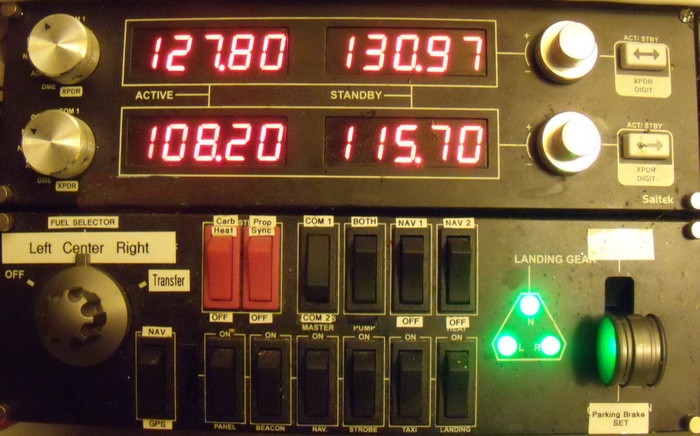
The top instrument is the Saitek radio panel. It gives you control of physically setting Com 1 & Com 2, Nav 1 & Nav 2, ADF, DME, Expander.

You might find it well worth the money, especially if you want to do real navigation.
Image


The bottom panel would probably be of little interest to most people.

Through odd circumstances I ended up with two Saitek switch panels. SLOWLY, I'm getting around to repurposing the switches.

As you can see the magneto/start switch is now a fuel selector switch. The landing gear lever will now set & release the parking break.

The top row of switches should be easy enough to read.

Simply put - I REALLY like using real switches & buttons as opposed to trying to click on the right spot of the screen.


But any way you do it, just keep on flying. <<u
.. .
Get the most out of your controls - SPAD.neXt

Image
. . . . . .Any time, any plane, any weather.
. . . . . . . . . . . . . Prepar3d V4
User avatar
OldAirmail
Major
Major
 
Posts: 4814
Joined: Sun Feb 17, 2013 3:06 pm
Location: Concrete, WA ICAO - 3W5

Re: Douglas C117D V2 install problem.

Postby garymbuska » Fri May 08, 2015 7:19 am

You can put any panel into any aircraft. That is one of my dislikes is when someone goes to all the trouble to design a four aircraft that really looks great but than mess it up by using a default panel from a two engine aircraft. It really looks stupid here you have four engines but only two throttles. I guess one is not supposed to use the other two engines. As four making any panel for any aircraft it does not take a person with a PHD to do this all you need to do is to make a bitmap than put the gauges into it. I will agree the bit map takes a little skill but it is not that hard. As for putting gauges into it all you need here is a program called FSPANEL STUDIO. Granted you can do this the hard way but it is a trail and error getting the gauges to show up correctly with in the bitmap because you have to know the coordinates of each gauge.
FSPANEL STUDIO makes this as easy as falling off a log all you have to do is to drag and drop the gauge where you want it at and it will be right there when you fly it.
Anyone who is serious about designing aircraft or panels should have FSPANEL STUDIO unless you like to do it the hard way.
If you have ever looked at a panel cfg file where you see a gauge with all of those numbers in it. Most of those numbers tell FS where to put the gauge and how big to make it. Location and size are everything it would look dumb to put a small gauge int a big window it would not fill it. Get the location wrong and the gauge could wind up on top of another gauge or someplace else it does not belong at.
8-)
Gary M Buska
SYSTEM Specs ASUS P8Z68 V/GEN 3 mother board: INTELL I7 2600k 3.48 ghz Quad core CPU with Sandy bridge: 12 Gigs of 1800hz ram:
GTX 950 OVER CLOCKED: 2 Gigs Ram Windows 10 Home 64 bit Operating system. 750W Dedicated modular power supply. Two Internal 1TB hard drives 1 External 1TB 3.2 USB hard drive. SAITEK Cessna flight Yoke with throttles.
CH Rudder Peddles 27 inch Wide screen Monitor
User avatar
garymbuska
Major
Major
 
Posts: 4415
Joined: Tue Dec 30, 2003 11:10 am
Location: Jacksonville, Florida

Previous

Return to Flight Simulator X (FSX) and Steam

Who is online

Users browsing this forum: No registered users and 565 guests

