FaceTrackNoIR

FSX including FSX Steam version.

FaceTrackNoIR

Postby Thai09 » Sat Dec 18, 2010 6:24 am

Don
Thai09
2nd Lieutenant
2nd Lieutenant
 
Posts: 144
Joined: Fri Nov 06, 2009 3:47 am

Re: FaceTrackNoIR

Postby patchz » Sat Dec 18, 2010 8:32 am

That would be free, IF you already have a web cam.
Image
If God intended aircraft engines to have horizontally opposed engines, Pratt and Whitney would have made them that way.
User avatar
patchz
Colonel
Colonel
 
Posts: 10424
Joined: Wed Mar 11, 2009 7:33 pm
Location: IN THE FUNNY PAPERS

Re: FaceTrackNoIR

Postby Thai09 » Sat Dec 18, 2010 10:39 am

What a nice and happy reply just here before Christmas!

No webcam?

Here ya go, buy one and give yourself a nice Christmas present to cheer you up, ok?

http://www.newegg.com/Store/SubCategory ... e=Web-Cams

::)
Thai09
2nd Lieutenant
2nd Lieutenant
 
Posts: 144
Joined: Fri Nov 06, 2009 3:47 am

Re: FaceTrackNoIR

Postby patchz » Sat Dec 18, 2010 6:35 pm

What a nice and happy reply just here before Christmas!

No webcam?

Here ya go, buy one and give yourself a nice Christmas present to cheer you up, ok?

http://www.newegg.com/Store/SubCategory ... e=Web-Cams

::)

I did not intend to come off as being the grinch, just making a statement. I don't have a web cam and would not buy one just for this purpose. Nor do I want one for the usual purpose. If I was going to spend that much toward this type of usage, I would just go ahead and buy TrackIR. Sorry if my post sounded unfriendly. :)
Image
If God intended aircraft engines to have horizontally opposed engines, Pratt and Whitney would have made them that way.
User avatar
patchz
Colonel
Colonel
 
Posts: 10424
Joined: Wed Mar 11, 2009 7:33 pm
Location: IN THE FUNNY PAPERS

Re: FaceTrackNoIR

Postby Steve M » Sat Dec 18, 2010 6:57 pm

If my girlfriend was listening, I could be the proud owner of a second 22" monitor Christmas morning! I'll give this a try and thanks for the heads up.
We all know I'm getting a plaid shirt or wool sox but I'm still going to check this out!    
Image
User avatar
Steve M
Major
Major
 
Posts: 4765
Joined: Sun Aug 31, 2008 1:02 pm
Location: Cambridge On.

Re: FaceTrackNoIR

Postby Daube » Sun Dec 19, 2010 10:53 am

I am currently downloading this software to test it.
I'll post a little feedback in the evening :)
User avatar
Daube
Lieutenant Colonel
Lieutenant Colonel
 
Posts: 6611
Joined: Wed Oct 05, 2005 8:34 am
Location: Nice (FR)

Re: FaceTrackNoIR

Postby Daube » Sun Dec 19, 2010 12:29 pm

Ok I made a little test flight with this tool.
I think I will be using it a lot !!  :D

There are a few important points, though:

- the beta update is necessary for using in FSX. It brings the simconnect ability.

- once the tool is launched, the only thing you have to do is to select "simconnect" in the protocol field. Then press "start" button, and launch FSX. Your head will move, nothing to configure in FS !  8-)

- the tool has to be configured properly for pleasant use, mainly for the filtering settings and the response curves, because the default settings might not be suitable for everyone.

- the movements of your head in the sim are a little bit late compared to your own head, but after a short while it's easy to get used to it :)

- the movement of the head is not completely precise, that is that if you move your head into a certain angle and then freeze, the head in the sim will move as well, but will it will not always completely freeze, due to lack of precision. During flight, this gives a really great effect, it's like the aircraft comes to life ! But when you have to click a button, it can become a little bit difficult to aim sometimes :)


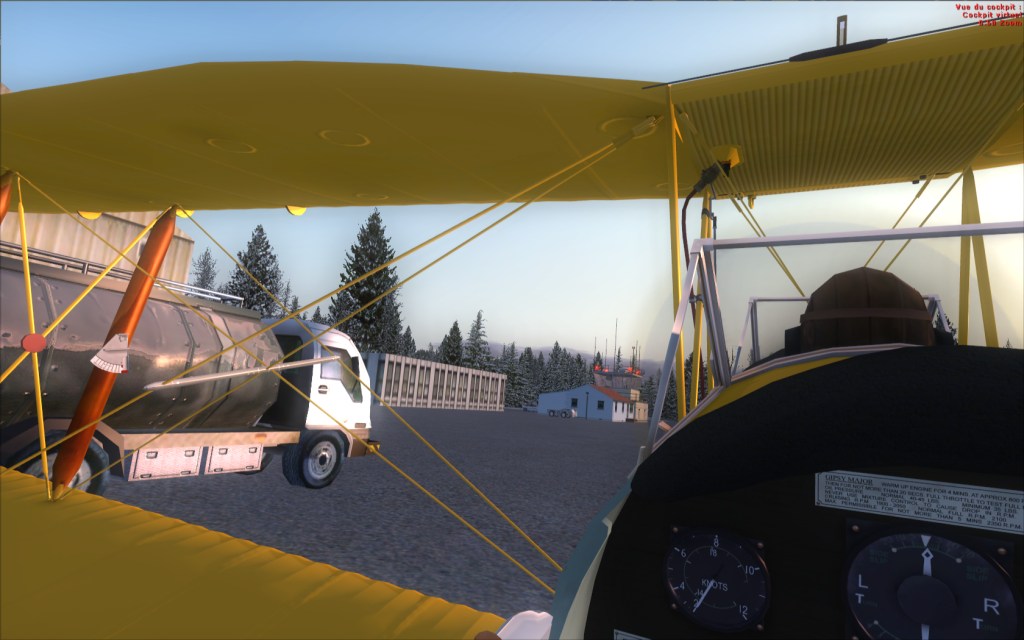
My final impression is that I am extremely pleased. I made a flight around a small airport in the Tiger Moth, and it was really a blast to put the head on the side to taxi, and to look around while flying. It's hard to describe, and the owners of TrackIR certainly know the feeling. Sure the tool is less efficient than a real TrackIR, if I refer to the various TrackIR videos to compare. However, for a freeware, the level of quality of this little tool is definitely pleasing ! :)
User avatar
Daube
Lieutenant Colonel
Lieutenant Colonel
 
Posts: 6611
Joined: Wed Oct 05, 2005 8:34 am
Location: Nice (FR)

Re: FaceTrackNoIR

Postby Steve M » Sun Dec 19, 2010 1:27 pm

I'll be trying this soon, I wonder if the quality of the web cam makes any difference? My Cam is just a cheapie.
Image
User avatar
Steve M
Major
Major
 
Posts: 4765
Joined: Sun Aug 31, 2008 1:02 pm
Location: Cambridge On.

Re: FaceTrackNoIR

Postby Daube » Sun Dec 19, 2010 2:17 pm

What is important is how fluid the picture produced by your webcam is. Also, how crisp the picture is, this is important.
The software will recognize the shape of your face and its movements.
If your face is blurry and moves only 3 times per seconds, that's not going to work :)
User avatar
Daube
Lieutenant Colonel
Lieutenant Colonel
 
Posts: 6611
Joined: Wed Oct 05, 2005 8:34 am
Location: Nice (FR)

Re: FaceTrackNoIR

Postby Daube » Sun Dec 19, 2010 2:22 pm

I have managed to set the response curves a little bit more efficiently. It still needs a but of tweaking to really suit my taste, but it's getting better a better.
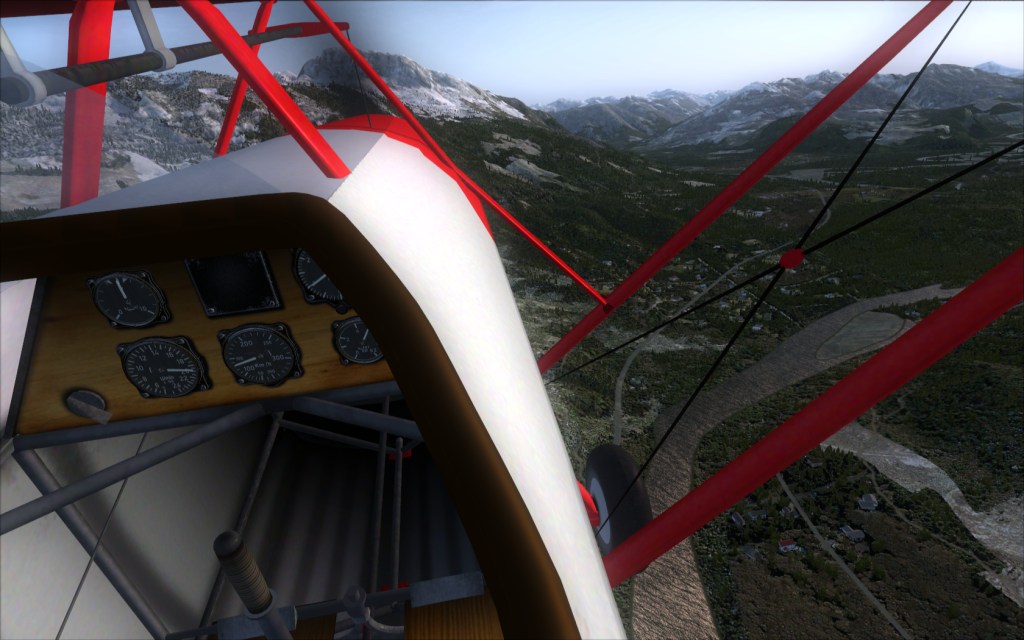
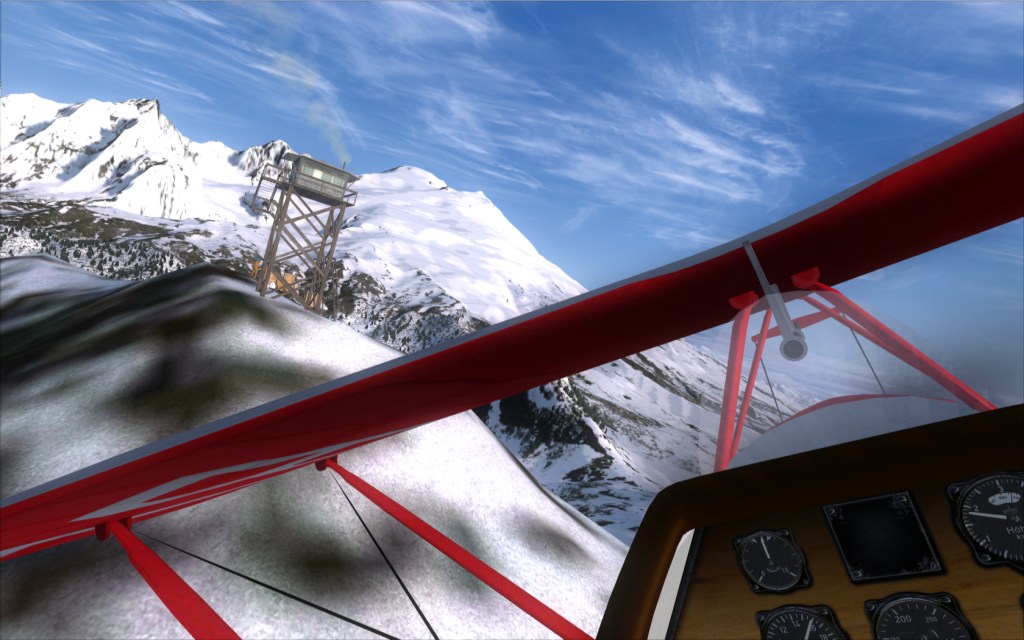
It's hard to show what kind of fun you get with that thing with simple pictures, a movie would be more suitable. However, you can see what kind of VFR experience you can get :)

Image

Image

Image

:D
User avatar
Daube
Lieutenant Colonel
Lieutenant Colonel
 
Posts: 6611
Joined: Wed Oct 05, 2005 8:34 am
Location: Nice (FR)

Re: FaceTrackNoIR

Postby Steve M » Sun Dec 19, 2010 2:59 pm

Thanks Daube, for the info and screenshots, very helpfull. I ordered Matrox Dualhead2go today, when that comes in and I pick up another screen, I'll get a better cam too.
Last edited by Steve M on Sun Dec 19, 2010 3:02 pm, edited 1 time in total.
Image
User avatar
Steve M
Major
Major
 
Posts: 4765
Joined: Sun Aug 31, 2008 1:02 pm
Location: Cambridge On.

Re: FaceTrackNoIR

Postby B-Valvs » Sun Dec 19, 2010 6:53 pm

This is a very cool development. Unfortunatly I'm in the same boat as Patchz with the whole webcam thing.

8-)
User avatar
B-Valvs
Lieutenant Colonel
Lieutenant Colonel
 
Posts: 5904
Joined: Mon Aug 24, 2009 7:05 pm
Location: 5B2

Re: FaceTrackNoIR

Postby Bazza » Mon Dec 20, 2010 2:53 am

Is it necessary to have FSUIPC installed to run this,,,,?
Image
Where's the throttle...?
User avatar
Bazza
Captain
Captain
 
Posts: 646
Joined: Wed Apr 20, 2005 7:39 am

Re: FaceTrackNoIR

Postby Daube » Mon Dec 20, 2010 4:54 am

Only for FS9.
In FSX, FSUIPC is not used by this tool.
User avatar
Daube
Lieutenant Colonel
Lieutenant Colonel
 
Posts: 6611
Joined: Wed Oct 05, 2005 8:34 am
Location: Nice (FR)

Re: FaceTrackNoIR

Postby olderndirt » Mon Dec 20, 2010 9:43 am

Looks like another device, like EZDOK, which gets better with more exposure and usage.
Daube - how about ambient light?
[img]http://www.simviation.com/yabbuploads/oldrt18.jpg
User avatar
olderndirt
Major
Major
 
Posts: 3495
Joined: Sat Dec 20, 2008 3:07 pm
Location: Rochester, WA

Next

Return to Flight Simulator X (FSX) and Steam

Who is online

Users browsing this forum: No registered users and 598 guests