bombardier wrote:hello huy753
..................
so what I'm i doing wrong not putting the aircraft cfg in aircraft folder?
bombardier


bombardier wrote:hello huy753
to answer your question just the plane from the menu start where the planes are listed in free flight.
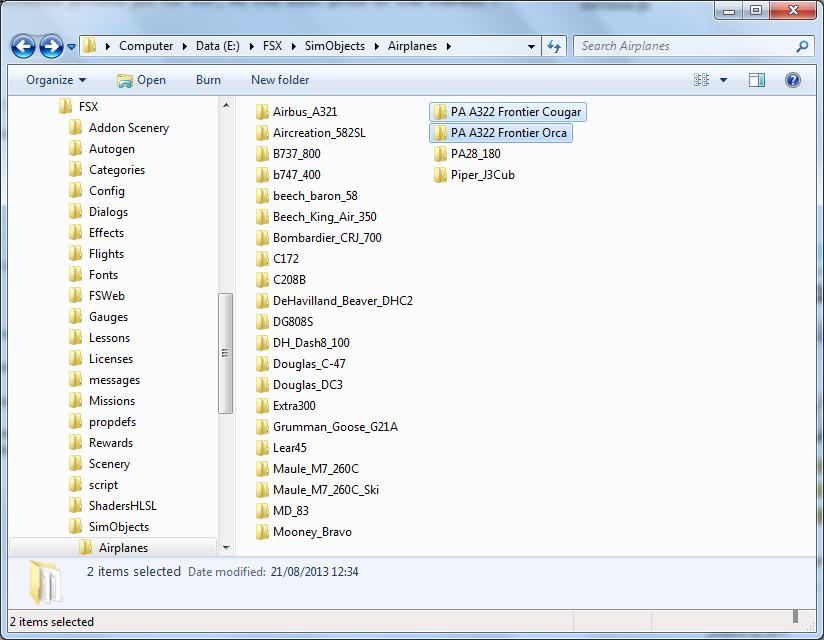
its funny, the planes that I have downloaed and installed are listed in the simobjects-airplanes folder but they do not show up in the airplane list in free flight thats any plane I try to install. the camsims they install and able to fly no problem.
I only got 15 camsims and another 20 different planes and growing. so too many planes is not the aswer.
so what I'm i doing wrong not putting the aircraft cfg in aircraft folder?
bombardier


bombardier wrote:hello again: huy753: you said fixing the plane in the simsobjects folder how would I do that if thats the problem. I also read the help in simviation on" how to install jets in fsx".
I do not know if this helps but I got fsx gold I do not know if thats the problem or what. and also fsx gold is compatible for w7. and I run it under administrators rights. I also have it as compatibility mode for w7 it may need to change for compatibility mode for w xp service pack 3. maybe thats the problem. just shooting around ideas here.
bombardier
ps. I still have a few on my desk top that have not installed right . I'm doing what each one is asking as far as installing them.
I have downloaed the airplanes onto a flash drive from the public city library. do think thats one of the reasons its not showing up also.


bombardier wrote:hello huy753: thanks for trying to help me
I will look into your ideas soon. but for now I want to give you the step by step procedure of how i open a zip folder and see if you see if I'm doing any thing wrong.
first I got a a380 travel service I got the zip folder I click on "extract all" it aotomatically makes a new folder title "A380 travel service" next read the
"reademe installation" 1) unzip all files in a temporary folder it all ready did that for me folder "A380 travel service" see above so I did not do that.
2) then copy airbus A380-800 into airplanes I did that.
3) copy effects to effects folder I did that.
now the folder that says A380 travel service I opened that up and I see effects, model vc, panel , sound, textures travel service, pa380.air, aircraft cfg then close . copy and paste the folder A380 travel service into airplanes did not show up in free flight.
bombardier


bombardier wrote:hello to all:
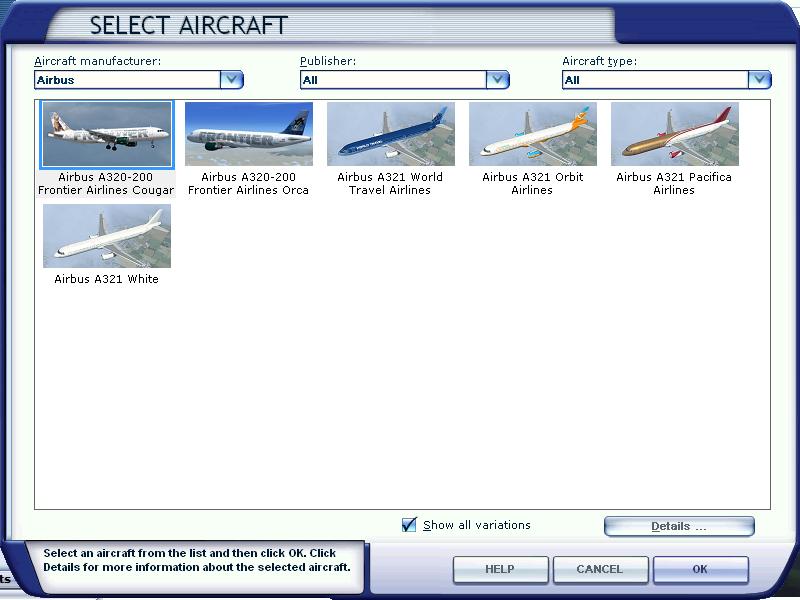
I have manage to install 2 frontier jets made by the same creator mohammed al kahalifa. one is an orca and the other cougar. the orca frontier (the first one) showed up ok and then I installed the other cougar frontier. the cougar frontier showed up but the orca disappeared what happened. the only thing I did was both jets has the same effects folder so when I installed the other effects folder that came with the cougar it must over written the orca. I do not know just guessing.
how can I get the orca frontier back with out makeing the cougar frontier disappear.
any ideas?
bombardier


Hagar wrote:bombardier wrote:hello to all:
I have manage to install 2 frontier jets made by the same creator mohammed al kahalifa. one is an orca and the other cougar. the orca frontier (the first one) showed up ok and then I installed the other cougar frontier. the cougar frontier showed up but the orca disappeared what happened. the only thing I did was both jets has the same effects folder so when I installed the other effects folder that came with the cougar it must over written the orca. I do not know just guessing.
how can I get the orca frontier back with out makeing the cougar frontier disappear.
any ideas?
bombardier
Going back to your original question I have managed to track down the two aircraft you mention.
http://simviation.com/1/search?submit=1&keywords=pa322_f9orca.zip&categoryId=
http://simviation.com/1/search?submit=1&keywords=pa322_f9cougar.zip&categoryId=&filename=Y
Although they are repaints they are both configured as complete aircraft so easy enough to install.
The Effects files for both aircraft are identical so it's not necessary to install them more than once. Even if you did this (or did not install them at all) it should not affect the aircraft displaying on the FSX Aircraft selection menu.
You might like to make sure the 'Show all variations' box is checked.
hello huy753: thanks for trying to help me
I will look into your ideas soon. but for now I want to give you the step by step procedure of how i open a zip folder and see if you see if I'm doing any thing wrong.
first I got a a380 travel service I got the zip folder I click on "extract all" it aotomatically makes a new folder title "A380 travel service" next read the
"reademe installation" 1) unzip all files in a temporary folder it all ready did that for me folder "A380 travel service" see above so I did not do that.
2) then copy airbus A380-800 into airplanes I did that.
3) copy effects to effects folder I did that.
now the folder that says A380 travel service I opened that up and I see effects, model vc, panel , sound, textures travel service, pa380.air, aircraft cfg then close . copy and paste the folder A380 travel service into airplanes did not show up in free flight.
bombardier


Huy753 wrote:That is the problem.. Bombardier has followed the normal steps/instructions of installing a plane. As he said, he has installed 2 planes, and one of them did work with the same instructions of installing a plane. (Copying the folder, and pasting it into SimobJects/airplanes).
Even if it doesn't affect the displaying menu, he followed the same steps to install the plane.. So I'm pretty sure his second plane is incorrect. What is weird in this case, is that his first plane did work, but not his second plane.


Return to Flight Simulator X (FSX) and Steam
Users browsing this forum: No registered users and 1118 guests