fsx cockpit makeover

FSX including FSX Steam version.

Re: fsx cockpit makeover

Postby drbob777 » Sun Nov 21, 2010 1:10 am

could you mabey share with me how to do this please?
i have the file converter and pixia.


Help as in moving it to your C172 folder or actually painting the panel?

drbob777
2nd Lieutenant
2nd Lieutenant
 
Posts: 89
Joined: Fri Aug 06, 2010 4:16 pm

Re: fsx cockpit makeover

Postby Hagar » Sun Nov 21, 2010 4:19 am

but would you all mind telling me how to replace guages via the notepad?

Open Panel.cfg in Notepad & scroll down to the [VCockpitxx] sections. This example is [VCockpit02]. The gauges are listed by file name. These are all default cluster gauges that contain one or more sub-gauges. The gauge name (in this case Cessna.dll) is followed by an exclamation mark ! & then the name of the sub-gauge.

size_mm=512,512
pixel_size=512,512
texture=$C172s_2
background_color=0,0,0

gauge00=Cessna!Heading_Indicator,
Image

Founder & Sole Member - Grumpy's Over the Hill Club for Veteran Virtual Aviators
Member of the Fox Four Group
My Google Photos albums
My Flickr albums
User avatar
Hagar
Colonel
Colonel
 
Posts: 30868
Joined: Wed Jun 19, 2002 7:15 am
Location: Costa Geriatrica

Re: fsx cockpit makeover

Postby kev13479 » Sun Nov 21, 2010 1:38 pm

i have the demo, but thats only for the panel right?
because i was talking about in the virtual cockpit.
Kev13479
User avatar
kev13479
2nd Lieutenant
2nd Lieutenant
 
Posts: 88
Joined: Mon Nov 01, 2010 1:45 pm

Re: fsx cockpit makeover

Postby kev13479 » Sun Nov 21, 2010 1:42 pm

[/quote]
Help as in moving it to your C172 folder or actually painting the panel?[/quote]

sorry, i know i was very unclear yesterday, had a busy day.
what i was trying to say was ---> Is it possible to put guages in diffent places in the cockpit where there is nothing? (e.g. the right side of the panel on the defult C172... but for the virtual cockpit).
Kev13479
User avatar
kev13479
2nd Lieutenant
2nd Lieutenant
 
Posts: 88
Joined: Mon Nov 01, 2010 1:45 pm

Re: fsx cockpit makeover

Postby Hagar » Sun Nov 21, 2010 1:44 pm

i have the demo, but thats only for the panel right?
because i was talking about in the virtual cockpit.

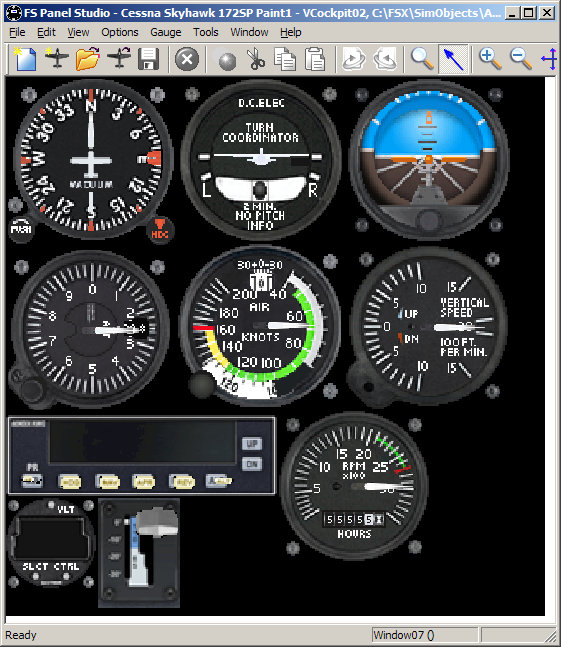
Open the C172 panel in FS Panel Studio. Click Window & select VCockpit01 or VCockpit02.

Image

To swap a gauge first click on it to select it. Then click Edit & select Swap.
Last edited by Hagar on Sun Nov 21, 2010 2:02 pm, edited 1 time in total.
Image

Founder & Sole Member - Grumpy's Over the Hill Club for Veteran Virtual Aviators
Member of the Fox Four Group
My Google Photos albums
My Flickr albums
User avatar
Hagar
Colonel
Colonel
 
Posts: 30868
Joined: Wed Jun 19, 2002 7:15 am
Location: Costa Geriatrica

Re: fsx cockpit makeover

Postby Hagar » Sun Nov 21, 2010 1:46 pm

sorry, i know i was very unclear yesterday, had a busy day.
what i was trying to say was ---> Is it possible to put guages in diffent places in the cockpit where there is nothing? (e.g. the right side of the panel on the defult C172... but for the virtual cockpit).

No. As I told you before you can only swap existing gauges.
Last edited by Hagar on Sun Nov 21, 2010 1:47 pm, edited 1 time in total.
Image

Founder & Sole Member - Grumpy's Over the Hill Club for Veteran Virtual Aviators
Member of the Fox Four Group
My Google Photos albums
My Flickr albums
User avatar
Hagar
Colonel
Colonel
 
Posts: 30868
Joined: Wed Jun 19, 2002 7:15 am
Location: Costa Geriatrica

Re: fsx cockpit makeover

Postby kev13479 » Sun Nov 21, 2010 7:24 pm

ok, one last question,
i have never uploaded anything onto simv before, but i have created some textures for the defult C208B... is it entirely legal for me to just upload this?
do i need a licence or what?
Kev13479
User avatar
kev13479
2nd Lieutenant
2nd Lieutenant
 
Posts: 88
Joined: Mon Nov 01, 2010 1:45 pm

Re: fsx cockpit makeover

Postby BrandonF » Sun Nov 21, 2010 10:55 pm

ok, one last question,
i have never uploaded anything onto simv before, but i have created some textures for the defult C208B... is it entirely legal for me to just upload this?
do i need a licence or what?


Tell me one thing. You've seen add-on textures for almost every default aircraft before, right? It's completely legal, and I see no reason why it wouldn't be.  8-)

Happy uploading!  :D

8-)
BrandonF
Major
Major
 
Posts: 2288
Joined: Wed Apr 22, 2009 11:37 pm

Re: fsx cockpit makeover

Postby kev13479 » Mon Nov 22, 2010 4:52 pm

ok, thanks everyone for the information.
and i see your point brandon, just thought it might be a good idea to check first.
Kev13479
User avatar
kev13479
2nd Lieutenant
2nd Lieutenant
 
Posts: 88
Joined: Mon Nov 01, 2010 1:45 pm

Re: fsx cockpit makeover

Postby BrandonF » Mon Nov 22, 2010 7:07 pm

and i see your point brandon, just thought it might be a good idea to check first.


It's always a good idea to check before doing something for the first time.  ;) I don't blame you. Sounds like something I would have asked back when I was learning how to edit aircraft.

8-)
BrandonF
Major
Major
 
Posts: 2288
Joined: Wed Apr 22, 2009 11:37 pm

Previous

Return to Flight Simulator X (FSX) and Steam

Who is online

Users browsing this forum: No registered users and 368 guests