In game menu problem

FSX including FSX Steam version.

In game menu problem

Postby XxRazgrizxX » Wed Jul 28, 2010 4:39 pm

let me start off first by saying, well at least my opinion, DO NOT BUY THE AEROSIM FIRST STEP 777 cuz it gave me nothing but problems.

1. After installing i got a bunch of scenery errors and my in game menu dissapeared.

2. I uninstalled it and was able to fix my scenery errors but now my in game menu wont come up which is very frustrating because not i cant use addons like PMDG, FSpX, ConcordeX, etc...

this is what i mean

i open up a flight in fsx:
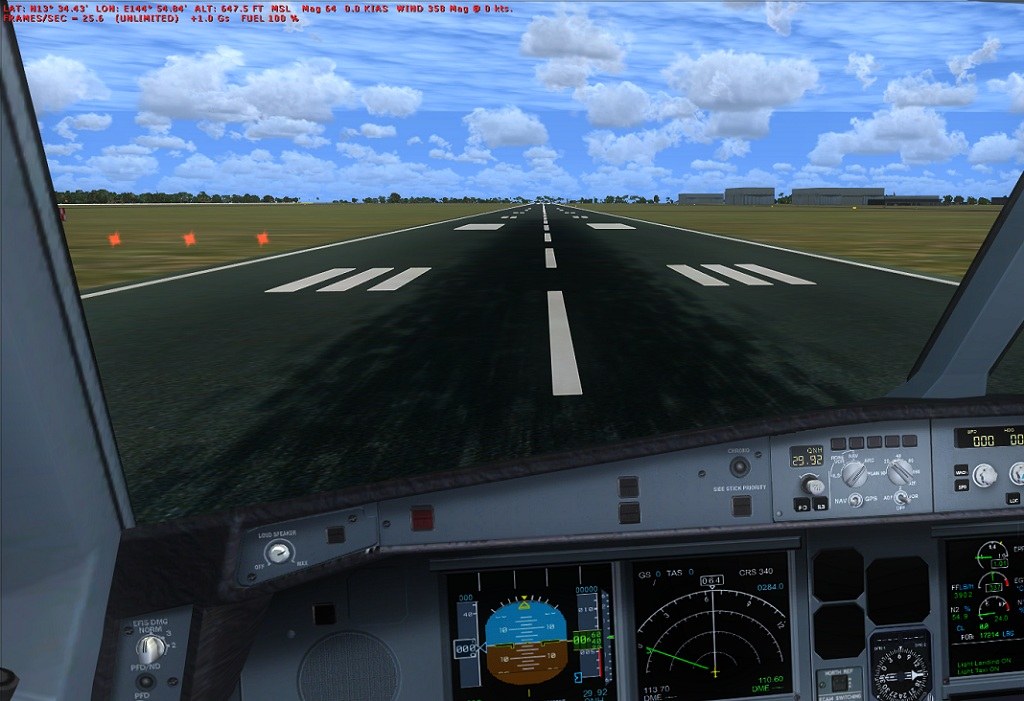
Image


BUT WHEN I GO AND HIT 'Alt' TO OPEN THE MENUS
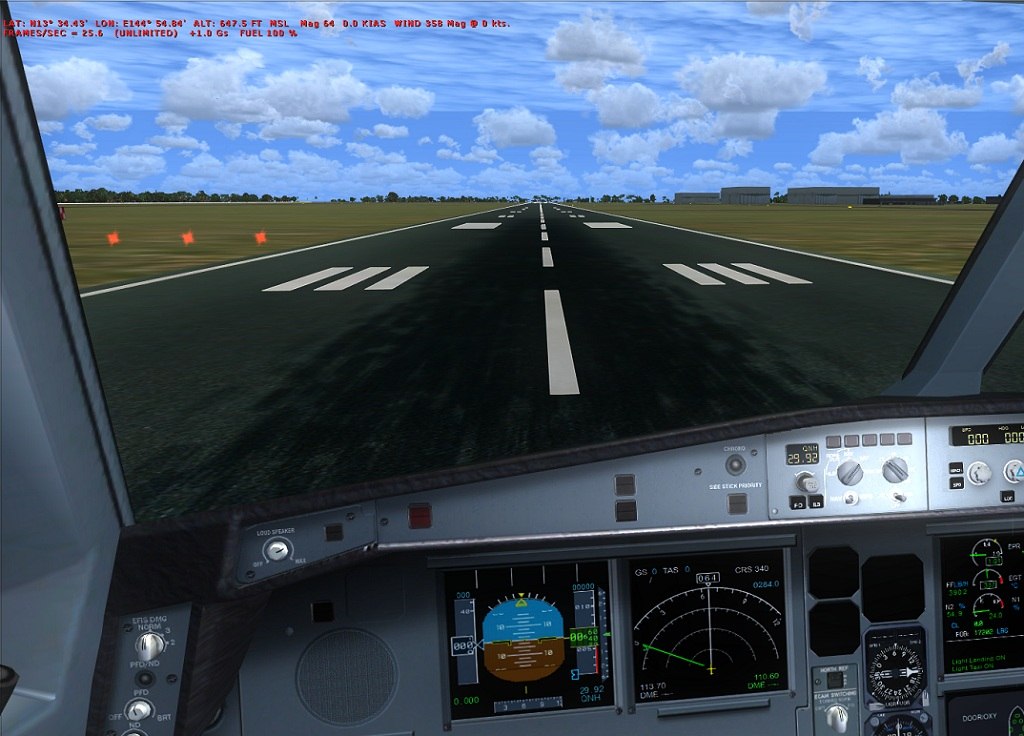
Image


see how the text has moved down to make room but its completely invisable and i cant get it back...

anyone have a fix for this?
Image
Image

http://www.youtube.com/user/Razgriz100000
User avatar
XxRazgrizxX
1st Lieutenant
1st Lieutenant
 
Posts: 372
Joined: Thu Oct 09, 2008 9:13 pm
Location: KPTK --- Clarkston, MI

Re: In game menu problem

Postby FuturePilot » Wed Jul 28, 2010 4:57 pm

Can you click on the menu? Or is it totally gone?
ASUS M4A89GTD, 16GB 1333MHz DDR3 RAM, 160GB 10,000 RPM HDD + 1TB 7200 RPM HDD, AMD Phenom II x4 965BE 3.4
User avatar
FuturePilot
Major
Major
 
Posts: 1553
Joined: Wed Apr 08, 2009 9:47 pm
Location: MD, TN, and Grand Cayman

Re: In game menu problem

Postby XxRazgrizxX » Wed Jul 28, 2010 5:14 pm

Can you click on the menu? Or is it totally gone?


Nope, completely gone, like i said, the text moves down but theres nothing to click on
Image
Image

http://www.youtube.com/user/Razgriz100000
User avatar
XxRazgrizxX
1st Lieutenant
1st Lieutenant
 
Posts: 372
Joined: Thu Oct 09, 2008 9:13 pm
Location: KPTK --- Clarkston, MI

Re: In game menu problem

Postby XxRazgrizxX » Wed Jul 28, 2010 9:12 pm

ohh and i cant right click in game either, like to change views or anything
Image
Image

http://www.youtube.com/user/Razgriz100000
User avatar
XxRazgrizxX
1st Lieutenant
1st Lieutenant
 
Posts: 372
Joined: Thu Oct 09, 2008 9:13 pm
Location: KPTK --- Clarkston, MI

Re: In game menu problem

Postby Boikat » Wed Jul 28, 2010 9:51 pm

Try renaming your FSX.cfg (Which effectively removes the FSX.cfg), then restarting FSX.
Image
"I reject your reality, and substitute my own" Adam Savage, Mythbusters
User avatar
Boikat
Major
Major
 
Posts: 2974
Joined: Thu Mar 20, 2008 8:23 pm
Location: NW Loueezianner

Re: In game menu problem

Postby XxRazgrizxX » Thu Jul 29, 2010 12:10 am

Try renaming your FSX.cfg (Which effectively removes the FSX.cfg), then restarting FSX.


ok that worked TY!!
Image
Image

http://www.youtube.com/user/Razgriz100000
User avatar
XxRazgrizxX
1st Lieutenant
1st Lieutenant
 
Posts: 372
Joined: Thu Oct 09, 2008 9:13 pm
Location: KPTK --- Clarkston, MI

Re: In game menu problem

Postby Boikat » Thu Jul 29, 2010 9:40 am

Coolness!  :)
Image
"I reject your reality, and substitute my own" Adam Savage, Mythbusters
User avatar
Boikat
Major
Major
 
Posts: 2974
Joined: Thu Mar 20, 2008 8:23 pm
Location: NW Loueezianner

Re: In game menu problem

Postby Fr. Bill » Thu Jul 29, 2010 12:21 pm

In the future, before deleting fsx.cfg file, simply open it in Notepad and remove the entry following the Situation= parameter...

What this records is the last loaded "situation." Whenever you delete the last aircraft you had loaded, this entry remains and the sim try's to load a non-existent "situation," which confuses the heck out of it!!!
:D
BillImage Gauge Programming - 3d Modeling Eaglesoft Development Group Intel Core 2 Quad Q6600-4GB DDR2 Crucial PC6400-800 GB SATA-ATI Radeon HD2400 Pro 256MB DX10 [i
Fr. Bill
Captain
Captain
 
Posts: 961
Joined: Sun Apr 27, 2003 1:31 pm
Location: Hammond, IN

Re: In game menu problem

Postby Andy7212 » Sun Aug 01, 2010 3:40 pm

I'm having the same problem, but I guess I'm a real noob, and don't know where to find the fsx.cfg (Windows 7). If anyone could direct/help, that would be great ;)
Andy7212
Ground hog
Ground hog
 
Posts: 27
Joined: Tue Jul 20, 2010 1:22 pm

Re: In game menu problem

Postby XxRazgrizxX » Sun Aug 01, 2010 4:42 pm

I'm having the same problem, but I guess I'm a real noob, and don't know where to find the fsx.cfg (Windows 7). If anyone could direct/help, that would be great ;)


C:\Users\ ("USERNAME") \AppData\Roaming\Microsoft\FSX
Image
Image

http://www.youtube.com/user/Razgriz100000
User avatar
XxRazgrizxX
1st Lieutenant
1st Lieutenant
 
Posts: 372
Joined: Thu Oct 09, 2008 9:13 pm
Location: KPTK --- Clarkston, MI

Re: In game menu problem

Postby Andy7212 » Sun Aug 01, 2010 5:45 pm

I'm having the same problem, but I guess I'm a real noob, and don't know where to find the fsx.cfg (Windows 7). If anyone could direct/help, that would be great ;)


C:\Users\ ("USERNAME") \AppData\Roaming\Microsoft\FSX


Don't think I have a fsx.cfg file there. CFG files in that location: airlines, camera, display, Elumens, Kiosksettings, scenery, suneffect, terrain.

Not sure if I'm looking in the right place though :/
Andy7212
Ground hog
Ground hog
 
Posts: 27
Joined: Tue Jul 20, 2010 1:22 pm

Re: In game menu problem

Postby EVVFCX » Mon Aug 02, 2010 6:55 am

Hi all,
I have menu problem of the oposite kind, I press Alt key, do whatever i want and then the menu titles stay displayed, doesnt do this on FS9.

Is this another fsx.cfg problem, it's always done it since I installed the fsx gold a few months ago.

Steve
May the Mynd be with you.
So far my number of landings either passenger or pilot equal my number of takeoffs.

FSX Gold Acc, P3D V4, FS2020
User avatar
EVVFCX
Captain
Captain
 
Posts: 751
Joined: Tue Nov 27, 2007 8:32 am
Location: Pontefract, West Yorkshire

Re: In game menu problem

Postby Boikat » Mon Aug 02, 2010 8:40 am

I'm having the same problem, but I guess I'm a real noob, and don't know where to find the fsx.cfg (Windows 7). If anyone could direct/help, that would be great ;)


C:\Users\ ("USERNAME") \AppData\Roaming\Microsoft\FSX


Don't think I have a fsx.cfg file there. CFG files in that location: airlines, camera, display, Elumens, Kiosksettings, scenery, suneffect, terrain.

Not sure if I'm looking in the right place though :/


You should be able to find it by doing a windows explorer "search", unless win-7 is radically different from Vista.
Image
"I reject your reality, and substitute my own" Adam Savage, Mythbusters
User avatar
Boikat
Major
Major
 
Posts: 2974
Joined: Thu Mar 20, 2008 8:23 pm
Location: NW Loueezianner

Re: In game menu problem

Postby Boikat » Mon Aug 02, 2010 8:42 am

Hi all,
I have menu problem of the oposite kind, I press Alt key, do whatever i want and then the menu titles stay displayed, doesnt do this on FS9.

Is this another fsx.cfg problem, it's always done it since I installed the fsx gold a few months ago.

Steve


THe menu stays after you hold the "Alt" key down for a second or so?
Image
"I reject your reality, and substitute my own" Adam Savage, Mythbusters
User avatar
Boikat
Major
Major
 
Posts: 2974
Joined: Thu Mar 20, 2008 8:23 pm
Location: NW Loueezianner

Re: In game menu problem

Postby Andy7212 » Mon Aug 02, 2010 11:54 am

I'm having the same problem, but I guess I'm a real noob, and don't know where to find the fsx.cfg (Windows 7). If anyone could direct/help, that would be great ;)


C:\Users\ ("USERNAME") \AppData\Roaming\Microsoft\FSX


Don't think I have a fsx.cfg file there. CFG files in that location: airlines, camera, display, Elumens, Kiosksettings, scenery, suneffect, terrain.

Not sure if I'm looking in the right place though :/


You should be able to find it by doing a windows explorer "search", unless win-7 is radically different from Vista.


Marvelous! Thanks a lot. I was looking in the wrong place ;)
Andy7212
Ground hog
Ground hog
 
Posts: 27
Joined: Tue Jul 20, 2010 1:22 pm


Return to Flight Simulator X (FSX) and Steam

Who is online

Users browsing this forum: No registered users and 355 guests