
Nvidia Ntune

FSX including FSX Steam version.

Re: Nvidia Ntune

Postby Alejandro Rhodes » Fri Mar 26, 2010 7:20 am

[quote]That's the fan control for the GPU fan.
Alejandro Rhodes
Ground hog
Ground hog
 
Posts: 0
Joined: Sun Jan 27, 2013 6:33 am

Re: Nvidia Ntune

Postby stonek » Fri Mar 26, 2010 7:32 am

IMO don't be scared by the lack of the GPU fan control. In many cases the GPU fan is automated and many softwares cannot control it. Just keep an eye on GPU temps under stress (I usually use OCCT to test the stress of GPU) and see if they reach a point of stability so to be sure that the fan is correctly working.
User avatar
stonek
Ground hog
Ground hog
 
Posts: 23
Joined: Tue Mar 09, 2010 1:15 pm
Location: Italy

Re: Nvidia Ntune

Postby aairon » Sat Mar 27, 2010 9:55 pm

78C is too hot, you need to check that you are using the latest Nvidia driver that you can get from the Nvidia site, don't go else where for it. Having the correct driver may allow EVGA precision to "see" the fan. I see you mentioned that you have crashed to a blue screen twice! This means there is something very wrong. If you want to overclock a video card it takes a lot of time to find a stable point. after a single change in any parameter like memory clock, core clock, or shader clock, any of these adjustments will need to be checked for stability, You can only make one change at a time, otherwise when you have a fail you will not know which parameter caused the problem. It can take hours but when done right you may realize very large gains in fps and overall playability.
Last edited by aairon on Sat Mar 27, 2010 9:58 pm, edited 1 time in total.
aairon
Ground hog
Ground hog
 
Posts: 2
Joined: Mon Jan 18, 2010 7:55 pm
Location: San Diego

Re: Nvidia Ntune

Postby Alejandro Rhodes » Mon Mar 29, 2010 10:22 am

78C is too hot, you need to check that you are using the latest Nvidia driver that you can get from the Nvidia site, don't go else where for it. Having the correct driver may allow EVGA precision to "see" the fan. I see you mentioned that you have crashed to a blue screen twice! This means there is something very wrong. If you want to overclock a video card it takes a lot of time to find a stable point. after a single change in any parameter like memory clock, core clock, or shader clock, any of these adjustments will need to be checked for stability, You can only make one change at a time, otherwise when you have a fail you will not know which parameter caused the problem. It can take hours but when done right you may realize very large gains in fps and overall playability.


Wow ,I almost did not see this !! thanks for this important briefing
and thanks everyone for your help

Alex
Alejandro Rhodes
Ground hog
Ground hog
 
Posts: 0
Joined: Sun Jan 27, 2013 6:33 am

Re: Nvidia Ntune

Postby vgbaron » Mon Mar 29, 2010 11:56 am

Alrot - 78C is hot for a cpu - it's normal for a newer video card. I have a GTX280 and when I have it under a big load, it will easily get to 78C. Max temp on the 280 is 105C.

The max temp on the 8400gs is 100c - you're fine.

Vic
Last edited by vgbaron on Mon Mar 29, 2010 12:01 pm, edited 1 time in total.
I7 980x 4.43G P6X58D 6G Mushkin 1612 6-8-6-24 1T EVGA GTX480 826/4200
User avatar
vgbaron
1st Lieutenant
1st Lieutenant
 
Posts: 479
Joined: Mon Dec 10, 2007 1:40 pm
Location: Burbank CA USA

Re: Nvidia Ntune

Postby Alejandro Rhodes » Mon Mar 29, 2010 1:33 pm

Alrot - 78C is hot for a cpu - it's normal for a newer video card. I have a GTX280 and when I have it under a big load, it will easily get to 78C. Max temp on the 280 is 105C.

The max temp on the 8400gs is 100c - you're fine.

Vic


I'm by coincidence at this moment tuning the GPU with the EVGA Precision and I was looking inside the FSX  74C - 76C with everything high Clouds terrain details ,manythings at 100% and the PMDG .
I was a little bit worried ,but I also read some where else days ago since the begining of this thread the same thing you just said GPU works a little bit hotter than CPU.
thanks to confirm this Vic.
Alejandro Rhodes
Ground hog
Ground hog
 
Posts: 0
Joined: Sun Jan 27, 2013 6:33 am

Re: Nvidia Ntune

Postby vgbaron » Tue Mar 30, 2010 11:18 am

Yes, your GPU should be fine. However I would try to cool the CPU down a bit. It will run at 74 - 76C but most of the CPU's will reduce power a bit to protect the chip and this results in poorer performance.

I would do one of two things - assuming you have a decent cooler on the CPU - remove it - clean the goop off the cpu with alcohol and apply some artic silver 5 - follow the guidelines on their website - use very little - too many people think that more is better - it's not - a micro thin film is all that's needed. Then test again - give it a few days to burn in. If the temps don't drop - look at getting a better cooler.

Also look closely at your existing fans and airflow - be sure there is nothing blocking the flow of air like dirt or cables, etc.

If you are NOT overclocking, you should be around 55 - 60C running FSX.

If you ARE overclocking you should still try for 55 - 60C but you'll need a better cooling system.

Vic
I7 980x 4.43G P6X58D 6G Mushkin 1612 6-8-6-24 1T EVGA GTX480 826/4200
User avatar
vgbaron
1st Lieutenant
1st Lieutenant
 
Posts: 479
Joined: Mon Dec 10, 2007 1:40 pm
Location: Burbank CA USA

Re: Nvidia Ntune

Postby Alejandro Rhodes » Tue Mar 30, 2010 6:31 pm

Yes, your GPU should be fine. However I would try to cool the CPU down a bit. It will run at 74 - 76C but most of the CPU's will reduce power a bit to protect the chip and this results in poorer performance.

I would do one of two things - assuming you have a decent cooler on the CPU - remove it - clean the goop off the cpu with alcohol and apply some artic silver 5 - follow the guidelines on their website - use very little - too many people think that more is better - it's not - a micro thin film is all that's needed. Then test again - give it a few days to burn in. If the temps don't drop - look at getting a better cooler.

Also look closely at your existing fans and airflow - be sure there is nothing blocking the flow of air like dirt or cables, etc.

If you are NOT overclocking, you should be around 55 - 60C running FSX.

If you ARE overclocking you should still try for 55 - 60C but you'll need a better cooling system.

Vic


:o No No Vic ,all the contrary ,I'm sure I didn't explain well myself ,the CPU its fine ,and maybe too cold BTW ,I bought a bigger fan cooler a while ago for an old Pentium 4 ,I have a core duo 2.6 now..
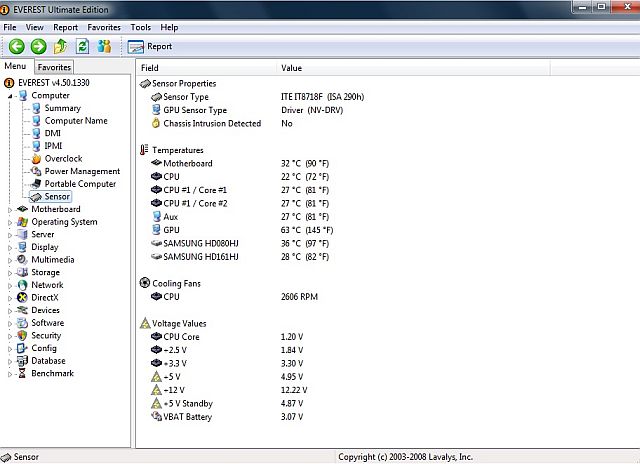
this all the temperature without the game and tweak by EVGA Precision..See?

     Image
Last edited by Alejandro Rhodes on Tue Mar 30, 2010 6:33 pm, edited 1 time in total.
Alejandro Rhodes
Ground hog
Ground hog
 
Posts: 0
Joined: Sun Jan 27, 2013 6:33 am

Re: Nvidia Ntune

Postby vgbaron » Wed Mar 31, 2010 12:16 pm

AH - ok  - those temps are fine. I thought you said that your *CPU* was running at 78c also.

My mistake.

Vic
I7 980x 4.43G P6X58D 6G Mushkin 1612 6-8-6-24 1T EVGA GTX480 826/4200
User avatar
vgbaron
1st Lieutenant
1st Lieutenant
 
Posts: 479
Joined: Mon Dec 10, 2007 1:40 pm
Location: Burbank CA USA

Previous

Return to Flight Simulator X (FSX) and Steam

Who is online

Users browsing this forum: No registered users and 471 guests