
Invisable Aircraft in FSX

FSX including FSX Steam version.

Invisable Aircraft in FSX

Postby planephysician » Fri Oct 09, 2009 1:36 pm

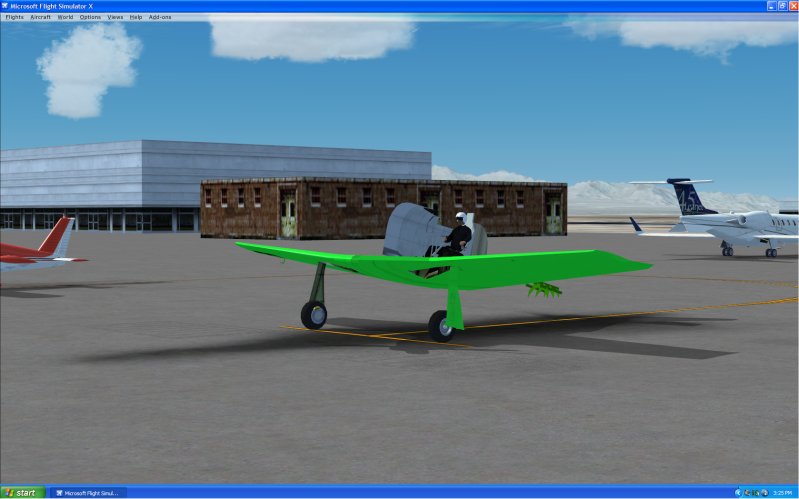
Is this a problem with running FSX on XP or are the other people with the same issues? I have an up-to-date computer (hardware and software). Most of my addon (payware or freeware - it doesn't matter) and some of the Acceleration Pack aircraft only partially show up. I have tried changing the video settings in the game, on the card or both and the best it does is a blank aircraft.

Image
planephysician
2nd Lieutenant
2nd Lieutenant
 
Posts: 131
Joined: Sun Oct 17, 2004 4:22 am
Location: Lost Wages, Nevada

Re: Invisable Aircraft in FSX

Postby Plugpennyshadow » Fri Oct 09, 2009 5:53 pm

Something is hosed.

1.  Have you intalled anything new lately?

2.  Have you un-installed anthing lately?

3.  Think back to the last time FSX worked properly and write down what you have changed on you machine or FSX install.

The Bad Penny Strikes!
Plugpennyshadow
2nd Lieutenant
2nd Lieutenant
 
Posts: 274
Joined: Sat Mar 15, 2008 1:56 pm

Re: Invisable Aircraft in FSX

Postby SilverbugXO » Fri Oct 09, 2009 6:06 pm

It looks like you have an advanced grahpics card. This happened to me too, and no matter what, DO NOT KEEP ON DIRECTX 10!
XO-8492
Callsign
SilverbugXO
Ground hog
Ground hog
 
Posts: 13
Joined: Thu Oct 08, 2009 7:06 pm

Re: Invisable Aircraft in FSX

Postby computerJ » Sun Oct 11, 2009 9:48 pm

turn off DX10 and do you have fsx acceleration?
User avatar
computerJ
2nd Lieutenant
2nd Lieutenant
 
Posts: 81
Joined: Tue Apr 28, 2009 12:25 pm
Location: fort macmurray

Re: Invisable Aircraft in FSX

Postby planephysician » Wed Nov 04, 2009 2:27 pm

Well I went out and bought Windows Vista and the problem went away. Must have been an XP thing. Thanks for your help though!!
planephysician
2nd Lieutenant
2nd Lieutenant
 
Posts: 131
Joined: Sun Oct 17, 2004 4:22 am
Location: Lost Wages, Nevada

Re: Invisable Aircraft in FSX

Postby vgbaron » Wed Nov 04, 2009 2:53 pm

Well I went out and bought Windows Vista and the problem went away. Must have been an XP thing. Thanks for your help though!!


probably would have fixed it by reinstalling XP too. Glad you got it working
I7 980x 4.43G P6X58D 6G Mushkin 1612 6-8-6-24 1T EVGA GTX480 826/4200
User avatar
vgbaron
1st Lieutenant
1st Lieutenant
 
Posts: 479
Joined: Mon Dec 10, 2007 1:40 pm
Location: Burbank CA USA


Return to Flight Simulator X (FSX) and Steam

Who is online

Users browsing this forum: No registered users and 342 guests