View change

FSX including FSX Steam version.

View change

Postby garymbuska » Tue Feb 03, 2015 7:13 pm

Hello everyone
How do I make it where I do not see the VC on any aircraft. Most aircraft I have when I go into the cockpit I see the VC and have to press shift 1 to get the main panel to show. I know there is a way As i had it fixed before I changed my Computers Now I can not remember how i did it.
I am not big on Virtual cockpits I would rather see the main panel.
:think:
Gary M Buska
SYSTEM Specs ASUS P8Z68 V/GEN 3 mother board: INTELL I7 2600k 3.48 ghz Quad core CPU with Sandy bridge: 12 Gigs of 1800hz ram:
GTX 950 OVER CLOCKED: 2 Gigs Ram Windows 10 Home 64 bit Operating system. 750W Dedicated modular power supply. Two Internal 1TB hard drives 1 External 1TB 3.2 USB hard drive. SAITEK Cessna flight Yoke with throttles.
CH Rudder Peddles 27 inch Wide screen Monitor
User avatar
garymbuska
Major
Major
 
Posts: 4415
Joined: Tue Dec 30, 2003 11:10 am
Location: Jacksonville, Florida

Re: View change

Postby Jetranger » Tue Feb 03, 2015 7:43 pm

Gary, I'd think, if ya went into the Aircrafts PANEL folder CFG File - and scrolled down to where it listed as

[VC Cockpit]

and DELETED everything below that it would Delete everything associated with the VC and the files ???


then go into the Aircrafts FOLDER itself and find any files that are the VC Files.

If I don't want the VC in most Aircraft , I just Cycle thru the Views, using the A Button on the keyboard until I get the VC to disappear,, then hit Shift 1 or Shift 2 depending on how the Aircrafts Designer has assigned what keys to the Panel Folder.
User avatar
Jetranger
Major
Major
 
Posts: 3232
Joined: Fri Sep 30, 2011 2:49 am
Location: Kansas City Missouri USA / KMKC

Re: View change

Postby H_PAUL » Tue Feb 03, 2015 9:17 pm

Howdy Gary

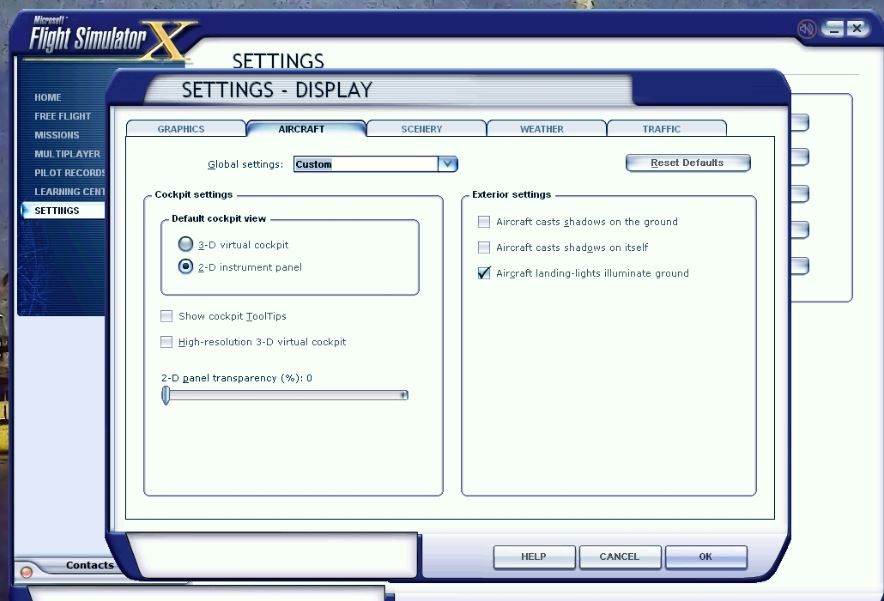
Run your FSX game, go to home screen, then settings, (display) I had to select the customize button below first, then select the Aircraft tab above..............here's what it looks like, as I took a screenshot for you..............default cockpit view is where to change it

Image

Hope this helps

H_Paul
User avatar
H_PAUL
2nd Lieutenant
2nd Lieutenant
 
Posts: 150
Joined: Mon Feb 04, 2002 2:40 am
Location: KSNA

Re: View change

Postby garymbuska » Wed Feb 04, 2015 9:32 am

Thanks a lot that is what i was looking for :dance: I knew it was something simple but could not think of it to save me. I guess i could blame it on old age but than that would be to easy. 8-)
Gary M Buska
SYSTEM Specs ASUS P8Z68 V/GEN 3 mother board: INTELL I7 2600k 3.48 ghz Quad core CPU with Sandy bridge: 12 Gigs of 1800hz ram:
GTX 950 OVER CLOCKED: 2 Gigs Ram Windows 10 Home 64 bit Operating system. 750W Dedicated modular power supply. Two Internal 1TB hard drives 1 External 1TB 3.2 USB hard drive. SAITEK Cessna flight Yoke with throttles.
CH Rudder Peddles 27 inch Wide screen Monitor
User avatar
garymbuska
Major
Major
 
Posts: 4415
Joined: Tue Dec 30, 2003 11:10 am
Location: Jacksonville, Florida

Re: View change

Postby H_PAUL » Wed Feb 04, 2015 11:00 am

Join the club in the ole age department, :doh: I just got lucky in remembering this time eh :whistle:
User avatar
H_PAUL
2nd Lieutenant
2nd Lieutenant
 
Posts: 150
Joined: Mon Feb 04, 2002 2:40 am
Location: KSNA

Re: View change

Postby Fozzer » Wed Feb 04, 2015 12:34 pm

....another 2D Main Panel aficionado...

Everything available, at a single glance!

...and editable!...>>>

http://www.fspanelstudio.com/

Paul.... :mrgreen: ...!
Win 8.1 64-bit. DX11. Advent Tower. Intel i7-3770 3.9 GHz 8-core. 8 GB System RAM. AMD Radeon HD 7700 1GB RAM. DVD ROM. 2 Terra Byte SATA Hard Drive. Philips 17" LCD Monitor. Saitek Cyborg X Fly-5 Joystick. ...and a Briggs and Stratton Petrol Lawn Mower.
User avatar
Fozzer
Colonel
Colonel
 
Posts: 27369
Joined: Thu Jan 31, 2002 3:11 pm
Location: Hereford. England. EGBS.

Re: View change

Postby TUCANTO » Thu Feb 05, 2015 5:49 am

I personally can not see that flying without a VC is realistic the pilot is not sitting in the pilots seat? and also
the view is restricted although a lot of VC's are a bit lacking in realism some are very good, I do use the 2D
to adjust some autopilots etc. or view certain instruments . but for realism in flying give me the VC every time.
TUCANTO
2nd Lieutenant
2nd Lieutenant
 
Posts: 55
Joined: Thu Sep 17, 2009 7:33 am
Location: Cleveland U.K.

Re: View change

Postby Fozzer » Thu Feb 05, 2015 8:22 am

TUCANTO wrote:I personally can not see that flying without a VC is realistic the pilot is not sitting in the pilots seat? and also
the view is restricted although a lot of VC's are a bit lacking in realism some are very good, I do use the 2D
to adjust some autopilots etc. or view certain instruments . but for realism in flying give me the VC every time.


Having enjoyed flying a REAL Cessna 152, I find flying? a simulated aeroplane; manoeuvring coloured pixels across my Monitor screen using a joystick, most unrealistic anyway!
Most of my daily Flights are for scenery exploration purposes only, so a 2D panel gives me easy access to all the various instruments I need to navigate during the flight.
After of playing various Computer games on various Computers and Games Machines for the past 40+ years, I find it very difficult, if not impossible, to imagine that I am flying a real aeroplane!

Fighting off hoards of Klingons in my Spacefighter equipped with photon torpedoes, attacking me in the Orion Nebulae, whilst sat in my comfy chair in front of my computer screen, fails to convince me that I am actually in the vacuum of outer space....
...even my vivid imagination wont stretch that far....
....Sorry Chums!... :lol: ...!

I know that I am a bit of a wet-blanket at times, but I find that living in the Real World prevents me from pretending to do things or believing in things which are impossible....
...just keep well clear of my photon torpedoes!... ;) ...!

Paul.....turning sharp left, on the approach to Betelgeuse... :mrgreen: ...!
Win 8.1 64-bit. DX11. Advent Tower. Intel i7-3770 3.9 GHz 8-core. 8 GB System RAM. AMD Radeon HD 7700 1GB RAM. DVD ROM. 2 Terra Byte SATA Hard Drive. Philips 17" LCD Monitor. Saitek Cyborg X Fly-5 Joystick. ...and a Briggs and Stratton Petrol Lawn Mower.

User avatar
Fozzer
Colonel
Colonel
 
Posts: 27369
Joined: Thu Jan 31, 2002 3:11 pm
Location: Hereford. England. EGBS.


Return to Flight Simulator X (FSX) and Steam

Who is online

Users browsing this forum: Major Blackstone and 455 guests