CH Yoke & FSX, n00b needs help assigning buttons

FSX including FSX Steam version.

CH Yoke & FSX, n00b needs help assigning buttons

Postby Jerry368 » Wed Dec 17, 2014 1:26 pm

My brother bought my nephew the CH Flight Sim Yoke & Pedals. He flies Flight Simulator X on Windows 7.

And then he asked me to set it up. I've never used Flight Simulator X before.

So it was pretty easy to get the elevator and ailerons to work.
I was able to google and figure out throttle, prop, and mixture.

I do have a question about the prop setting. I've only flown fixed pitch propeller aircraft, so um, how do I tell Flight Sim X to ignore the propeller setting and/or what is the right neutral propeller setting?

Mostly, I have questions about assigning and using the other buttons and controls. I have read how people map these buttons to change views out the window and things like that, but how is that done? Is that done using FSX itself from some menu? Or is it done with a different program altogether that creates different configurations, and if so, what is that program and where can I find it?

Thanks for the help in advance!

Jerry368
Ground hog
Ground hog
 
Posts: 1
Joined: Wed Dec 17, 2014 1:08 pm

Re: CH Yoke & FSX, n00b needs help assigning buttons

Postby jandjfrench » Thu Dec 18, 2014 5:13 pm

Hi jerry,
Regarding the prop setting: just start with it all the way up on the yoke and then after becoming airborne adjust it so that you keep the rpms out of the red. This is oversimplified but preventing over-revving the engine is the most important thing. Of course there will be interaction between the throttle, prop and mixture but I suggest not worrying about it at first. Well, mixture maybe at high altitudes.
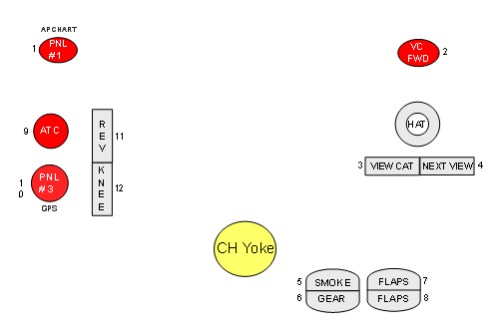
As far as programming the yoke keys there is one setting I highly recommend; setting button 2 (the right trigger button) to "Look forward (3-D cockpit)". Or button 1 (the left trigger) if your nephew is left handed. This way, no matter which view is currently selected you're immediately returned to the virtual cockpit looking straight forward. As many new aircraft no longer have 2-D cockpits this setting makes life much easier.
All control settings can be done thru FSX alone. I don't use anything else.
As he has both yoke and pedals I'll include an image of what I have. As I made this for my benefit, it may not be immediately clear what some of the functions are but at least it's something to consider.
Image
Have fun!
Jim F.
jandjfrench
2nd Lieutenant
2nd Lieutenant
 
Posts: 106
Joined: Fri Dec 31, 2010 10:13 pm
Location: Salinas, CA  USA


Return to Flight Simulator X (FSX) and Steam

Who is online

Users browsing this forum: No registered users and 468 guests