
Lost. All default fsx traffic.

FSX including FSX Steam version.

Lost. All default fsx traffic.

Postby mustangaroo » Thu Oct 23, 2014 9:20 pm

Welp, does anyone know where the default traffic files for fsx hides?? Cannot locate it so I am considering a repair or reload which is daunting. :oops: :oops:
mustangaroo
2nd Lieutenant
2nd Lieutenant
 
Posts: 184
Joined: Thu Feb 27, 2014 11:00 pm
Location: Chickasha Okla.

Re: Lost. All default fsx traffic.

Postby Jetranger » Fri Oct 24, 2014 12:55 am

STOP right there !!!

go no further !

before you Jump the Gun - Tell us all something , have you downloaded another scenery / airport and installed it in your flight simulator ????

and do YOU know for a "FACT",,,,, that it DID NOT have a FS/2004 A.I. Flight Plan in there ???

Because if sim pilots try to inject A.I. Traffic Plans / Files from FS/2004 into FSX of any version - you'll permanently ground all Air Traffic in FSX !!!

That's the 1st thing you need to make sure of - because if you don't - you'll re-install or repair you sim and STILL have NO A.I. Traffic , until you get rid of those FS/2004 A.I. Traffic file / plans !

Another Discussion Recently on the same subject :

http://forums.simviation.com/phpBB3/viewtopic.php?f=19&t=170932&p=1266598#p1266598


"Don't Mix FS9 and FSX Traffic Files: !!!!

FS9 traffic files are compatible with FSX. However, as described more fully in the User Manual, if FSX "sees" a compiled-for-FS9 traffic file, it will generate AI traffic for that file and any other compiled-for-FS9 traffic files it "sees"; but, it will "NOT" generate traffic for any compiled-for-FSX files. This has nothing to do with AI Flight Planner. It is a FSX "feature".

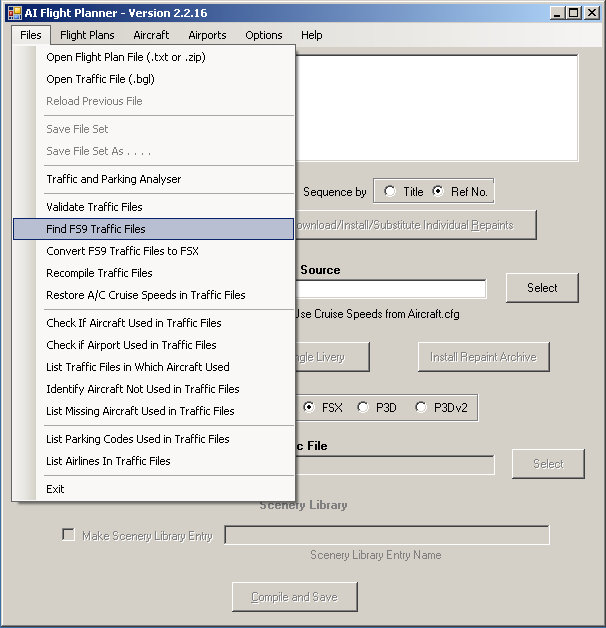
So, if you "DON'T" get (or suddenly stop getting) AI traffic from compiled-for-FSX traffic files, the first thing to look for is a compiled-for "FS9 file" somewhere within FSX's scope - probably in the Scenery\World\Scenery folder. You'll find AI Flight Planner's Find FS9 Files function very useful for this.
User avatar
Jetranger
Major
Major
 
Posts: 3232
Joined: Fri Sep 30, 2011 2:49 am
Location: Kansas City Missouri USA / KMKC

Re: Lost. All default fsx traffic.

Postby Hagar » Fri Oct 24, 2014 3:22 am

Jetranger wrote:So, if you "DON'T" get (or suddenly stop getting) AI traffic from compiled-for-FSX traffic files, the first thing to look for is a compiled-for "FS9 file" somewhere within FSX's scope - probably in the Scenery\World\Scenery folder. You'll find AI Flight Planner's Find FS9 Files function very useful for this.


Also search your FSX\Addon Scenery folders. Once it finds them AIFP2 can convert those FS9 traffic BGL files to FSX format. http://simviation.com/1/search?submit=1&keywords=aifp2&categoryId=

Image

This should fix your problem. The converted files will have a _FSX.bgl suffix. Once they're converted don't forget to delete the originals. AIFP2 has an option to do this automatically.
Image

Founder & Sole Member - Grumpy's Over the Hill Club for Veteran Virtual Aviators
Member of the Fox Four Group
My Google Photos albums
My Flickr albums
User avatar
Hagar
Colonel
Colonel
 
Posts: 30868
Joined: Wed Jun 19, 2002 7:15 am
Location: Costa Geriatrica

Re: Lost. All default fsx traffic.

Postby mustangaroo » Fri Oct 24, 2014 12:37 pm

Bless you kind sir. I did have that aifp program but was confused about what it does. I have dl'd some maiw stuff that jumped into the program[86] folder directly and had to hunt down aircraft, flight plans, airports...etc and put them into fs9 where they work fine. I occurs to me that when the maiw files self extract without oversight then life gets interesting. I did find things in scenery/world/scenery that I moved to a flash drive so I can cherry pick what does and does not work....one at a time. :geek: :geek: :D :D
mustangaroo
2nd Lieutenant
2nd Lieutenant
 
Posts: 184
Joined: Thu Feb 27, 2014 11:00 pm
Location: Chickasha Okla.

Re: Lost. All default fsx traffic.

Postby Jetranger » Fri Oct 24, 2014 7:58 pm

He, He,He,, :D I had a hunch

Yup most of us who've been into this for a while (since 2002) kinda don't Trust those Self Installers, as their directed to things by the person who sets them up to do Crazy things that'll drive ya batty. Sp we learned to do things manually by hand, slower process but its way better a fewer mistakes, once you learn the FOLDER structure of your flight simulator layout and what goes where.
User avatar
Jetranger
Major
Major
 
Posts: 3232
Joined: Fri Sep 30, 2011 2:49 am
Location: Kansas City Missouri USA / KMKC

Re: Lost. All default fsx traffic.

Postby mustangaroo » Sat Oct 25, 2014 3:21 am

There is a lot to keep track of when fsx files cannot see each other. FS9 is a little bit better but can still test the frontal lobes. Once I had enough freeware aircraft I went off the deep end with add-on scenery.. more like quick sand than water. When I truly figure out add-on file structure and associated ai compilers I will put it up for those who get mired in this maze. :whistle: :whistle:
mustangaroo
2nd Lieutenant
2nd Lieutenant
 
Posts: 184
Joined: Thu Feb 27, 2014 11:00 pm
Location: Chickasha Okla.

Re: Lost. All default fsx traffic.

Postby garymbuska » Sun Oct 26, 2014 8:45 am

Like others have stated do not trust self installers unless you know the person that created the file knows what they are doing.
This is my list of things not to do in FSX
1). Never install anything directly into FSX or FS9
2). Do not use files that have auto installers.
3). If you are not sure of what something is DO NOT MESS WITH IT.

One thing you want to do is Make a backup of files before you do anything!!!!!!
Abiding by these rules will usually keep you out of trouble.

<<u
Gary M Buska
SYSTEM Specs ASUS P8Z68 V/GEN 3 mother board: INTELL I7 2600k 3.48 ghz Quad core CPU with Sandy bridge: 12 Gigs of 1800hz ram:
GTX 950 OVER CLOCKED: 2 Gigs Ram Windows 10 Home 64 bit Operating system. 750W Dedicated modular power supply. Two Internal 1TB hard drives 1 External 1TB 3.2 USB hard drive. SAITEK Cessna flight Yoke with throttles.
CH Rudder Peddles 27 inch Wide screen Monitor
User avatar
garymbuska
Major
Major
 
Posts: 4415
Joined: Tue Dec 30, 2003 11:10 am
Location: Jacksonville, Florida


Return to Flight Simulator X (FSX) and Steam

Who is online

Users browsing this forum: No registered users and 485 guests