FSX on SSD problem?

FSX including FSX Steam version.

FSX on SSD problem?

Postby Speed of flight » Fri Sep 26, 2014 12:07 am

I think this is where this should go?...
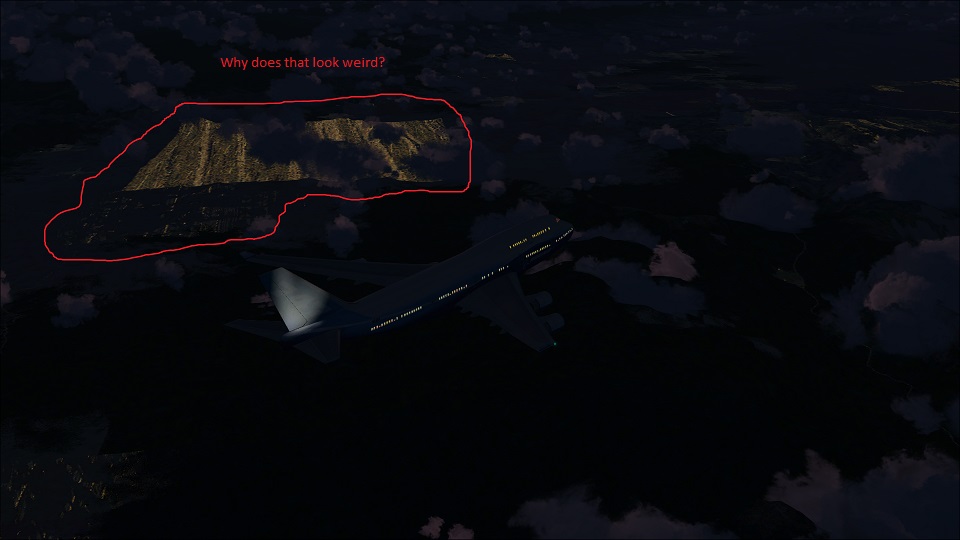
I recently installed a new 250 GB Samsung 840 SSD, and noticed a problem. This is a clean and fresh install of FSX+Acceleration with the Orbx Iceland demo installed, but it did this before, and I don't have any ideas what would cause this graphical issue.
Before we point at drivers, I must say that I use an old one that I have stored locally, and it's the last known video card driver to not display weird artifacts in random places. I keep it on one of my other hard drives to install whenever I may need it. I've reset the GPUs clock and memory settings back to stock over this one, incase there was a clockspeed issue, or something.
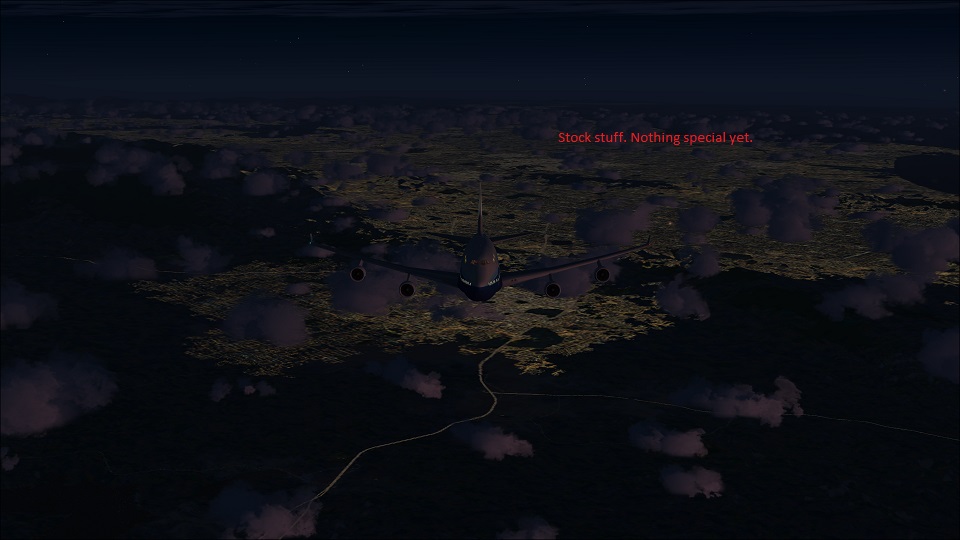
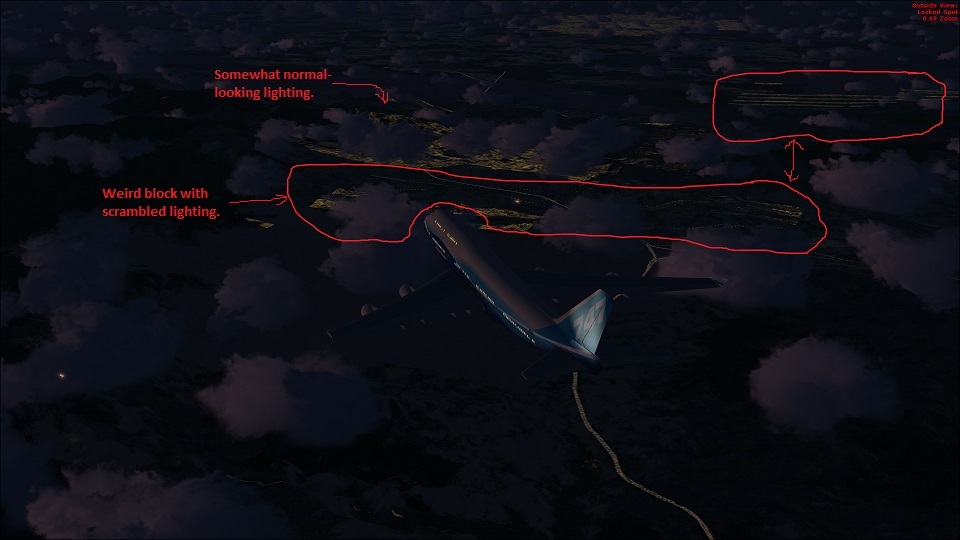
I flew over the LA basin do demonstrate this unique issue. It looks somewhat like an artifact, but not quite. Like something is somewhat out of line, but I have no ideas.
I also have RAPID mode enabled on the SSD, which apparently uses DRAM as something of a buffer to speed read and write times. I don't really know how it works, but maybe that's the problem.
Anyone really know SSDs yet? Have they been around long enough for some all-knowing SSD oracle to exist yet? I'm going to have to sort this out before I can put in all the bonus eye-candy.

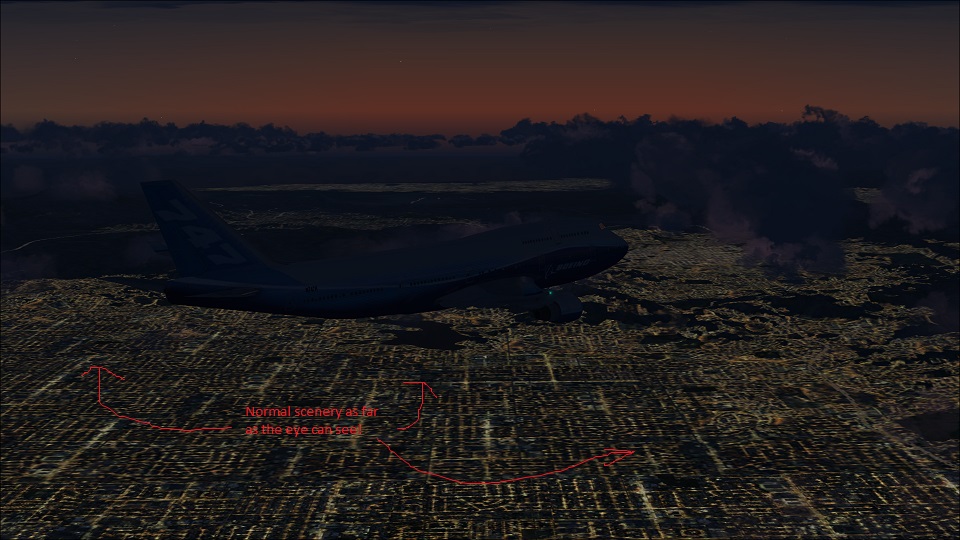
A normal, and planned cityscape. Seems like everything is OK here.
Image

It seems fine here, also. Like around a city that FSX is drawing from a BGL or something, it's fine.
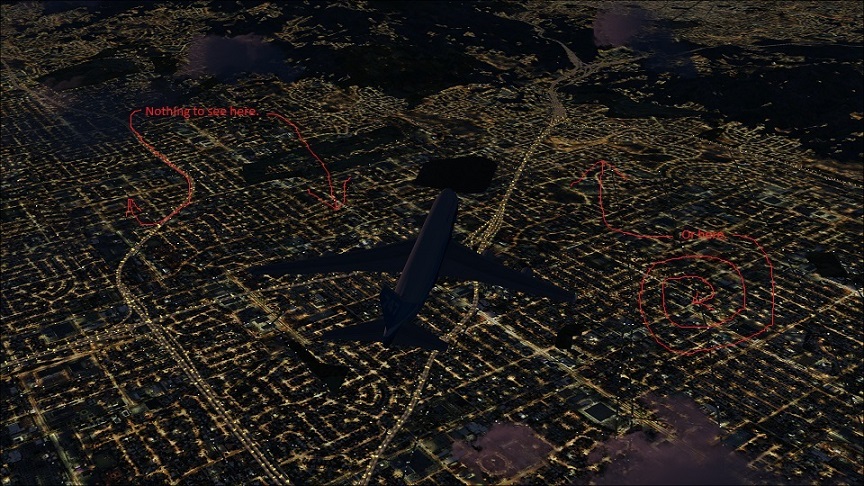
Image

Yep...
Image

But 10 minutes north...
Image

And what the...
Image

So, any ideas?
Image

I don't know how RAPID mode on a Samsung SSD works. I've read as much as I could about it, and only know what they'll tell a regular consumer. Who knows?
Asus Crosshair V Formula-Z, NB & FSB @2608 MHz
AMD 8350 @ 5.02 GHz 1.524V (200.6 x 25)
Corsair H100i
16GB GSkill Trident @ 2133 MHz C10
Asus 7870 2 GB 1200core/5500mem
Samsung 250GB SSD
RaidMax 1200W
Cooler Master HAF 932
Windows 7 x64
VRS Superbug/TacPack, Iris A-10A, PMDG 77W, 744 and MD-11
REX texture direct, FTX Global
User avatar
Speed of flight
1st Lieutenant
1st Lieutenant
 
Posts: 301
Joined: Tue Dec 22, 2009 9:48 pm

Re: FSX on SSD problem?

Postby mjrhealth » Fri Sep 26, 2014 5:15 am

I highly doubt it is a SSD issue. Those things are caused thruogh scenery priority and teh such. Nothing to do with SSD.
mjrhealth
2nd Lieutenant
2nd Lieutenant
 
Posts: 187
Joined: Sun Apr 15, 2007 5:06 am
Location: Gosford, NSW Australia

Re: FSX on SSD problem?

Postby OldAirmail » Fri Sep 26, 2014 5:16 am

[b]A closer look at RAPID DRAM caching on the Samsung 840 EVO SSD[/b]

This optional, software-based solution commandeers a portion of system memory for use as a separate drive cache.


I'm wondering if your system RAM might be too slow?

I have a Samsung system SSD (without the "RAPID DRAM" software) and an off brand SSD for the sim - no problem
.. .
Get the most out of your controls - SPAD.neXt

Image
. . . . . .Any time, any plane, any weather.
. . . . . . . . . . . . . Prepar3d V4
User avatar
OldAirmail
Major
Major
 
Posts: 4814
Joined: Sun Feb 17, 2013 3:06 pm
Location: Concrete, WA ICAO - 3W5

Re: FSX on SSD problem?

Postby garymbuska » Fri Sep 26, 2014 7:32 am

While I do not have a SSD drive after reading the article from the first post I think he is on to something here. While the amount of RAM you have could be a problem the speed at which the ram runs I would think be more important here. It does you no good to have a high speed device only to have it slowed down by slow RAM speeds. Kind of like putting a high speed sports car in bumper to bumper traffic and than wondering why it is going so slow.
Same thing apply,s here.
With most devices you have what is termed handshaking which means if one device is faster than the other than the faster one has to wait till the slower one catches up before it can output any more data, and the two devices talk to each other letting each one know when it is able for more data.
This could be the case here.
<<u
Gary M Buska
SYSTEM Specs ASUS P8Z68 V/GEN 3 mother board: INTELL I7 2600k 3.48 ghz Quad core CPU with Sandy bridge: 12 Gigs of 1800hz ram:
GTX 950 OVER CLOCKED: 2 Gigs Ram Windows 10 Home 64 bit Operating system. 750W Dedicated modular power supply. Two Internal 1TB hard drives 1 External 1TB 3.2 USB hard drive. SAITEK Cessna flight Yoke with throttles.
CH Rudder Peddles 27 inch Wide screen Monitor
User avatar
garymbuska
Major
Major
 
Posts: 4415
Joined: Tue Dec 30, 2003 11:10 am
Location: Jacksonville, Florida

Re: FSX on SSD problem?

Postby Speed of flight » Fri Sep 26, 2014 2:02 pm

You really think too slow? I know that DDR3 is able to clock up to 3000+ MHz these days, but 2400+- Gould be fast enough, I'd think. I would be surprised, really, but nothing is off the table...

With RAPID mode off, Samsung includes a "benchmark" tool with their "magician" software. It performs right at the rated speed with it switched off, about 550 MB/s, or whatever, but with it on, it ramps up to 4500+ MB/s, and I was impressed by that speed. That's 66% o the max SATA 6GB/a max, I thought was way faster than FSX would ever need.

I wonder if I still have this problem with it switched off?

Thanks for the help, I'll see if maybe that is a problem, and keep updating.
Asus Crosshair V Formula-Z, NB & FSB @2608 MHz
AMD 8350 @ 5.02 GHz 1.524V (200.6 x 25)
Corsair H100i
16GB GSkill Trident @ 2133 MHz C10
Asus 7870 2 GB 1200core/5500mem
Samsung 250GB SSD
RaidMax 1200W
Cooler Master HAF 932
Windows 7 x64
VRS Superbug/TacPack, Iris A-10A, PMDG 77W, 744 and MD-11
REX texture direct, FTX Global
User avatar
Speed of flight
1st Lieutenant
1st Lieutenant
 
Posts: 301
Joined: Tue Dec 22, 2009 9:48 pm

Re: FSX on SSD problem?

Postby OldAirmail » Fri Sep 26, 2014 4:43 pm

I agree with you. I wrote my post just before going to work and didn't read your specs.

GSkill Trident ram should be way more than good enough.

Sorry.
.. .
Get the most out of your controls - SPAD.neXt

Image
. . . . . .Any time, any plane, any weather.
. . . . . . . . . . . . . Prepar3d V4
User avatar
OldAirmail
Major
Major
 
Posts: 4814
Joined: Sun Feb 17, 2013 3:06 pm
Location: Concrete, WA ICAO - 3W5

Re: FSX on SSD problem?

Postby Ang2dogs » Sat Sep 27, 2014 12:35 pm

I had exactly the same problem, so it might not be your computer.
I installed some scenery that corrupted my lclookup.bgl file,
which can be found in your main FSX Scenery\BASE\Scenery folder.
Hope this helps.
User avatar
Ang2dogs
Captain
Captain
 
Posts: 862
Joined: Sun Aug 19, 2007 12:38 am
Location: black mountain hills of Dakota


Return to Flight Simulator X (FSX) and Steam

Who is online

Users browsing this forum: No registered users and 493 guests