Missing thumbnails

FSX including FSX Steam version.

Missing thumbnails

Postby Modlerbob » Thu Jul 10, 2014 11:29 pm

What is the file extension for the image of each plane that appears on the list of planes to fly and where is it located in the airplane directory. I have four or five planes that have a generic image with a question mark instead of an image of that plane.
User avatar
Modlerbob
2nd Lieutenant
2nd Lieutenant
 
Posts: 288
Joined: Tue May 27, 2014 12:06 am
Location: Central Florida

Re: Missing thumbnails

Postby Capt_Cronic » Fri Jul 11, 2014 12:22 am

thumbnail.jpg in the aircrafts texure folders
ASUS P8Z77-VLK, I5-3570k @ 4.4ghz, G.SKILL 16gb 1600, GTX 570 2560MB GDDR5, 2x OCZ Vertex 4 128Gb SSD SATA 3,
WD 500GB SATA 3, ASUS DRW-24B1ST SATA 3, OCZ ModXStream Pro 700W Modular, Samsung 52" lcd, Win 7 Ultimate x64 SP1
Capt_Cronic
2nd Lieutenant
2nd Lieutenant
 
Posts: 218
Joined: Fri Nov 08, 2013 1:37 pm

Re: Missing thumbnails

Postby pskomski » Fri Jul 11, 2014 2:11 am

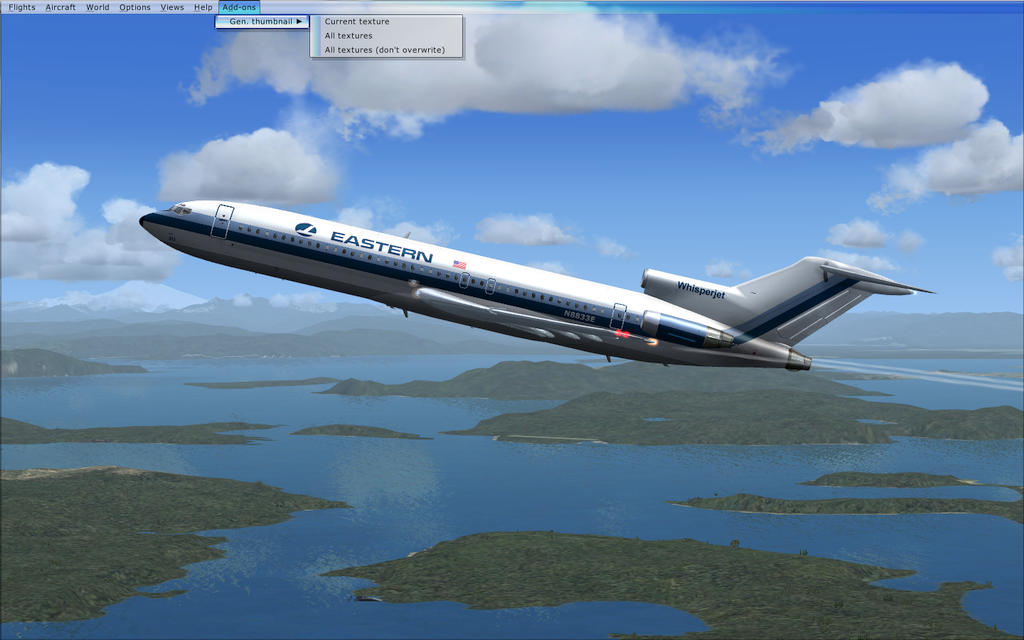
Search here for autothumbnail. It generates a thumbnail for the plane that you are currently flying.
pskomski
Ground hog
Ground hog
 
Posts: 3
Joined: Mon Sep 09, 2013 3:12 am

Re: Missing thumbnails

Postby Modlerbob » Fri Jul 11, 2014 2:30 am

Thanks very much. <<q
User avatar
Modlerbob
2nd Lieutenant
2nd Lieutenant
 
Posts: 288
Joined: Tue May 27, 2014 12:06 am
Location: Central Florida

Re: Missing thumbnails

Postby Modlerbob » Fri Jul 11, 2014 7:30 am

I downloaded the addon and also the microsoft file that I found was needed but after several attempts including a full reboot it does not show up in FSX in the addon pull down. Does anyone know whether it works with Win 7 Pro? I notice the directory structure is different than what the readme text indicated.
User avatar
Modlerbob
2nd Lieutenant
2nd Lieutenant
 
Posts: 288
Joined: Tue May 27, 2014 12:06 am
Location: Central Florida

Re: Missing thumbnails

Postby garymbuska » Fri Jul 11, 2014 7:44 am

Modlerbob wrote:I downloaded the addon and also the microsoft file that I found was needed but after several attempts including a full reboot it does not show up in FSX in the addon pull down. Does anyone know whether it works with Win 7 Pro? I notice the directory structure is different than what the readme text indicated.

Where did this install to?
I am not sure about this but have you tried running as administrator?
I can not remember if win 7 pro has that option

:?: <<u
Gary M Buska
SYSTEM Specs ASUS P8Z68 V/GEN 3 mother board: INTELL I7 2600k 3.48 ghz Quad core CPU with Sandy bridge: 12 Gigs of 1800hz ram:
GTX 950 OVER CLOCKED: 2 Gigs Ram Windows 10 Home 64 bit Operating system. 750W Dedicated modular power supply. Two Internal 1TB hard drives 1 External 1TB 3.2 USB hard drive. SAITEK Cessna flight Yoke with throttles.
CH Rudder Peddles 27 inch Wide screen Monitor
User avatar
garymbuska
Major
Major
 
Posts: 4415
Joined: Tue Dec 30, 2003 11:10 am
Location: Jacksonville, Florida

Re: Missing thumbnails

Postby Bass » Fri Jul 11, 2014 8:05 am

Bob, here's another idea.
If you only got a few ac not showing pics in your list, you could load those ac's in FSX, find a nice external look and take a picture (v).
Rename picture(s) to thumbnail.jpg and put it in the texture folder(s) of the ac(s) you need.
Remember those pictures are .bmp's so quite big, but it will function. You can reduse the size if you want, excample with BDSizer.
"Just try to be YOU"!............ Kurt 

System. GA-X58A-UD3R, i7-950QC, Corsair XMS3 18GB 2000, GTX 780 tf 3GB, Corsair CMPSU-850, 24 BenQ 120, TM Hotas cougar, win7 pro.
User avatar
Bass
Major
Major
 
Posts: 3043
Joined: Wed Feb 15, 2012 9:32 am
Location: Scandinavia

Re: Missing thumbnails

Postby Hagar » Fri Jul 11, 2014 8:06 am

Modlerbob wrote:I downloaded the addon and also the microsoft file that I found was needed but after several attempts including a full reboot it does not show up in FSX in the addon pull down. Does anyone know whether it works with Win 7 Pro? I notice the directory structure is different than what the readme text indicated.


Autothumbnail works well on WinXP. I'm not sure it's compatible with Win7/8.

If it's installed correctly this is where you will find it.
Image
Image

Founder & Sole Member - Grumpy's Over the Hill Club for Veteran Virtual Aviators
Member of the Fox Four Group
My Google Photos albums
My Flickr albums
User avatar
Hagar
Colonel
Colonel
 
Posts: 30868
Joined: Wed Jun 19, 2002 7:15 am
Location: Costa Geriatrica

Re: Missing thumbnails

Postby Modlerbob » Fri Jul 11, 2014 10:59 am

I think maybe it doesn't work in Windows 7 pro. The net.framework 3.5 file specifically states it does not work in win 7 pro. I reset my computer to it's last saved state before yesterday and tried to reinstall with no luck. WSlite is the only addon that shows up in the addon drop down.

I was manually able to do a screenshot for the planes with no thumbnail image and get them in the right location.
User avatar
Modlerbob
2nd Lieutenant
2nd Lieutenant
 
Posts: 288
Joined: Tue May 27, 2014 12:06 am
Location: Central Florida

Re: Missing thumbnails

Postby Hagar » Fri Jul 11, 2014 12:42 pm

Modlerbob wrote:I think maybe it doesn't work in Windows 7 pro. The net.framework 3.5 file specifically states it does not work in win 7 pro.

As I suspected. Thanks for confirming it.

I was manually able to do a screenshot for the planes with no thumbnail image and get them in the right location.

Glad you sorted it. :)
Image

Founder & Sole Member - Grumpy's Over the Hill Club for Veteran Virtual Aviators
Member of the Fox Four Group
My Google Photos albums
My Flickr albums
User avatar
Hagar
Colonel
Colonel
 
Posts: 30868
Joined: Wed Jun 19, 2002 7:15 am
Location: Costa Geriatrica

Re: Missing thumbnails

Postby jandjfrench » Sat Jul 12, 2014 12:53 am

Hi,
I'm running Win 7 pro 64bit and Autothumbnail works fine. Autothumbnail must be updated with "autothumbnail_fix.zip" which is available at Avsim. It's my understanding that it's the 64 bit that's the problem, not the Windows version. To evaluate I suggest replacing an existing thumbnail. I recall having an occasional problem but don't remember what the problem was. I do highly recommend the program.
Jim F.
jandjfrench
2nd Lieutenant
2nd Lieutenant
 
Posts: 106
Joined: Fri Dec 31, 2010 10:13 pm
Location: Salinas, CA  USA

Re: Missing thumbnails

Postby Modlerbob » Sat Jul 12, 2014 7:25 am

Thanks for the updated info. I will find the fix and try it. However I have now fixed or replaced all my missing thumbnails the hard way.
User avatar
Modlerbob
2nd Lieutenant
2nd Lieutenant
 
Posts: 288
Joined: Tue May 27, 2014 12:06 am
Location: Central Florida

Re: Missing thumbnails

Postby Modlerbob » Sat Jul 12, 2014 7:48 am

jandjfrench wrote:Hi,
I'm running Win 7 pro 64bit and Autothumbnail works fine. Autothumbnail must be updated with "autothumbnail_fix.zip" which is available at Avsim. It's my understanding that it's the 64 bit that's the problem, not the Windows version. To evaluate I suggest replacing an existing thumbnail. I recall having an occasional problem but don't remember what the problem was. I do highly recommend the program.
Jim F.

I tried to install the fix and got this message back

Cannot initialize simconnect Error HRESULT E_FAIL has been returned from a call to a COM component.
User avatar
Modlerbob
2nd Lieutenant
2nd Lieutenant
 
Posts: 288
Joined: Tue May 27, 2014 12:06 am
Location: Central Florida

Re: Missing thumbnails

Postby Modlerbob » Sat Jul 12, 2014 8:24 am

OK, my bad. I've got to learn to read the entire instructions. After following the instructions it works fine now. I've got to say it's now much easier than doing the thumbnails manually.
User avatar
Modlerbob
2nd Lieutenant
2nd Lieutenant
 
Posts: 288
Joined: Tue May 27, 2014 12:06 am
Location: Central Florida

Re: Missing thumbnails

Postby Bass » Sat Jul 12, 2014 8:26 am

:clap:
"Just try to be YOU"!............ Kurt 

System. GA-X58A-UD3R, i7-950QC, Corsair XMS3 18GB 2000, GTX 780 tf 3GB, Corsair CMPSU-850, 24 BenQ 120, TM Hotas cougar, win7 pro.
User avatar
Bass
Major
Major
 
Posts: 3043
Joined: Wed Feb 15, 2012 9:32 am
Location: Scandinavia


Return to Flight Simulator X (FSX) and Steam

Who is online

Users browsing this forum: No registered users and 461 guests