Will not show up...

FSX including FSX Steam version.

Will not show up...

Postby Flying Trucker » Wed Apr 17, 2013 3:08 pm

Good afternoon all... <<u


Downloaded the Piper PA44 Seminole Olympic Package from the Simviation Download Site.

This is a Full Package.

Have checked it two or three times and added everything where I think it should be.

The simulated aircraft is in SimObjects and everything seems to be there.

The aircraft will not show up in the Aircraft Selection Location in FSX.

Setting as suggested in the package is 1280 X 1024 X 32 and that is what I have FSX set to.

Not sure what is wrong.
Cheers...Happy Landings...Doug
Flying Trucker
Colonel
Colonel
 
Posts: 14398
Joined: Sat Mar 26, 2005 12:28 pm

Re: Will not show up...

Postby Flying Trucker » Wed Apr 17, 2013 4:01 pm

Ok Folks, have it working now.

I had to add something to each of the Titles in the CFG File and now the aircraft works and shows fine.... <<q
Cheers...Happy Landings...Doug
Flying Trucker
Colonel
Colonel
 
Posts: 14398
Joined: Sat Mar 26, 2005 12:28 pm

Re: Will not show up...

Postby Jetranger » Thu Apr 18, 2013 10:43 am

<<q

Yip, gotta watch dem der suckers - dem der CFG Files, throw Ya, fer a loop everytime ! <<t
User avatar
Jetranger
Major
Major
 
Posts: 3232
Joined: Fri Sep 30, 2011 2:49 am
Location: Kansas City Missouri USA / KMKC

Re: Will not show up...

Postby Flying Trucker » Thu Apr 18, 2013 11:51 am

Thanks Jet...it took me awhile to figure out the problem... :whistle:
Cheers...Happy Landings...Doug
Flying Trucker
Colonel
Colonel
 
Posts: 14398
Joined: Sat Mar 26, 2005 12:28 pm

Re: Will not show up...

Postby Modlerbob » Sat May 31, 2014 1:26 pm

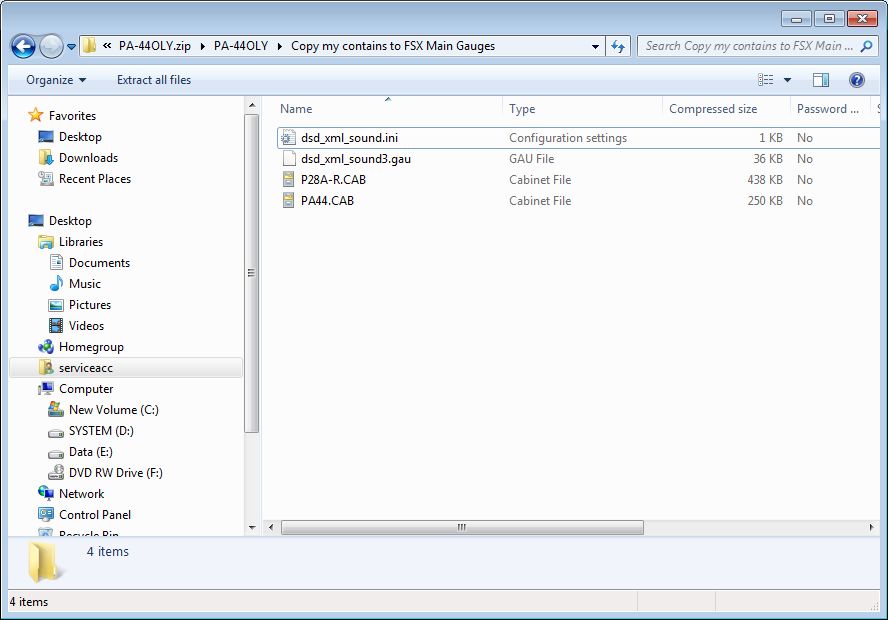
I am having trouble with the Piper Seminole too. It downloaded and unzipped OK, I thought, but half the instruments are missing, most importantly the airspeed indicator and the altimeter. Hard to fly without those two. They are missing in the virtual cockpit as well as the "normal" full cockpit and even in the minimal forward view. I went back and unzipped the gauges into the guages directory as well as the aircraft directory. Any suggestions would be appreciated.
User avatar
Modlerbob
2nd Lieutenant
2nd Lieutenant
 
Posts: 288
Joined: Tue May 27, 2014 12:06 am
Location: Central Florida

Re: Will not show up...

Postby Hagar » Sat May 31, 2014 2:33 pm

Modlerbob wrote: I went back and unzipped the gauges into the guages directory as well as the aircraft directory. Any suggestions would be appreciated.

It works fine for me. The gauges are obviously not installed correctly. Unzipping files direct to the FSX directories is not a good idea.
Go back to the downloaded file & open the folder named Copy my contains to FSX Main Gauges. This folder contains 4 files (see my shot below).

Image

Select these files & paste them into your FSX\Gauges folder. That should fix your problem.
Image

Founder & Sole Member - Grumpy's Over the Hill Club for Veteran Virtual Aviators
Member of the Fox Four Group
My Google Photos albums
My Flickr albums
User avatar
Hagar
Colonel
Colonel
 
Posts: 30868
Joined: Wed Jun 19, 2002 7:15 am
Location: Costa Geriatrica

Re: Will not show up...

Postby mustangaroo » Sat May 31, 2014 8:09 pm

I ran across a similar situation with the french version of a vindicator dive bomber. It seems that in order for it to show it needed to be unzipped directly to the aircraft folder in sim objects. After a look I saw that there was no way for it to show as packaged even if it went into the airplanes file because it needed a title page which only happened if it were unzipped like I described. Lotsa luck with your sim and happy flying. :doh: :D :D
mustangaroo
2nd Lieutenant
2nd Lieutenant
 
Posts: 184
Joined: Thu Feb 27, 2014 11:00 pm
Location: Chickasha Okla.

Re: Will not show up...

Postby Hagar » Sun Jun 01, 2014 1:38 am

mustangaroo wrote:I ran across a similar situation with the french version of a vindicator dive bomber. It seems that in order for it to show it needed to be unzipped directly to the aircraft folder in sim objects. After a look I saw that there was no way for it to show as packaged even if it went into the airplanes file because it needed a title page which only happened if it were unzipped like I described.

Sorry mustang. I have many years of experience in installing addons to the MS sims & have never found one that couldn't be installed manually*. I would still strongly advise against extracting/unzipping files direct to FSX or any other version of MSFS.

Unfortunately there was never a template for configuring addons & all developers have their own ways of doing things. Downloads will vary to some extent but should be easy enough to figure out once you understand the basic principles.

*Except for the odd auto-installer that can't be redirected to a Temp folder. I immediately delete this type of download.

If you give me a link to the Vindicator I will check it out for you.

Image

Founder & Sole Member - Grumpy's Over the Hill Club for Veteran Virtual Aviators
Member of the Fox Four Group
My Google Photos albums
My Flickr albums
User avatar
Hagar
Colonel
Colonel
 
Posts: 30868
Joined: Wed Jun 19, 2002 7:15 am
Location: Costa Geriatrica

Re: Will not show up...

Postby mustangaroo » Sun Jun 01, 2014 8:01 am

Hi Hagar. I am sure there is a way to paste all the files in the proper order. What I did not see in the zipped files was a way to see the sim config. Now that might be windows 7 not seeing things but after I did unzip the folder everything showed up. Time will tell if this has a trojan I suppose. I have left some programs alone over concerns about "other" needed items but this seems benign at the present. :shifty: :pray: :think:
mustangaroo
2nd Lieutenant
2nd Lieutenant
 
Posts: 184
Joined: Thu Feb 27, 2014 11:00 pm
Location: Chickasha Okla.

Re: Will not show up...

Postby Hagar » Mon Jun 02, 2014 5:45 am

mustangaroo wrote:Hi Hagar. I am sure there is a way to paste all the files in the proper order. What I did not see in the zipped files was a way to see the sim config. Now that might be windows 7 not seeing things but after I did unzip the folder everything showed up. Time will tell if this has a trojan I suppose. I have left some programs alone over concerns about "other" needed items but this seems benign at the present. :shifty: :pray: :think:

I'm not sure what you mean about sim config or why you suspect a trojan. :?:

A lot will depend on the way the author configured the zipfile. You might be surprised at the number of respected freeware developers who don't know the best way of doing this. It might also depend on the method you use to extract zipfiles. You might like to check out my second reply in this thread. http://forums.simviation.com/phpBB3/viewtopic.php?f=13&t=170062
Image

Founder & Sole Member - Grumpy's Over the Hill Club for Veteran Virtual Aviators
Member of the Fox Four Group
My Google Photos albums
My Flickr albums
User avatar
Hagar
Colonel
Colonel
 
Posts: 30868
Joined: Wed Jun 19, 2002 7:15 am
Location: Costa Geriatrica

Re: Will not show up...

Postby mustangaroo » Mon Jun 02, 2014 10:02 am

Hagar the dl I am talking about is relatively new for simviation.....at least the one I am talking about. After extracting it looked like just a bunch of loose files with no particular identifier for the airplanes folder. Probably just an oversight when it was packaged but there it is. :? :!: :!: :idea: :idea:
mustangaroo
2nd Lieutenant
2nd Lieutenant
 
Posts: 184
Joined: Thu Feb 27, 2014 11:00 pm
Location: Chickasha Okla.

Re: Will not show up...

Postby Hagar » Mon Jun 02, 2014 10:39 am

mustangaroo wrote:Hagar the dl I am talking about is relatively new for simviation.....at least the one I am talking about.

If you give me the file name of the problem aircraft I can check it out.

After extracting it looked like just a bunch of loose files with no particular identifier for the airplanes folder. Probably just an oversight when it was packaged but there it is. :? :!: :!: :idea: :idea:

I covered this in the thread from the link in my last reply? Did you read it?
Image

Founder & Sole Member - Grumpy's Over the Hill Club for Veteran Virtual Aviators
Member of the Fox Four Group
My Google Photos albums
My Flickr albums
User avatar
Hagar
Colonel
Colonel
 
Posts: 30868
Joined: Wed Jun 19, 2002 7:15 am
Location: Costa Geriatrica


Return to Flight Simulator X (FSX) and Steam

Who is online

Users browsing this forum: No registered users and 993 guests