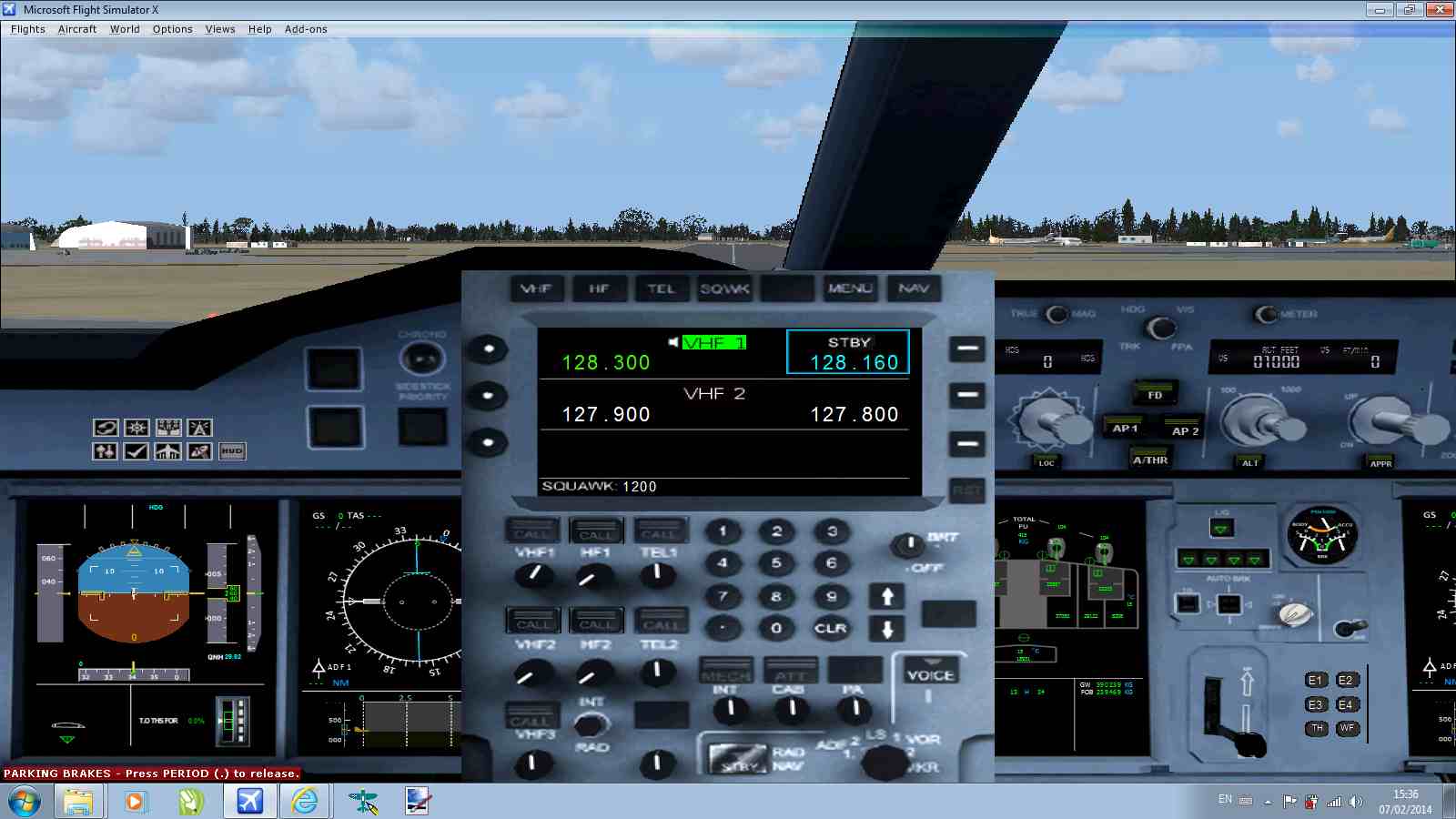
PA A380 VC

FSX including FSX Steam version.

PA A380 VC

Postby Mackyboy » Fri Feb 07, 2014 5:42 am

Hi all,
I just downed the Project Airbus A380 Virtual Cockpit, and what a great cockpit it is.
But I'm having trouble making an ILS landing, I don't know how to put the course heading in, or the runway frequency.
Can somebody help please, because this VC is the best A380 VC I've seen.
I've tried to insert a screen shot but when I click on "Img" all I get is this:-


I tried to copy and paste, but to no avail
Many Thanks
MB
Mackyboy
2nd Lieutenant
2nd Lieutenant
 
Posts: 82
Joined: Fri Jun 24, 2011 4:19 pm
Location: Co. Cavan, Ireland

Re: PA A380 VC

Postby garymbuska » Fri Feb 07, 2014 8:33 am

Mackyboy wrote:Hi all,
I just downed the Project Airbus A380 Virtual Cockpit, and what a great cockpit it is.
But I'm having trouble making an ILS landing, I don't know how to put the course heading in, or the runway frequency.
Can somebody help please, because this VC is the best A380 VC I've seen.
I've tried to insert a screen shot but when I click on "Img" all I get is this:-


I tried to copy and paste, but to no avail
Many Thanks
MB


I am not sure if you can use a VC to enter your heading and the frequency for the ILS. I go to the regular panel to enter this information.
But maybe that is possible in some VC'S. But so far I have not seen one that will.
As for the image you have to upload it. Look at the top of the page far right hand corner you will see the ICON for upload images.


<<v
Gary M Buska
SYSTEM Specs ASUS P8Z68 V/GEN 3 mother board: INTELL I7 2600k 3.48 ghz Quad core CPU with Sandy bridge: 12 Gigs of 1800hz ram:
GTX 950 OVER CLOCKED: 2 Gigs Ram Windows 10 Home 64 bit Operating system. 750W Dedicated modular power supply. Two Internal 1TB hard drives 1 External 1TB 3.2 USB hard drive. SAITEK Cessna flight Yoke with throttles.
CH Rudder Peddles 27 inch Wide screen Monitor
User avatar
garymbuska
Major
Major
 
Posts: 4415
Joined: Tue Dec 30, 2003 11:10 am
Location: Jacksonville, Florida

Re: PA A380 VC

Postby Mackyboy » Fri Feb 07, 2014 11:14 am

Thank you for your help on the picture.
Here is the screen shot of the 2D panel, I've figured out how to put in the course heading it's the runway freq I'm now stuck on.
MB
https://www.simviation.com/phpupload/upl ... 825759.jpg
Mackyboy
2nd Lieutenant
2nd Lieutenant
 
Posts: 82
Joined: Fri Jun 24, 2011 4:19 pm
Location: Co. Cavan, Ireland

Re: PA A380 VC

Postby Fozzer » Fri Feb 07, 2014 11:58 am

Are you able to insert the settings that you need in an aircraft like the default Beech Baron 58/Cessna 172 Trainer, with its Bendix-King Radio stack?

..and what about the default Learjet 45, a similar panel?

That will illustrate if you are fully conversant with whole process of Radio Navigation and the use of the Autopilot in the Flight Sims.

Do you have the approach Chart for the airfield that you are aiming for?
That will show all the frequencies that you require.

Paul...FSX + G-Plan + FS Tramp...for all the radio frequencies!
Win 8.1 64-bit. DX11. Advent Tower. Intel i7-3770 3.9 GHz 8-core. 8 GB System RAM. AMD Radeon HD 7700 1GB RAM. DVD ROM. 2 Terra Byte SATA Hard Drive. Philips 17" LCD Monitor. Saitek Cyborg X Fly-5 Joystick. ...and a Briggs and Stratton Petrol Lawn Mower.
User avatar
Fozzer
Colonel
Colonel
 
Posts: 27369
Joined: Thu Jan 31, 2002 3:11 pm
Location: Hereford. England. EGBS.

Re: PA A380 VC

Postby Mackyboy » Fri Feb 07, 2014 5:27 pm

Hi Fozzer,
No I'm not able to do that, is it easy.
It's the course heading I need, so the aircraft lines up on final, is there a way of putting that in. I've figured out had to put the frequency in.
any idea's
thanks
MB
Mackyboy
2nd Lieutenant
2nd Lieutenant
 
Posts: 82
Joined: Fri Jun 24, 2011 4:19 pm
Location: Co. Cavan, Ireland

Re: PA A380 VC

Postby Fozzer » Fri Feb 07, 2014 7:24 pm

Mackyboy wrote:Hi Fozzer,
No I'm not able to do that, is it easy.
It's the course heading I need, so the aircraft lines up on final, is there a way of putting that in. I've figured out had to put the frequency in.
any idea's
thanks
MB


My advice would be to forget all about big, flashy, Jumbo Passenger Jets for a while, and load up the default Cessna 172 Trainer, and take the "flying lessons" in the Flight Sim.... ;) ...!
Together with the "Flight School Forum" here, you will learn all about flying, including Radio Navigation, which you will find a lot of fun, and highly educational!
Learning your way around The Bendix-King Radio Stack, and being aware of all the Radio Beacon Frequencies will give you a lot of satisfaction in planning and navigating your daily flights!

Start off in easy stages first, with the Trainers....like real Pilots do!.... ;) ... ;) ...!

After a while you can join in, in;"Multiplayer", where you will be guided in all the various procedures, one to one!

Start Small!

Paul....I love my Radios!... :mrgreen: ...!
Win 8.1 64-bit. DX11. Advent Tower. Intel i7-3770 3.9 GHz 8-core. 8 GB System RAM. AMD Radeon HD 7700 1GB RAM. DVD ROM. 2 Terra Byte SATA Hard Drive. Philips 17" LCD Monitor. Saitek Cyborg X Fly-5 Joystick. ...and a Briggs and Stratton Petrol Lawn Mower.
User avatar
Fozzer
Colonel
Colonel
 
Posts: 27369
Joined: Thu Jan 31, 2002 3:11 pm
Location: Hereford. England. EGBS.


Return to Flight Simulator X (FSX) and Steam

Who is online

Users browsing this forum: No registered users and 762 guests