Frame Rates And Poor Smoothness

FSX including FSX Steam version.

Frame Rates And Poor Smoothness

Postby AviationGeek » Sat Jan 11, 2014 2:42 pm

WHAT COMPUTER DO I NEED FOR HIGH QUALITY GAMING..........Basically i have been flying with flight simulator for some time now and always get these really sudden drop in frame rates they only usually range around 17-20 but will suddenly drop to like 2 for about 5 seconds and go back to normal again.

My computer Stuff As Follows:
-windows 7 professional 64 bit
-2.1ghz processor
-4096mb ram
-ATI radeon HD 3200 Graphics

And My Computer Is A Toshiba Satellite A350D

Much Appretiated My Aviation Guys Cheers, Ask For Additional Information If Needed

Aviation Geek, p.s Im new to forums,
AviationGeek
Ground hog
Ground hog
 
Posts: 4
Joined: Sat Jan 11, 2014 2:31 pm

Re: Frame Rates And Poor Smoothness

Postby OldAirmail » Sat Jan 11, 2014 3:58 pm

Are you asking how to improve what you have on your laptop?

Your options are somewhat limited, but something may be done by turning down your FSX setting, and replacing your memory.


Or are you asking what you should buy to replace it?

Do you have an amount of money that you can/are willing to spend?

Are you able to buy parts and assemble them? Or do you need to buy a complete package?
.. .
Get the most out of your controls - SPAD.neXt

Image
. . . . . .Any time, any plane, any weather.
. . . . . . . . . . . . . Prepar3d V4
User avatar
OldAirmail
Major
Major
 
Posts: 4814
Joined: Sun Feb 17, 2013 3:06 pm
Location: Concrete, WA ICAO - 3W5

Re: Frame Rates And Poor Smoothness

Postby AviationGeek » Sat Jan 11, 2014 4:50 pm

I was looking for a desktop really, although my laptop dies meet the requirements for fsx, any ideas on what to get? A Refurb or Second Hand 100-150££ ????
AviationGeek
Ground hog
Ground hog
 
Posts: 4
Joined: Sat Jan 11, 2014 2:31 pm

Re: Frame Rates And Poor Smoothness

Postby OldAirmail » Sat Jan 11, 2014 6:19 pm

Two questions;

How large is you currant hard drive?

Physically what do you have for memory? One, or two ram cards? Also, do you have two ram slots?


For what you have to spend, I'm thinking that it might be better to fix up your laptop for now, and work towards a better desktop system later.

There may be some good improvement possible.


BTW - have you seen much in the way of second hand desktops for 100-150££?

Being very careful in what you buy could work out ok. Not GREAT!, but still better than what you have.

Buy the wrong used computer though, and it could be a waste of money.
.. .
Get the most out of your controls - SPAD.neXt

Image
. . . . . .Any time, any plane, any weather.
. . . . . . . . . . . . . Prepar3d V4
User avatar
OldAirmail
Major
Major
 
Posts: 4814
Joined: Sun Feb 17, 2013 3:06 pm
Location: Concrete, WA ICAO - 3W5

Re: Frame Rates And Poor Smoothness

Postby Fozzer » Sat Jan 11, 2014 7:09 pm

The Review:...>>> http://www.trustedreviews.com/Toshiba-S ... top_review

Looks like it should run FSX at very reduced settings.... :roll: ....

...or FS 2004 at very high settings!.... :dance: ....!

As always, for anyone who is struggling to get FSX to run to their satisfaction on their low-end Computer/Laptop, I always recommend purchasing a copy of FS 2004, and really enjoy the Flight Sim experience, whilst saving up for a Gaming Desktop Computer suitable to run FSX!

Paul...FSX + FS 2004...Best of both Worlds!... :D ...!
Win 8.1 64-bit. DX11. Advent Tower. Intel i7-3770 3.9 GHz 8-core. 8 GB System RAM. AMD Radeon HD 7700 1GB RAM. DVD ROM. 2 Terra Byte SATA Hard Drive. Philips 17" LCD Monitor. Saitek Cyborg X Fly-5 Joystick. ...and a Briggs and Stratton Petrol Lawn Mower.
User avatar
Fozzer
Colonel
Colonel
 
Posts: 27369
Joined: Thu Jan 31, 2002 3:11 pm
Location: Hereford. England. EGBS.

Re: Frame Rates And Poor Smoothness

Postby OldAirmail » Sat Jan 11, 2014 8:34 pm

Yeah. What he said. :D

That might be the best way.

The more you add to FSX, the better it gets. But also the more computer power you need.

You could order this for £9.78.

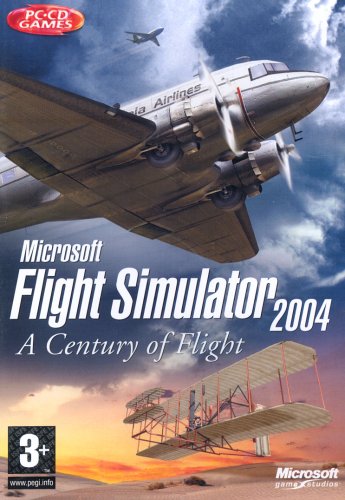
Microsoft Flight Simulator 2004: A Century of Flight (PC CD)

Image

As Paul said, it'll run much faster on your laptop, and you can start saving for a very good system.

If you still want to try to improve your laptop let me know about your hard drive and memory setup.
.. .
Get the most out of your controls - SPAD.neXt

Image
. . . . . .Any time, any plane, any weather.
. . . . . . . . . . . . . Prepar3d V4
User avatar
OldAirmail
Major
Major
 
Posts: 4814
Joined: Sun Feb 17, 2013 3:06 pm
Location: Concrete, WA ICAO - 3W5

Re: Frame Rates And Poor Smoothness

Postby AviationGeek » Sun Jan 12, 2014 1:40 am

Oh Okay Cool, Thanks Guys, What's the difference between fsx and fs 2004 Are The Graphics Not As Good Or Somthing?

Do You Have Any Ideas Where I Can Find Out About The Ram And Stuff?, I'm Rubbish When It Comes To Computers
AviationGeek
Ground hog
Ground hog
 
Posts: 4
Joined: Sat Jan 11, 2014 2:31 pm

Re: Frame Rates And Poor Smoothness

Postby Fozzer » Sun Jan 12, 2014 4:38 am

AviationGeek wrote:Oh Okay Cool, Thanks Guys, What's the difference between fsx and fs 2004 Are The Graphics Not As Good Or Somthing?

Do You Have Any Ideas Where I Can Find Out About The Ram And Stuff?, I'm Rubbish When It Comes To Computers


The really wonderful thing about FS 2004 is that with a slightly more modern Computer and Laptop, it will run SMOOTHLY at very high settings; and there is a wealth of fantastic, FREE add-ons; scenery, airfields, aircraft, scenery mesh, etc, out there, to make FS 2004 look almost as good as FSX....
...I know..I have done it, with my previous, lowly, year 2005 Dell Tower Computer!....trust me!... :D ...!

There is so much more "stuff" out there for FS 2004, and you can also use add-ons from FS '98, FS 2000, and FS 2002, all mostly compatible with each other!

Actually, about the ONLY thing you DON'T get in FS 2004, are the moving FSX road and water traffic!
...but who needs moving traffic, anyway.....it only gets in the way!.... :lol: ...!

Get yourself a cosy copy of FS 2004, and have a peek through the mountains of FREE Simviation, FS 2004 add-ons, spend some time adding them bit, by bit, to FS 2004, and you will end up with a Flight Sim to match FSX....
...and it will run ....SMOOTHLY!...."SMOOTH" is always nice!... :dance: ...!

Go on...give it a go......You will be in good company with lots of other very happy FS 2004 Pilots!

Paul...FS 2004 + FSX...and a big bag of smoothies!... :mrgreen: ...!

...and another really useful tip...
If you fancy flying "Multiplayer" with others...it is REALLY easy to get connected in FS 2004.....instantly!... Have fun with your Mates!
Win 8.1 64-bit. DX11. Advent Tower. Intel i7-3770 3.9 GHz 8-core. 8 GB System RAM. AMD Radeon HD 7700 1GB RAM. DVD ROM. 2 Terra Byte SATA Hard Drive. Philips 17" LCD Monitor. Saitek Cyborg X Fly-5 Joystick. ...and a Briggs and Stratton Petrol Lawn Mower.
User avatar
Fozzer
Colonel
Colonel
 
Posts: 27369
Joined: Thu Jan 31, 2002 3:11 pm
Location: Hereford. England. EGBS.

Re: Frame Rates And Poor Smoothness

Postby AviationGeek » Sun Jan 12, 2014 5:16 am

Sounds Amazing, Will it work with like a A319 Easyjet?

I Usually Just Fly To UK Airports e.g London to Edinburgh Bristol to Dublin?

If So I think I Might Get It?
AviationGeek
Ground hog
Ground hog
 
Posts: 4
Joined: Sat Jan 11, 2014 2:31 pm

Re: Frame Rates And Poor Smoothness

Postby Fozzer » Sun Jan 12, 2014 5:25 am

AviationGeek wrote:Sounds Amazing, Will it work with like a A319 Easyjet?

I Usually Just Fly To UK Airports e.g London to Edinburgh Bristol to Dublin?

If So I think I Might Get It?


Yep...

With a few FREE add-ons, like UK Airport scenery, there are tons of FREE "passenger tubes" to add to all the other FREE aircraft your Hangar!
A search for FS 2004 UK scenery files will show lots of them!

You have a whole world of free add-ons available to you with FS 2004!

Add things, bit by bit!.... :D ...!

Paul.... :mrgreen: ...!
Win 8.1 64-bit. DX11. Advent Tower. Intel i7-3770 3.9 GHz 8-core. 8 GB System RAM. AMD Radeon HD 7700 1GB RAM. DVD ROM. 2 Terra Byte SATA Hard Drive. Philips 17" LCD Monitor. Saitek Cyborg X Fly-5 Joystick. ...and a Briggs and Stratton Petrol Lawn Mower.
User avatar
Fozzer
Colonel
Colonel
 
Posts: 27369
Joined: Thu Jan 31, 2002 3:11 pm
Location: Hereford. England. EGBS.

Re: Frame Rates And Poor Smoothness

Postby OldAirmail » Sun Jan 12, 2014 9:56 am

Just a note - FS9 & FS2004 can be used interchangeably when speaking/writing. We understand that they are the same.

Computers don't.

If you don't find A319 using FS9, try looking again using FS2004.

Something to be aware of is that you'll find an aircraft that you want thoroughly mixed up with a lot of "repaints".

The majority of the downloads with "repaint" in the description DON'T have the actual aircraft in the download.


As to laptop memory. If your laptop has two memory slots, it probably has two 2GB memory cards.

Ask a friend for help, or take the laptop to a computer store, and replace one or both of your memory cards.

So, if you have two 2GB cards, replacing only one with a 4GB card, will give you a total of 6GB. This will give your operating system some badly needed memory space.

I have an old laptop with the same setup. Yours and mine ARE NOT gamming machines so this will probably work out fine.

On the other hand, I have seen laptops with only one memory slot. In that case your options may be more limited.

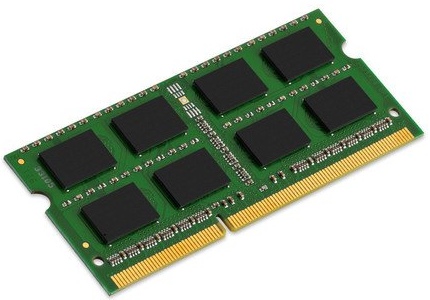
Just a quick check I found this. This is just an example to show you that memory isn't all that expensive. I'm not saying this will work in your laptop.

Kingston 4GB 1333MHz DDR3 £28.99

Image

If you can find small mom & pop computer store, you may find what you need for less than half that, instillation included!
.. .
Get the most out of your controls - SPAD.neXt

Image
. . . . . .Any time, any plane, any weather.
. . . . . . . . . . . . . Prepar3d V4
User avatar
OldAirmail
Major
Major
 
Posts: 4814
Joined: Sun Feb 17, 2013 3:06 pm
Location: Concrete, WA ICAO - 3W5

Re: Frame Rates And Poor Smoothness

Postby Fozzer » Sun Jan 12, 2014 10:16 am

I don't know if Laptops work the same, but in Windows, on the "Start" button in the bottom left of the Task Bar.....

Press Start, then type .... "dxdiag"....(without the quotes)...

This will display the contents of your Computer/Laptop.....

...(but not the contents of your stomach during an autopsy)... ;) ...!

Paul...contented.... :mrgreen: ...!
Win 8.1 64-bit. DX11. Advent Tower. Intel i7-3770 3.9 GHz 8-core. 8 GB System RAM. AMD Radeon HD 7700 1GB RAM. DVD ROM. 2 Terra Byte SATA Hard Drive. Philips 17" LCD Monitor. Saitek Cyborg X Fly-5 Joystick. ...and a Briggs and Stratton Petrol Lawn Mower.

User avatar
Fozzer
Colonel
Colonel
 
Posts: 27369
Joined: Thu Jan 31, 2002 3:11 pm
Location: Hereford. England. EGBS.


Return to Flight Simulator X (FSX) and Steam

Who is online

Users browsing this forum: No registered users and 829 guests