Addons install for Dummies

FSX including FSX Steam version.

Re: Addons install for Dummies

Postby bombardier » Thu Dec 26, 2013 12:14 pm

if I can cut in to this post thanks but if not I will make a new post and sorry about that if I cut in: I'm is the same thing is happening to me

I have downloaded project airbus A380 klm 45 mbs big. its in my fsx airplane folder but when I hope to fly its not showing up. I'm I suppose to do anything with the aircraft cfg? I got w7 if that helps any.

oh by the way just off topic here how many jets and or planes can you download ?

when I download, do I need to turn off my anti virus and or tell my w7 and my virus program to let downloads pass through. if to let them pass through how would I set that up simviation downloads or what.?

where can I get an windows xp disk?

bombardier
User avatar
bombardier
2nd Lieutenant
2nd Lieutenant
 
Posts: 288
Joined: Sat Sep 04, 2010 2:58 pm
Location: united states

Re: Addons install for Dummies

Postby Hagar » Thu Dec 26, 2013 2:09 pm

bombardier wrote:if I can cut in to this post thanks but if not I will make a new post and sorry about that if I cut in: I'm is the same thing is happening to me

I have downloaded project airbus A380 klm 45 mbs big. its in my fsx airplane folder but when I hope to fly its not showing up. I'm I suppose to do anything with the aircraft cfg? I got w7 if that helps any.


I presume you mean this one? http://simviation.com/1/search?submit=1&keywords=A380-KLM.zip&categoryId=&filename=Y

Installation is perfectly straightforward. A380-KLM.zip contains a yellow folder named A380-KLM & a file named Readme.txt. Paste the folder named A380-KLM into your FSX\SimObjects\Airplanes folder. It's a complete aircraft with its own panel & sound. There is no need to modify Aircraft.cfg or anything else.

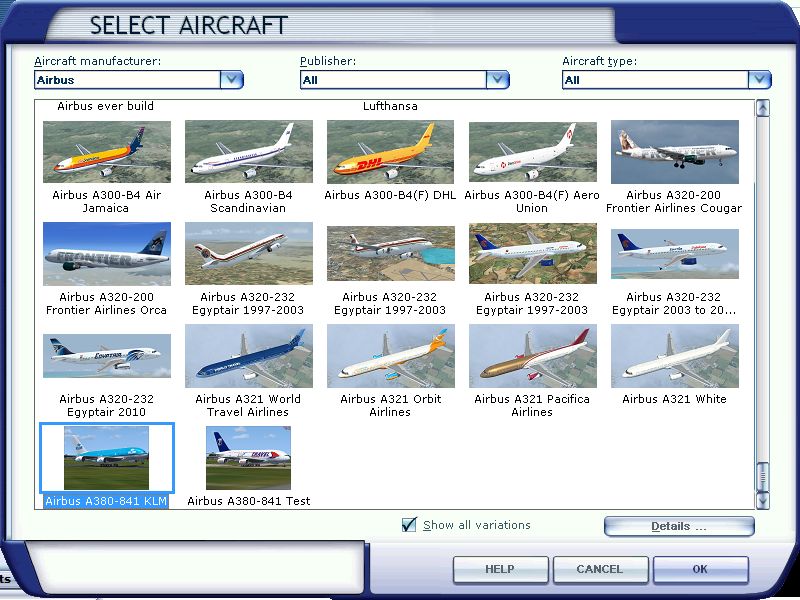
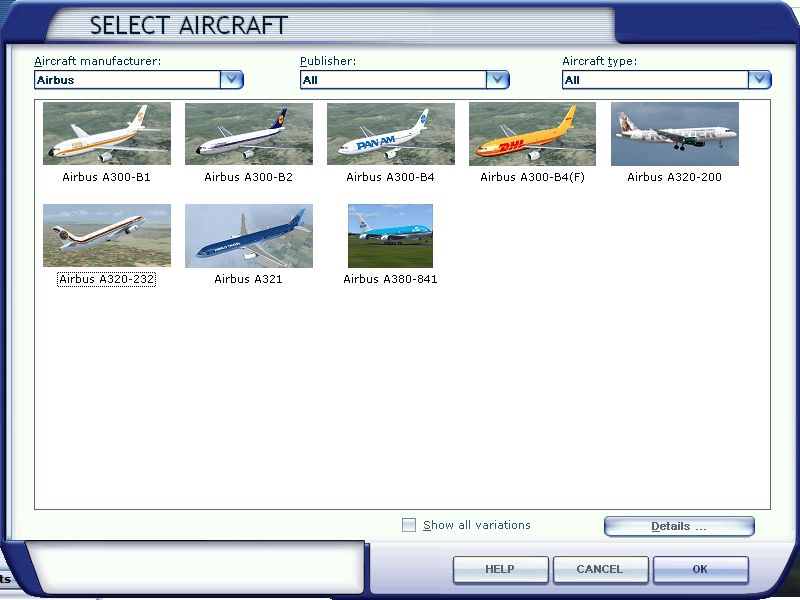
If you have other versions of the Project Airbus A380 installed make sure the "Show all variations" box is checked in the FSX aircraft selection window. I suspect this could be the reason it's not listed on your menu.

"All variations" box unchecked
Image

Checked
Image

oh by the way just off topic here how many jets and or planes can you download ?

when I download, do I need to turn off my anti virus and or tell my w7 and my virus program to let downloads pass through. if to let them pass through how would I set that up simviation downloads or what.?

Downloads from the Simviation free area are limited to 2 files per session. Downloads from the members area are unlimited. If you can download individual files successfully there is no need to change anything.

where can I get an windows xp disk?

bombardier

You might be able to get a copy on eBay. Not sure why you want it. FSX runs well on Win7.
Image

Founder & Sole Member - Grumpy's Over the Hill Club for Veteran Virtual Aviators
Member of the Fox Four Group
My Google Photos albums
My Flickr albums
User avatar
Hagar
Colonel
Colonel
 
Posts: 30868
Joined: Wed Jun 19, 2002 7:15 am
Location: Costa Geriatrica

Re: Addons install for Dummies

Postby bombardier » Thu Dec 26, 2013 7:53 pm

hello hagar:

I did what you told me to do. I copy and pasted the folder its listed in airplanes but not showing up I even checked "show all versions". now any ideas. I still think windows 7 has something to do with it. when I have windows xp I never had this trouble.

bombardier

hello hagr: I did check "show all versions" and the jet is listed in the plane list. but one question though why does "show all versions" need to be checked? it seems like to me that all planes should show up in the planes list with or without the show all versions checked or unchecked.
User avatar
bombardier
2nd Lieutenant
2nd Lieutenant
 
Posts: 288
Joined: Sat Sep 04, 2010 2:58 pm
Location: united states

Re: Addons install for Dummies

Postby garymbuska » Thu Dec 26, 2013 9:15 pm

bombardier wrote:hello hagar:

I did what you told me to do. I copy and pasted the folder its listed in airplanes but not showing up I even checked "show all versions". now any ideas. I still think windows 7 has something to do with it. when I have windows xp I never had this trouble.

bombardier

hello hagr: I did check "show all versions" and the jet is listed in the plane list. but one question though why does "show all versions" need to be checked? it seems like to me that all planes should show up in the planes list with or without the show all versions checked or unchecked.


If you installed FSX in the default location which is C:Program Files(86) than that could be your problem.
Windows 7 and windows 8 have permission issues and with FSX it can effect third party software. Both Operating systems treat the program file folder like system files and try to prevent anything else from running in that area.
The best procedure is to install FSX on a hard drive that does not have your operating system on it. Adding a partition will not help. If you only have the one hard drive you need to make a folder anyplace but inside the program file folder. I have FSX installed on a external drive and FS9 on a second internal hard drive, which gives me three hard drives.
Now mind you this may not be what is actually causing your problem all I know is that due to permission issues some software will not run correctly place in this area.

<<v
Gary M Buska
SYSTEM Specs ASUS P8Z68 V/GEN 3 mother board: INTELL I7 2600k 3.48 ghz Quad core CPU with Sandy bridge: 12 Gigs of 1800hz ram:
GTX 950 OVER CLOCKED: 2 Gigs Ram Windows 10 Home 64 bit Operating system. 750W Dedicated modular power supply. Two Internal 1TB hard drives 1 External 1TB 3.2 USB hard drive. SAITEK Cessna flight Yoke with throttles.
CH Rudder Peddles 27 inch Wide screen Monitor
User avatar
garymbuska
Major
Major
 
Posts: 4415
Joined: Tue Dec 30, 2003 11:10 am
Location: Jacksonville, Florida

Re: Addons install for Dummies

Postby Hagar » Fri Dec 27, 2013 4:08 am

bombardier wrote:hello hagr: I did check "show all versions" and the jet is listed in the plane list. but one question though why does "show all versions" need to be checked? it seems like to me that all planes should show up in the planes list with or without the show all versions checked or unchecked.

I'm glad my suggestion worked. If the box is unchecked only one variation of a specific aircraft will be listed. I'm not sure why this option is included & I always leave the box checked.

I still think windows 7 has something to do with it. when I have windows xp I never had this trouble.

As Gary points out Win7 has a few quirks but these are easily overcome. You should have no problems installing complete aircraft even if your FSX is in the default Program Files location. The only likely trouble might be when you wish to edit CFG files to add repaints. I have XP on my desktop PC & Win7 64-bit on my laptop. It didn't take long to get used to it.
Image

Founder & Sole Member - Grumpy's Over the Hill Club for Veteran Virtual Aviators
Member of the Fox Four Group
My Google Photos albums
My Flickr albums
User avatar
Hagar
Colonel
Colonel
 
Posts: 30868
Joined: Wed Jun 19, 2002 7:15 am
Location: Costa Geriatrica

Re: Addons install for Dummies

Postby Hagar » Fri Dec 27, 2013 6:42 am

I forgot to mention that I changed my Win7 to Classic mode. This makes it similar to XP. http://windows.microsoft.com/en-gb/windows-vista/change-windows-to-classic-view
Image

Founder & Sole Member - Grumpy's Over the Hill Club for Veteran Virtual Aviators
Member of the Fox Four Group
My Google Photos albums
My Flickr albums
User avatar
Hagar
Colonel
Colonel
 
Posts: 30868
Joined: Wed Jun 19, 2002 7:15 am
Location: Costa Geriatrica

Re: Addons install for Dummies

Postby bombardier » Fri Dec 27, 2013 7:36 am

hello hagar:

I'm not planning on doing any repaints

I think I will leave everything alone. I downloaded 3 more planes (not the one I had problems with) last night and they are showing up in planes list. classic mode? where can I find that sounds good to me. in compatibiity mode I got windows xp sp3 has listed and run as adminstrator is checked also.

the only thing I might change if I have to is the sound in some of the A380 jets. some A380 sounds listed as bombardier sound. and maybe change the sound real life sound like the 737-800 sound.

bombardier
User avatar
bombardier
2nd Lieutenant
2nd Lieutenant
 
Posts: 288
Joined: Sat Sep 04, 2010 2:58 pm
Location: united states

Re: Addons install for Dummies

Postby garymbuska » Fri Dec 27, 2013 9:57 am

As you can see by my signature I am using Windows 8 64 bit. Before I installed it I did some digging and ran across a article that stated that Windows 7 and Windows 8 64 bit systems seem to have permission issues with some software. Now this may only apply to the 64 bit versions I do not know but the way I looked at it was a ounce of prevention is worth a ton of cure. It was not going to create any problem by installing FSX on a separate hard drive as I have always had it on a second hard drive even when I was using windows XP.
Like I said the permission problem might not be what is causing the issue you had but it might be. By installing it someplace other than the program file folder I do not have to worry about any third party software not working correctly. Who knows you might not ever have this problem but than again you might depending on what you add. 8-)
There are plenty of post about this issue of permissions when it comes to Windows 7 and 8


<<s
Gary M Buska
SYSTEM Specs ASUS P8Z68 V/GEN 3 mother board: INTELL I7 2600k 3.48 ghz Quad core CPU with Sandy bridge: 12 Gigs of 1800hz ram:
GTX 950 OVER CLOCKED: 2 Gigs Ram Windows 10 Home 64 bit Operating system. 750W Dedicated modular power supply. Two Internal 1TB hard drives 1 External 1TB 3.2 USB hard drive. SAITEK Cessna flight Yoke with throttles.
CH Rudder Peddles 27 inch Wide screen Monitor
User avatar
garymbuska
Major
Major
 
Posts: 4415
Joined: Tue Dec 30, 2003 11:10 am
Location: Jacksonville, Florida

Re: Addons install for Dummies

Postby bombardier » Fri Dec 27, 2013 10:36 am

hello to all:

first I knew I should have post a thread someplace else but any way:

the 380 klm engine sound is fake it is a lear jet sound. is there a sticky on how to replace an engine sound with another? ok, heres what I want to do I want to replace the fake sound with 737-800_sound. is it just as easy to type the words in the sound folder? if no sound cfg when what? after this I will post in my thread.

bombardier
User avatar
bombardier
2nd Lieutenant
2nd Lieutenant
 
Posts: 288
Joined: Sat Sep 04, 2010 2:58 pm
Location: united states

Re: Addons install for Dummies

Postby Bass » Fri Dec 27, 2013 10:46 am

Just copy any sound folder you want, place it in aircraft folder. Rename the present sound folder to sound.orig or delete it ;)

In some ac you'll see this in the sound folder sound.cfg
[fltsim]
alias=c172\sound
Then just change the c172 to whatever ac sound you want.
"Just try to be YOU"!............ Kurt 

System. GA-X58A-UD3R, i7-950QC, Corsair XMS3 18GB 2000, GTX 780 tf 3GB, Corsair CMPSU-850, 24 BenQ 120, TM Hotas cougar, win7 pro.
User avatar
Bass
Major
Major
 
Posts: 3043
Joined: Wed Feb 15, 2012 9:32 am
Location: Scandinavia

Re: Addons install for Dummies

Postby Hagar » Fri Dec 27, 2013 5:42 pm

bombardier wrote: classic mode? where can I find that sounds good to me.

Click on the link in my previous reply.
Image

Founder & Sole Member - Grumpy's Over the Hill Club for Veteran Virtual Aviators
Member of the Fox Four Group
My Google Photos albums
My Flickr albums
User avatar
Hagar
Colonel
Colonel
 
Posts: 30868
Joined: Wed Jun 19, 2002 7:15 am
Location: Costa Geriatrica

Re: Addons install for Dummies

Postby bombardier » Sat Dec 28, 2013 1:15 pm

hello hagar and bass:

I got the sound changed, thanks

in real life an A380 jet would not sound like a lear jet sound. so why use the lear jet sound in an a380 jet any way? I thought they want to keep everything life like or on the realism side anyway.

bombardier
User avatar
bombardier
2nd Lieutenant
2nd Lieutenant
 
Posts: 288
Joined: Sat Sep 04, 2010 2:58 pm
Location: united states

Re: Addons install for Dummies

Postby Hagar » Sat Dec 28, 2013 2:19 pm

bombardier wrote:hello hagar and bass:

I got the sound changed, thanks

in real life an A380 jet would not sound like a lear jet sound. so why use the lear jet sound in an a380 jet any way? I thought they want to keep everything life like or on the realism side anyway.

bombardier

The KLM A380 package I checked out includes an A320 sound package. I assume that a suitable A380 sound package was not available at the time it was uploaded.
Image

Founder & Sole Member - Grumpy's Over the Hill Club for Veteran Virtual Aviators
Member of the Fox Four Group
My Google Photos albums
My Flickr albums
User avatar
Hagar
Colonel
Colonel
 
Posts: 30868
Joined: Wed Jun 19, 2002 7:15 am
Location: Costa Geriatrica

Previous

Return to Flight Simulator X (FSX) and Steam

Who is online

Users browsing this forum: No registered users and 838 guests