'Airport information' how to turn off.

FSX including FSX Steam version.

'Airport information' how to turn off.

Postby Eagle eye » Wed Dec 11, 2013 8:35 pm

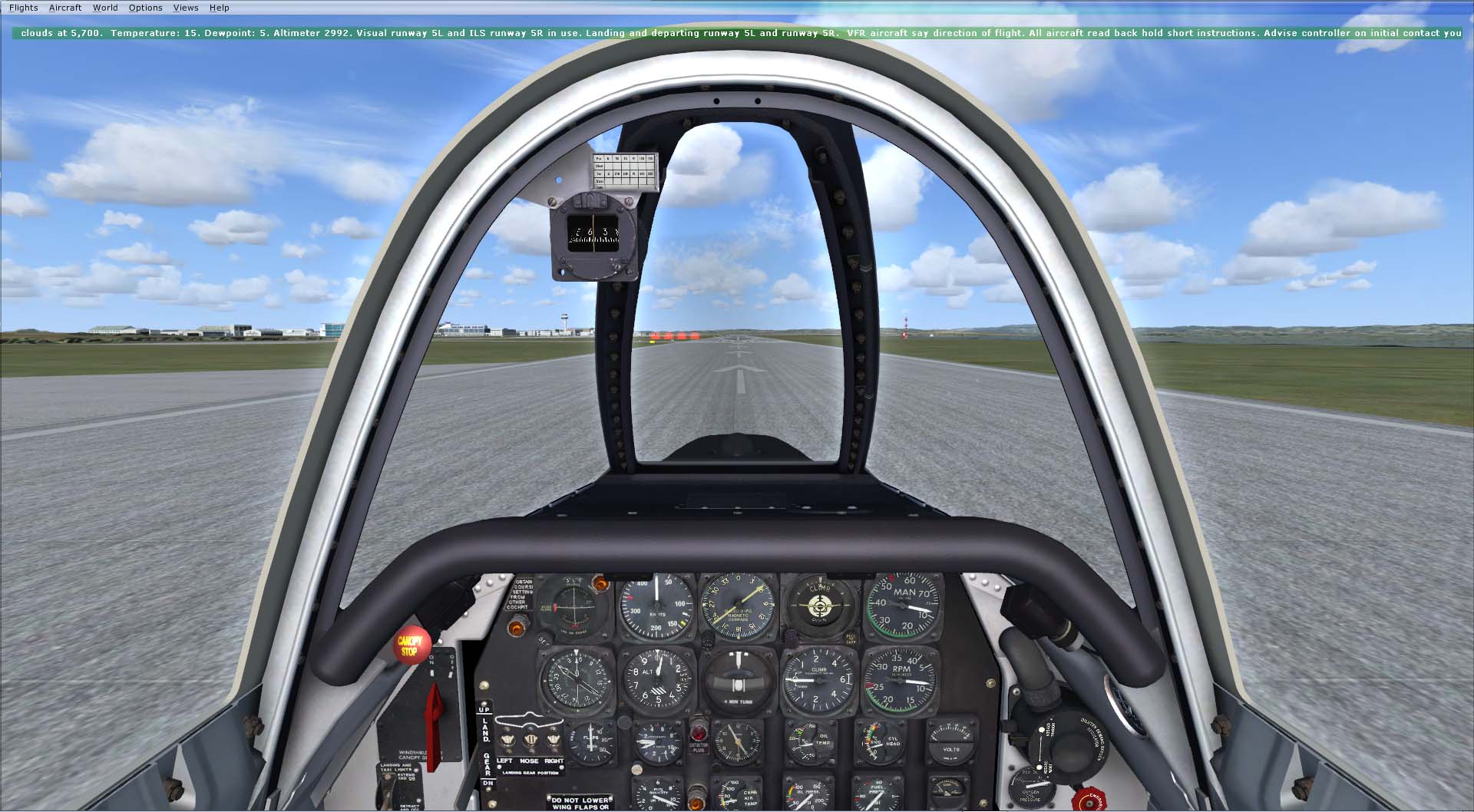
I am quite new to FSX and this forum but I have a problem with FSX which I can't fathom. I recently added the 'Ants Airplanes' T28 Trojan. The aircraft is excellent in every way, however my problem is each time I use it I get a continuous visual & audio 'Airport information'. It is unnecessary and frankly annoying, can someone tell me what I can do to turn it OFF:?: :doh:

User avatar
Eagle eye
Ground hog
Ground hog
 
Posts: 47
Joined: Wed Jul 10, 2013 5:19 pm
Location: New Zealand

Re: 'Airport information' how to turn off.

Postby garymbuska » Wed Dec 11, 2013 9:39 pm

Eagle eye wrote:I am quite new to FSX and this forum but I have a problem with FSX which I can't fathom. I recently added the 'Ants Airplanes' T28 Trojan. The aircraft is excellent in every way, however my problem is each time I use it I get a continuous visual & audio 'Airport information'. It is unnecessary and frankly annoying, can someone tell me what I can do to turn it OFF:?: :doh:

Hello and welcome to Simviation From what you describe what you are seeing is what is commonly called ATIS Automatic Terminal Information System or in plane terms airport information to turn this off just press the number 1 key and it should go away
This is what you need to find out important items about the airport you are at
such as Altimeter visibility active runway and the direction and speed of the wind
I strongly suggest that you start out by reading the vast learning center to find this press the ~ key (upper left hand corner) then click on learning center.
If something like this message stumps you it is something that you should read otherwise you are going to get totally confused.
There are also lessons you can take that will help

Good luck <<v
Gary M Buska
SYSTEM Specs ASUS P8Z68 V/GEN 3 mother board: INTELL I7 2600k 3.48 ghz Quad core CPU with Sandy bridge: 12 Gigs of 1800hz ram:
GTX 950 OVER CLOCKED: 2 Gigs Ram Windows 10 Home 64 bit Operating system. 750W Dedicated modular power supply. Two Internal 1TB hard drives 1 External 1TB 3.2 USB hard drive. SAITEK Cessna flight Yoke with throttles.
CH Rudder Peddles 27 inch Wide screen Monitor
User avatar
garymbuska
Major
Major
 
Posts: 4415
Joined: Tue Dec 30, 2003 11:10 am
Location: Jacksonville, Florida

Re: 'Airport information' how to turn off.

Postby Eagle eye » Wed Dec 11, 2013 11:16 pm

I am sorry to say but pressing the number 1 on the number keys or on the keyboard do not turn the message off on my FSX install. You can turn off the visual green tape by right clicking and selecting close window but the audio keeps going, and only when I use the 'Ant Airplanes' Trojan T28. I still need HELP! See the screen shot below:-
https://www.simviation.com/phpupload/upl ... 857133.jpg
User avatar
Eagle eye
Ground hog
Ground hog
 
Posts: 47
Joined: Wed Jul 10, 2013 5:19 pm
Location: New Zealand

Re: 'Airport information' how to turn off.

Postby PhantomTweak » Thu Dec 12, 2013 12:02 am

Do you always start at the same airport? Sounds to me like your aircraft's default radio frequency is set to an ATIS. Most airports have them. Just tune your primary radio freq (COM1) to another selection, and bingo! problem solved! :D

start out by reading the vast learning center
is the best way to learn to tune the radios if you aren't familiar with them already. very easy with almost all the radios, and ALWAYS easy once you become familiar with the particular radios you use most :)

Welcome to Simviation, by the way! always good to have a fresh victim....errrrr.... new person to talk with! :D

Good flights and fair weather to ya!

Pat~
Have fun, fly high, far, and free!
Pat
2S7, Chiloquin OR Image
User avatar
PhantomTweak
Captain
Captain
 
Posts: 599
Joined: Mon Oct 14, 2013 11:10 pm
Location: Chiloquin OR

Re: 'Airport information' how to turn off.

Postby Fozzer » Thu Dec 12, 2013 3:44 am

I would always recommend using the Cessna 172 Trainer, and becoming familiar with operating the excellent Bendix-King Radio Stack.
It contains all the various modules used for Communication, Identification, and Navigation, including its Audio Panel at the top, from where you can control the various Audio signals (Beacons, etc).
Audio Communication frequencies are tuned from the "Com 1" Panel.

Its always good to familiarise oneself with flying the; "Trainers" first!

Radio Communication and Navigation is fun, then!

Paul.... :mrgreen: ...!
Win 8.1 64-bit. DX11. Advent Tower. Intel i7-3770 3.9 GHz 8-core. 8 GB System RAM. AMD Radeon HD 7700 1GB RAM. DVD ROM. 2 Terra Byte SATA Hard Drive. Philips 17" LCD Monitor. Saitek Cyborg X Fly-5 Joystick. ...and a Briggs and Stratton Petrol Lawn Mower.
User avatar
Fozzer
Colonel
Colonel
 
Posts: 27369
Joined: Thu Jan 31, 2002 3:11 pm
Location: Hereford. England. EGBS.

Re: 'Airport information' how to turn off.

Postby garymbuska » Thu Dec 12, 2013 8:23 am

Like others have said you must have saved the flight with the ATIS tuned in COM1.
When you first install FSX by default when you crank it up it will load the default flight and aircraft and it will have every thing running including the engines. When you press the ~ key this will open the ATC window and should gice you a couple of options each option will have a number beside
The number 1 is usually contact ATIS this will automatically switch COM 1 to the correct frequency needed by the airport you are at.
than to turn it off you press the ~ key again and press the number 2 option which should switch to the ground frequency.
I am guessing that by luck the frequency that was set on COM 1 just happens to be what the airport you are at uses for ATC.
That is a rare accident If you switch airports it should go away as each airport uses a different frequency and the odds of finding another airport with the same frequency is to high but it is likely
Most of us prefer to start up cold and dark and at the airport we usually call home base. I would take Fozzer advice and start out with the Cessna.
It is a very good first time aircraft and ideal for training. Even in the real world one would not just jump into a Jet aircraft, one has to crawl before you can walk.
This is what you need to do once you have fsx up and running and are at your starting airport with what ever aircraft you wish to use for starting.
Press shift + F1 this should shut down all of the engines unless you have changed assignments.
The ATIS is controlled by the radio COM 1 frequency some radios have a standby and a active frequency others only have active I have not used the aircraft you mentioned so I do not know what it is using for a radio. But in either case you need to change the frequency of COM 1.
What most of us do is to customize FSX to what we expect at the start. Which means changing the assignments to perform the most basic tasks.
As a example I use SHIFT B to turn on/off the battery and use SHIFT + G to turn on/off the generators.
The above is just a glimpse of what is involved. As I stated before you need to take a slow start and look through the learning center this is the best way to begin.
In the real world one has to take what is called a ground class which is where you learn what you need to know about ground operations and aircraft basics.
I know that you are just wanting to dive in and get flying I can understand that but there is so much more to get the full effect one needs to go through the steps as if he was flying the real thing. Trust me it really makes a difference when you under stand everything that you are doing.
But I know that some just want to fly if that is the case here than perhaps all you really need is just a basic lesson or two. which you can find in fsx as well.


<<r
Gary M Buska
SYSTEM Specs ASUS P8Z68 V/GEN 3 mother board: INTELL I7 2600k 3.48 ghz Quad core CPU with Sandy bridge: 12 Gigs of 1800hz ram:
GTX 950 OVER CLOCKED: 2 Gigs Ram Windows 10 Home 64 bit Operating system. 750W Dedicated modular power supply. Two Internal 1TB hard drives 1 External 1TB 3.2 USB hard drive. SAITEK Cessna flight Yoke with throttles.
CH Rudder Peddles 27 inch Wide screen Monitor
User avatar
garymbuska
Major
Major
 
Posts: 4415
Joined: Tue Dec 30, 2003 11:10 am
Location: Jacksonville, Florida

Re: 'Airport information' how to turn off.

Postby Bass » Thu Dec 12, 2013 10:04 am

Just a Q.
Does this mean, you'll get the ATIS no matter what airfield you start from with that particular plane?
Reason why i ask is, everytime i start a flight from Reykjavik, Iceland (ORBX), no matter what aircraft, they'll send out ATIS!
I just turn the radio off, or, as i use to do, contact ATC to make the flight real!
"Just try to be YOU"!............ Kurt 

System. GA-X58A-UD3R, i7-950QC, Corsair XMS3 18GB 2000, GTX 780 tf 3GB, Corsair CMPSU-850, 24 BenQ 120, TM Hotas cougar, win7 pro.
User avatar
Bass
Major
Major
 
Posts: 3043
Joined: Wed Feb 15, 2012 9:32 am
Location: Scandinavia

Re: 'Airport information' how to turn off.

Postby EVVFCX » Thu Dec 12, 2013 10:42 am

Hi All,

It's best to look at your settings for controls, in options/controls/button key presses.

This is because the buttons as mentioned above may not be located with other 'pilots' and this is
purely down to where you are from or tobe more precise, where your keyboard is from and your keyboard nationality settings.

For example on my keyboard, the ~ is a shifted charcater and is on my # key next to the main 'ENTER' button.

As Fozzer has said, start basic then move up, do the lessons and some of the missions, some of the helicopter
missions will drive you nuts.

regards

Steve
User avatar
EVVFCX
Captain
Captain
 
Posts: 751
Joined: Tue Nov 27, 2007 8:32 am
Location: Pontefract, West Yorkshire

Re: 'Airport information' how to turn off.

Postby garymbuska » Thu Dec 12, 2013 3:14 pm

EVVFCX wrote:Hi All,

It's best to look at your settings for controls, in options/controls/button key presses.

This is because the buttons as mentioned above may not be located with other 'pilots' and this is
purely down to where you are from or tobe more precise, where your keyboard is from and your keyboard nationality settings.

For example on my keyboard, the ~ is a shifted charcater and is on my # key next to the main 'ENTER' button.

As Fozzer has said, start basic then move up, do the lessons and some of the missions, some of the helicopter
missions will drive you nuts.

regards

Steve

Keyboards are either what are refereed to as QWERTY or some other arrangement to many to keep count of
The first row of letters are QWERTY on any QWERTY Keyboard and all other keys are standard which is why QWERTY keyboards are considered standard. Where they are made makes no difference
But to answer your question about the ATIS that is true no matter what airport you go to if you use the ~ key or open the ATC window the number 1 option is usually contact ATIS this will automatically tune com 1 to the correct frequency of the airport you are at.Unless the air port does not have a control tower than you will no see this option as ATIC is provided by the person in control of ground operations in the tower. MIND you this is not always the same person you file a flight plan with but could be.
The control towers at all airports are responsible for Ground control departure and arrival and that is it. Usually this is done by 3 different people but not always.
Every thing else is a center. so if you are at a airport that does not have a control tower you have to call the center for the area you are in to file a flight plan and you will not find any ATIS at these airports.
This is why I suggest that you check out the learning center as you can see it can get complicated in a hurry.


<<r
Gary M Buska
SYSTEM Specs ASUS P8Z68 V/GEN 3 mother board: INTELL I7 2600k 3.48 ghz Quad core CPU with Sandy bridge: 12 Gigs of 1800hz ram:
GTX 950 OVER CLOCKED: 2 Gigs Ram Windows 10 Home 64 bit Operating system. 750W Dedicated modular power supply. Two Internal 1TB hard drives 1 External 1TB 3.2 USB hard drive. SAITEK Cessna flight Yoke with throttles.
CH Rudder Peddles 27 inch Wide screen Monitor
User avatar
garymbuska
Major
Major
 
Posts: 4415
Joined: Tue Dec 30, 2003 11:10 am
Location: Jacksonville, Florida

Re: 'Airport information' how to turn off.

Postby Eagle eye » Thu Dec 12, 2013 3:25 pm

Thanks so much for your replies to my question on this forum. I am new to FSX and yes as someone commented I may be over eager, however I have not en-counted too many problems I couldn't handle on a computer before. I will admit todate I have never fully understood the radio stack and their implications to the aircraft operation. Instead relying on the FSX ATS system. The message I take from your replies is go read the manuals. So that's what I will do. Using the 'Ants Airplanes' T28 Trojan which has old style military radio UHF-VHF is so different to the modern Cessna 172 setup the words Com 1 don't figure. As a past licenced aircraft maintenance engineer my categories where engine and airframe so a radio operator or pilot I was not. Thanks once again, and I will take time to digest your replies and study a bit more of the manuals, cheers.
User avatar
Eagle eye
Ground hog
Ground hog
 
Posts: 47
Joined: Wed Jul 10, 2013 5:19 pm
Location: New Zealand

Re: 'Airport information' how to turn off.

Postby EVVFCX » Thu Dec 12, 2013 5:51 pm

I have to repeat what I put above.
Pressing the Tilde key on a default setup will have no effect on the atc window as it's not the default key for ATC window, the ' key is the default key to open and close it,
and it is the nationality setting that will define what keys are where on a keyboard no matter how the key is labelled on a qwerty keyboard.

So it's best to say check your own settings which is why I mentioned it above

regards

Steve
User avatar
EVVFCX
Captain
Captain
 
Posts: 751
Joined: Tue Nov 27, 2007 8:32 am
Location: Pontefract, West Yorkshire

Re: 'Airport information' how to turn off.

Postby garymbuska » Thu Dec 12, 2013 8:58 pm

EVVFCX wrote:I have to repeat what I put above.
Pressing the Tilde key on a default setup will have no effect on the atc window as it's not the default key for ATC window, the ' key is the default key to open and close it,
and it is the nationality setting that will define what keys are where on a keyboard no matter how the key is labelled on a qwerty keyboard.

So it's best to say check your own settings which is why I mentioned it above

regards

Steve

Ah ha I see said the blind man as he picked up the hammer and saw 8-)
You are 100% correct on that I had forgotten about that :oops:
Gary M Buska
SYSTEM Specs ASUS P8Z68 V/GEN 3 mother board: INTELL I7 2600k 3.48 ghz Quad core CPU with Sandy bridge: 12 Gigs of 1800hz ram:
GTX 950 OVER CLOCKED: 2 Gigs Ram Windows 10 Home 64 bit Operating system. 750W Dedicated modular power supply. Two Internal 1TB hard drives 1 External 1TB 3.2 USB hard drive. SAITEK Cessna flight Yoke with throttles.
CH Rudder Peddles 27 inch Wide screen Monitor
User avatar
garymbuska
Major
Major
 
Posts: 4415
Joined: Tue Dec 30, 2003 11:10 am
Location: Jacksonville, Florida

Re: 'Airport information' how to turn off.

Postby EVVFCX » Fri Dec 13, 2013 8:15 am

no problem Gary :)

Eagle Eye, practice in the 172's , even after your becoming proficient in the heavy tins go back every now and again and fly the 172 if your having trouble doing a task in the heavier craft.

Just sit at the airport and play around with the ATC window, you can also use your move to select any option on the ATC window, just left click on whatever you want to do.

The radios can be tuned for you, but try and get in the habit of knowing how to manually tune the radios, they are automatically tuned for you after selecting 'Tune To 'airport' tower etc, but, try not to use it as later when you do the lessons, you should be manually tuning.


regards

Steve
User avatar
EVVFCX
Captain
Captain
 
Posts: 751
Joined: Tue Nov 27, 2007 8:32 am
Location: Pontefract, West Yorkshire


Return to Flight Simulator X (FSX) and Steam

Who is online

Users browsing this forum: No registered users and 779 guests