Page 1 of 1
Blocky Shorelines - how to get rid of?

Posted:
Fri Nov 09, 2007 12:21 pmby TSC.
Evenin' all,
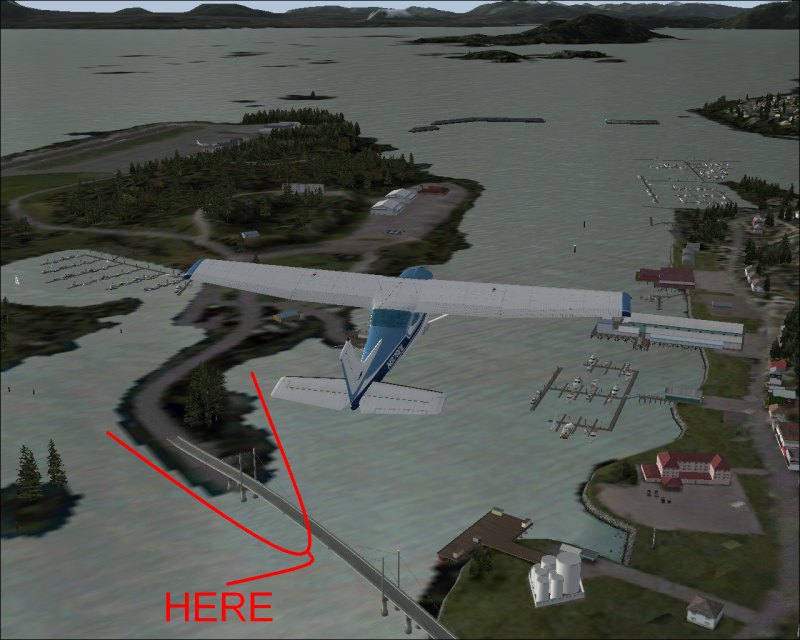
After a fresh install of FS9, I now have some horrible blocky shorelines & was wondering if any of you guys had some suggestions on how I can get rid of them or at the least, improve them.
Here's a piccy to show you, on the left (as marked) is your basic M$ affair which looks awful, the nice smooth shoreline on the right is courtesy of Tongass Fjords:
Cheers,
TSC.
Re: Blocky Shorelines - how to get rid of?
Posted:
Fri Nov 09, 2007 1:01 pmby Dan Morera
2 things you may want to look into is that the scenery is actually added on the FS9 library. and if it is make sure it is not under "something" in that same area
Re: Blocky Shorelines - how to get rid of?
Posted:
Sat Nov 10, 2007 4:20 amby Clipper
Martyn, try Real Environment Professional. I had horribly hard and unrealistic edges on my shorelines, this fantastic freeware smoothed it out completely. One of the most popular downloads of 2007, it's made a huge difference in the realism of my FS9. Hopefully this'll clear up your blocks. :)
Re: Blocky Shorelines - how to get rid of?
Posted:
Sat Nov 10, 2007 11:04 amby Wii
[quote]Martyn, try Real Environment Professional. I had horribly hard and unrealistic edges on my shorelines, this fantastic freeware smoothed it out completely. One of the most popular downloads of 2007, it's made a huge difference in the realism of my FS9. Hopefully this'll clear up your blocks.
Re: Blocky Shorelines - how to get rid of?
Posted:
Sat Nov 10, 2007 2:55 pmby TSC.
Thanks guys,
Have installed Real Environment Professional & it seems to have made an improvement, however, my FS9 shortcut has now gone from desktop & the icon for FS9 in the start menu says 'Safe Mode' - anybody know what this means & how to fix it?
Cheers,
TSC.