Page 1 of 2
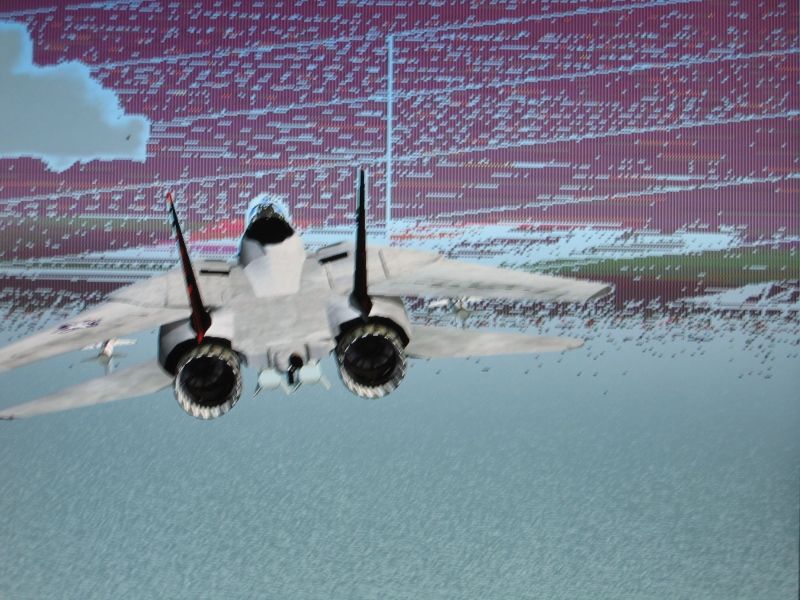
HELP ME!!!!!!!! WORST ERROR EVER!!!!!!! HELP!!!!!!

Posted:
Thu Oct 11, 2007 8:12 amby DonAlfonsoRoKil
Re: HELP ME!!!!!!!! WORST ERROR EVER!!!!!!! HELP!!
Posted:
Thu Oct 11, 2007 8:16 amby Sovien
I'm not sure Rev, it almost looks like a monitor problem. Do you this problem with any other game?
Re: HELP ME!!!!!!!! WORST ERROR EVER!!!!!!! HELP!!
Posted:
Thu Oct 11, 2007 8:18 amby DonAlfonsoRoKil
Haven't tried Games, yet.
I also first thought of a monitor problem, but why does EVERYTHING else like windows, movies, software, pictures etc. look normal?!!!
Thank you, though, I'll fire up a game!
Re: HELP ME!!!!!!!! WORST ERROR EVER!!!!!!! HELP!!
Posted:
Thu Oct 11, 2007 8:31 amby DonAlfonsoRoKil
I tried 3 Games still on my harddrive with more or less good results:
- Stronghold Crusader - worked without any problems! :-?
Then I came on the idea of taking ANOTHER Microsoft Product (I thought it could have partially the same graphics source code, and yes):
- Age of Empires III: Saw it already in Opening Screen - The same ugly green and purple rectangles!!!! :o
Then the next game:
- Augustus - It seemed to work, but..... as I stated it...... it told me......
"DIRECT 3D INITIALIZATION FAILED! The game will be continued."
Seems to be a driver problem, huh?
I'll now check dxdiag, then we'll see....maybe reinstall graca drivers...
Re: HELP ME!!!!!!!! WORST ERROR EVER!!!!!!! HELP!!
Posted:
Thu Oct 11, 2007 8:39 amby DonAlfonsoRoKil
NO SOLUTION - All tests with DXDiag were problemless perfect - what does this mean? :-? :-/
Re: HELP ME!!!!!!!! WORST ERROR EVER!!!!!!! HELP!!
Posted:
Thu Oct 11, 2007 9:26 amby JBaymore
Revalator,
Have you set the 3-D game resolution to a mode that the monitor does not support?
Re: HELP ME!!!!!!!! WORST ERROR EVER!!!!!!! HELP!!
Posted:
Thu Oct 11, 2007 9:35 amby DonAlfonsoRoKil
No, it is exactly the native resolution of 1280x1024 ( a 5:4 monitor) in 32-bit mode and 60 Htz.
60Hrz are normal for TFT screens as far as I know.
But of course thanks for your help.
rev
Re: HELP ME!!!!!!!! WORST ERROR EVER!!!!!!! HELP!!
Posted:
Thu Oct 11, 2007 11:08 amby garymbuska
No, it is exactly the native resolution of 1280x1024 ( a 5:4 monitor) in 32-bit mode and 60 Htz.
60Hrz are normal for TFT screens as far as I know.
But of course thanks for your help.
rev
Try a different resolution and see what happens . What do you have to loose if you set it to the minimum and still get the same results you more than likely have a monitor problem. But before you rush out and buy a new monitor you might want to update your video drivers unless you just did if so roll them back. 8-)
Re: HELP ME!!!!!!!! WORST ERROR EVER!!!!!!! HELP!!
Posted:
Fri Oct 12, 2007 3:43 amby Formula_1
Hi
It looks a lot like bad memory on the GFX card to me. I had 2 GF6800GT's that had bad memory and the 3d looked much like your picture shows. If I remember correctly, it was only a few games that showed the problem. A couple did not. But it was in fact bad memory on both of those cards that caused it.
As per Leadtek support. Get Coolbits and underclock your memory a couple hundred MHz and see if it goes away. If it does, then your cards memory is bad.
I hope it is only a driver issue and nothing more serious. It can't hurt to test your memory the way Leadtek told me to. It only takes a few minutes and should let you know if the memory is the problem.
Good luck
Re: HELP ME!!!!!!!! WORST ERROR EVER!!!!!!! HELP!!
Posted:
Fri Oct 12, 2007 7:49 amby DonAlfonsoRoKil
Well, Thank you for all your answers.
I will try all your tips in a few minutes, after I have eaten something (/came just from school).
hey Formula_1:
Did you say "
...the way Leadtek told me to"

??
I HAVE a Leadtek WinFast A6600 GT TDH Limited Edition to say the exact name.
Does this mean that Leadtek maybe uses cheaper RAM than the other manufacturers?!
Re: HELP ME!!!!!!!! WORST ERROR EVER!!!!!!! HELP!!
Posted:
Fri Oct 12, 2007 8:49 amby amos89
hey
i was just gonna congratulate you on your more splash screen fix - now i see this
hope it has nothing to do with that ground breaking work you did - dont know how anyone can stand staring at that loading bar every time they load up
works like a dream
hope you sort it out
rob
Re: HELP ME!!!!!!!! WORST ERROR EVER!!!!!!! HELP!!
Posted:
Fri Oct 12, 2007 2:37 pmby Formula_1
Does this mean that Leadtek maybe uses cheaper RAM than the other manufacturers?!
Hi
Well to be perfectly honest, that is how I felt. I had two of them and both went to crap very soon after I got them. I switched to Elsa brand and haven't had one single problem with it. I felt Leadtek used cheap ram to counter the cost of the big copper cooler that came on the 6800GT's. I could be wrong though, but both cards memory failed. It really made me wonder.
Re: HELP ME!!!!!!!! WORST ERROR EVER!!!!!!! HELP!!
Posted:
Fri Oct 12, 2007 5:44 pmby Kaworu
Hard ware failure. Have you still got your original cards? See if you can swap them out (if you have drivers!) and see if you have the problem. I know, this might be difficult, but remeber to REMOVE the drivers of your current card, INSTALL your old ones, then go from there.
Thats just what I would do.
Re: HELP ME!!!!!!!! WORST ERROR EVER!!!!!!! HELP!!
Posted:
Fri Oct 12, 2007 7:28 pmby JBaymore
He said his SCREENSHOTS were OK. If it was trhe video card memory,....... the screenshots would be the same. If it is HARDWARE, it is likely the LCD monitor.
best,
......................john
Re: HELP ME!!!!!!!! WORST ERROR EVER!!!!!!! HELP!!
Posted:
Fri Oct 12, 2007 7:56 pmby Kaworu
Good point. What difference does it make to the monitor if you hit alt. I thought it would just display it. Then again, I'm no expert, I don't claim to be either. :)