Page 1 of 1
Flight Simulator Problem

Posted:
Mon Oct 01, 2007 3:12 pmby FlightSimKid
Hi there well here i am, logged on to the PC start Flight Simulator 2004 uo and this message pops up

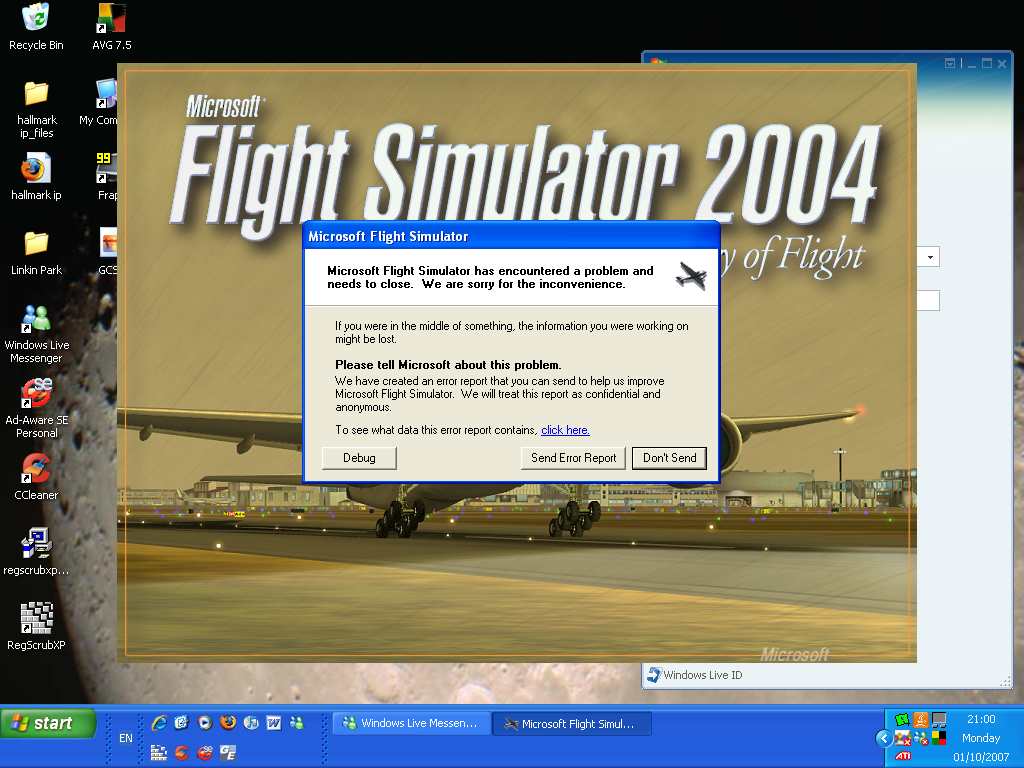
Please help me discover why this is happening
Re: Flight Simulator Problem
Posted:
Mon Oct 01, 2007 3:22 pmby Hagar
Hi there well here i am, logged on to the PC start Flight Simulator 2004 uo and this message pops up
Please help me discover why this is happening
Hi. This might be a little difficult to track down at long range. The first thing I would suggest is to find fs9.cfg & delete it.* Then fire up FS2004 & see if that fixed it. If it didn't work we can try something else.
*You can back up fs9.cfg by renaming the file if you prefer.
Re: Flight Simulator Problem
Posted:
Mon Oct 01, 2007 3:34 pmby FlightSimKid
Nope hasn't worked i get the UK2000 heathrow scenery problem up before if that helps, could locate it in the Scenery.cfg, i could try and delete that and back it up.
Re: Flight Simulator Problem
Posted:
Mon Oct 01, 2007 3:37 pmby Sovien
Have you installed any add-ons (aircraft, scenery, utilities, payware or freeware) recently? If you have, delete the last thing you can remember installing to FS9 and see if that clears it up.
Is there no other error message you get? Just the "send report to microsoft message"?
Re: Flight Simulator Problem
Posted:
Mon Oct 01, 2007 3:41 pmby Hagar
Nope hasn't worked i get the UK2000 heathrow scenery problem up before if that helps, could locate it in the Scenery.cfg, i could try and delete that and back it up.
Hmmm. You didn't mention a UK2000 scenery problem before. What's that all about?
It's most important to try & remember exactly what you did before this problem cropped up. Then we might be able to fix it.
Re: Flight Simulator Problem
Posted:
Mon Oct 01, 2007 3:42 pmby Wii
https://support.microsoft.com/oas/default.aspx?enty=pid&prid=6313&med=chat&gprid=35248&trl=so&ln=en-us&as=1A link to Customer support center chat at microsoft. It's easy, and helpful. Oh, you might need the PID for the game. If someone will get it for you (can't be me cause I'm installing FS9 currently. *inserts disk 2*
Re: Flight Simulator Problem
Posted:
Mon Oct 01, 2007 4:02 pmby FlightSimKid
Well it was fine earlier running ok, nothing wrong.come back 30mins later and it says the problem..ive deleted the entry for UK2000 Heathrow but it still shows up
Re: Flight Simulator Problem
Posted:
Mon Oct 01, 2007 4:07 pmby Hagar
Don't do anything in haste or you will probably make it worse. Did you change your default flight recently?
I've just realised that the UK2000 Heathrow scenery is payware. In that case it will probably have an uninstall option. I can't really help apart from suggesting that you reinstall it.
Re: Flight Simulator Problem
Posted:
Mon Oct 01, 2007 4:18 pmby FlightSimKid
Thanks guys for your help ive unistalled FS9 but the problem is i used this programe to uninstall it..and me being a moron i've just relised ive lost my disks

, will have to buy a new one then. Thanks alot anyway guys.