Taxi Lights- B737 Default FS9

Forum dedicated to Microsoft FS2004 - "A Century of Flight".

Taxi Lights- B737 Default FS9

Postby aritrixa » Sat Sep 29, 2007 10:50 am

Friends,

It is me again  ;)

After got a valuable lesson from Ashar (thanks, mate) all about lightings, I just discovered that my B737-400 FS9 default aircraft does not have taxi light switch. Is this correct or only me?

What should I do during taxi? Should I use Landing Lights to replace?

Thanks

Sorry, for this very basic stupid question.. :)
aritrixa
Ground hog
Ground hog
 
Posts: 32
Joined: Wed Aug 01, 2007 6:41 am

Re: Taxi Lights- B737 Default FS9

Postby Ashar » Sat Sep 29, 2007 11:06 am

Yes, the default 737 panel does not include a taxi-lights switch...But the model itself does have taxi lights...The only work around is to hit L and then turn off all the spare lights... ;)

There might be a panel fix that adds the switch, but I'm not too sure where I can find it :(
Blabbing Away at SimV Since June 8, 2004
Ashar
Major
Major
 
Posts: 4041
Joined: Wed Mar 14, 2007 4:13 am
Location: Ottawa, Ontario

Re: Taxi Lights- B737 Default FS9

Postby aritrixa » Sat Sep 29, 2007 11:11 am

Ah, OK....
Understood...

Thanks, again... :)
aritrixa
Ground hog
Ground hog
 
Posts: 32
Joined: Wed Aug 01, 2007 6:41 am

Re: Taxi Lights- B737 Default FS9

Postby garymbuska » Sat Sep 29, 2007 8:27 pm

Yes, the default 737 panel does not include a taxi-lights switch...But the model itself does have taxi lights...The only work around is to hit L and then turn off all the spare lights... ;)

There might be a panel fix that adds the switch, but I'm not too sure where I can find it :(


This would be a easy fix if you had FSPANEL STUIDO.
Gary M Buska
SYSTEM Specs ASUS P8Z68 V/GEN 3 mother board: INTELL I7 2600k 3.48 ghz Quad core CPU with Sandy bridge: 12 Gigs of 1800hz ram:
GTX 950 OVER CLOCKED: 2 Gigs Ram Windows 10 Home 64 bit Operating system. 750W Dedicated modular power supply. Two Internal 1TB hard drives 1 External 1TB 3.2 USB hard drive. SAITEK Cessna flight Yoke with throttles.
CH Rudder Peddles 27 inch Wide screen Monitor
User avatar
garymbuska
Major
Major
 
Posts: 4415
Joined: Tue Dec 30, 2003 11:10 am
Location: Jacksonville, Florida

Re: Taxi Lights- B737 Default FS9

Postby commoner » Sun Sep 30, 2007 9:06 am

...mmm...the model does indeed include taxi lights and you could "borrow" a switch from one of the other defaults or probably any plane which has a suitable switch..........

  Here's the method....this one is from the King Air......here then is the switch added to the panel.cfg of the B 737-400. Just the bottom line of this text will put the switch on the over head panel.....not too elegant I must admit but you could place it on the main panel where it was more appropriate or find a nicer one from somewhere. I just did this in a couple of minutes to prove the model does have taxi lights...........and it DOES work independently from the landing lights....commoner ;)

[Window04]
file=Upper_640.bmp
size_mm=327
position=2
visible=1
ident=OVERHEAD_PANEL

gauge00=737-400!Strobe Lights, 18, 13
gauge01=737-400!Navigation Lights, 45, 13
gauge02=737-400!Landing Lights, 67, 13
gauge03=737-400!Beacon Lights, 91, 13
gauge04=737-400!Deice Switch, 117, 13
gauge05=737-400!Pitot Heat, 143, 13
gauge06=737-400!Fuel Crossfeed, 167, 14
gauge07=737-400!Engine Start Left, 219, 17
gauge08=737-400!Engine Start Right, 273, 17
gauge09=KingAir!Taxi_Light, 0, 1


..UPDATE.....actually the Beech Baron switch is neater and is quite acceptable in my view....

 add this line instead for gauge 09  

 gauge09=Beech_Baron!Taxi Lights, 0 ,10

 see ya...commoner ;)
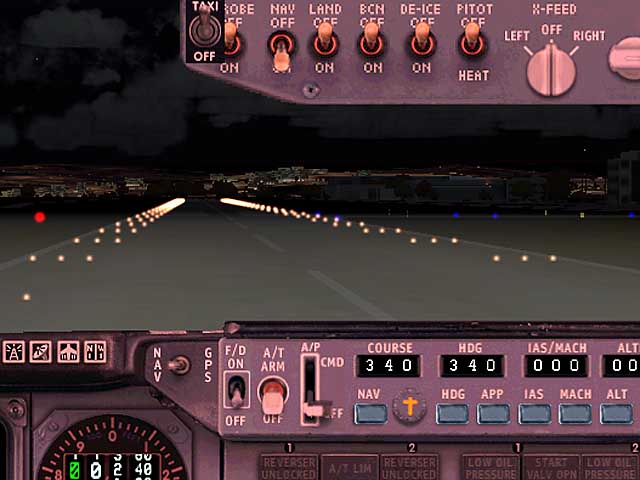
       Image
Last edited by commoner on Sun Sep 30, 2007 1:15 pm, edited 1 time in total.
Image"In theory, there is no difference between theory and practice. But, in practice, there is."
User avatar
commoner
Major
Major
 
Posts: 3221
Joined: Sat Aug 28, 2004 2:26 am
Location: Yorkshire. England. UK.


Return to FS 2004 - A Century of Flight

Who is online

Users browsing this forum: No registered users and 308 guests

