Page 1 of 1
not again

Posted:
Sat Sep 22, 2007 2:08 pmby FsNovice
Re: not again
Posted:
Sat Sep 22, 2007 3:44 pmby Iwannabeapilot
Problems with your graphics card maybe? PSU? I've heard problems like this can be related to those...
Re: not again
Posted:
Sat Sep 22, 2007 5:13 pmby FsNovice
Re: not again
Posted:
Sat Sep 22, 2007 5:35 pmby JBaymore
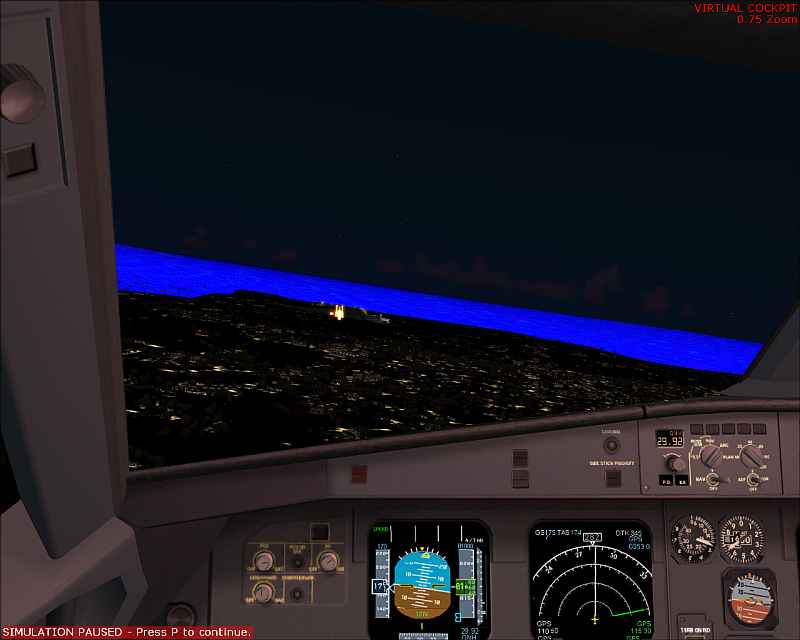
Sounds like maybe a specific texture file is missing?
best,
..................john
Re: not again
Posted:
Sat Sep 22, 2007 5:45 pmby FsNovice
Thanks J, any known way to replace it, without losing my files or having to reinstall? I damn hope so!!!
Re: not again
Posted:
Sat Sep 22, 2007 5:51 pmby JBaymore
The starting point is to figure out what was the LAST thing that you installed or uninstalled... and then try to figure out what texture it might have been based on filenames.
In fact it might not have been the LAST thing.... if you don;t fly there often. Could have been something you did months ago if you only recently went to that place.
It likely was something done between the last time you were there and it was fine... and the first time you went there and it was NOT fine.
best,
...................john
Re: not again
Posted:
Sat Sep 22, 2007 7:34 pmby garymbuska
If you need the default textures they are on one of the install cds. The texture are inside of the individual scenery folders. The problem will be if you do not want to over write all of the files in the scenery folder you will need to figure out which area needs to be fixed, and then just replace the textures files in that area. 8-)
There is a chance the textures are coming from the texture folder But I think the files in this folder are not location specific. So if there was a bad texture it would effect more than one area.
Remember that there are different textures for night or dusk. 8-)
Re: not again
Posted:
Sat Sep 22, 2007 8:01 pmby Kaworu
Possibly you could renane the FS9/Texture folder, then put back in the default textures. You could then copy the originals to over the defaults from your original texture folder. Good luck mate!
Re: not again
Posted:
Sun Sep 23, 2007 5:57 amby FsNovice
[quote]The starting point is to figure out what was the LAST thing that you installed or uninstalled... and then try to figure out what texture it might have been based on filenames.
In fact it might not have been the LAST thing.... if you don;t fly there often.
Re: not again
Posted:
Sun Sep 23, 2007 6:52 amby FsNovice
I have been able to nail the issue down to only at night, no other time does this happen. Does this help?
Re: not again
Posted:
Sun Sep 23, 2007 12:43 pmby Kaworu
Any specific time? Or an all night long affair?
Re: not again
Posted:
Sun Sep 23, 2007 12:50 pmby FsNovice
By night i mean if i select Night on the time and season tab of settings. Any time in this scale triggers this problem
Re: not again
Posted:
Sun Sep 23, 2007 2:30 pmby JBaymore
Now try selecting "Night" And speparately, Summer, Fall, Winter, Hard Winter, and Spring. Does it happen to ALL of them at night?
best,
..............john
Re: not again
Posted:
Sun Sep 23, 2007 2:46 pmby FsNovice
can confirm, happens on all of the seasons. Cheers guys for sticking with me on this one!
Re: not again
Posted:
Sun Sep 23, 2007 5:23 pmby JBaymore
So it is a night related texture (or textures) that is (are) independent of any particular seasonal variation.