
Need Help with AirWolf

Forum dedicated to Microsoft FS2004 - "A Century of Flight".

Need Help with AirWolf

Postby videokid1969 » Fri Aug 10, 2007 4:08 am
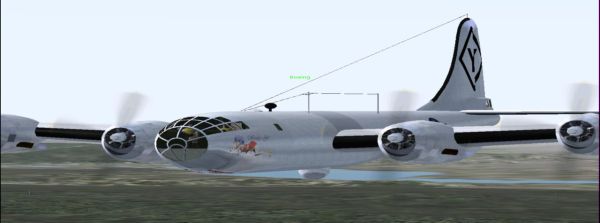
I downloaded AirWolf and it was working fine, except for the line or bar where I can see the gound in 3-D cockpit mode and my 2-D panle looked fine, Then I updated the panel and now my 2-D panle looks squeezed or comprest. Can any one tell me what I can do to fix theses problems or should I just redownload it and not update the panle? Also I have Flight Sim Manager and it works great but not all the aircraft I have listed in the program have photos what can I do to fix this so I know what plane I am looking at?
Image
videokid1969
2nd Lieutenant
2nd Lieutenant
 
Posts: 133
Joined: Fri Jul 13, 2007 12:17 am
Location: Greeley, CO

Re: Need Help with AirWolf

Postby DonAlfonsoRoKil » Fri Aug 10, 2007 5:36 am

Yes, first delete the old aircraft by deletng its folder(s) found in \Aircraft\ , tthen install the new one again.
Of course if it has an uninstaller, you don't need to delete the folder but sure is sure.
I would't update the panel again...
And you won't be able to ged rid of your 3D panel problem until a model update is released, because of that 3D cockpit isn't a panel, it's 3D data most times even in the same file as the outside-view model!!
DonAlfonsoRoKil
 

Re: Need Help with AirWolf

Postby videokid1969 » Fri Aug 10, 2007 5:42 am

Thanks for the info.
Image
videokid1969
2nd Lieutenant
2nd Lieutenant
 
Posts: 133
Joined: Fri Jul 13, 2007 12:17 am
Location: Greeley, CO


Return to FS 2004 - A Century of Flight

Who is online

Users browsing this forum: No registered users and 310 guests