Page 1 of 2

FS9.cfg and FS9

PostPosted: Sun Jul 29, 2007 4:00 pm
by a1
I have 2 files in the Application Data Microsoft FS9 folder. The fs9.cfg is a text document and the other is an Office Outlook Configuration file. They are both the same size and has the same stuff inside. What I change in the .cfg doesn't have any affect. But when i change the other one it has the results i was looking for. So which one do i edit when i do configuration stuff?

Thanks

Re: FS9.cfg and FS9

PostPosted: Sun Jul 29, 2007 5:58 pm
by garymbuska
I have 2 files in the Application Data Microsoft FS9 folder. The fs9.cfg is a text document and the other is an Office Outlook Configuration file. They are both the same size and has the same stuff inside. What I change in the .cfg doesn't have any affect. But when i change the other one it has the results i was looking for. So which one do i edit when i do configuration stuff?

Thanks


The file FS9 should use is the FS9.cfg file the other file is a copy with a OFFICE OUTLOOK name. You have to make sure that the other file does not have a BAK for a file extension. I have the exact same two files on my system 8-)

Re: FS9.cfg and FS9

PostPosted: Sun Jul 29, 2007 6:09 pm
by Hagar
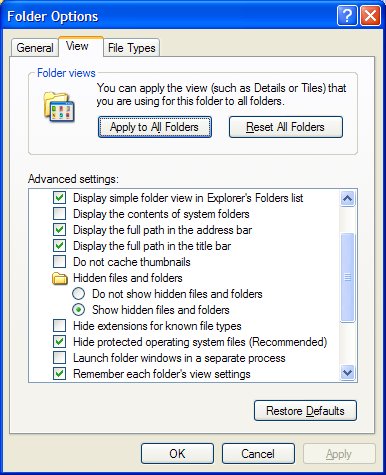
Assuming you have WinXP, from Windows Explorer go to Tools/Folder Options. Click the View tab & uncheck the [glow=yellow,2,300]Hide extensions for known file types[/glow] option. This will display all files complete with their file extensions which makes all this so much easier.

Image

See my Windows Basics & Working with Windows articles (posted at Grumpy's Lair) for more useful tips.

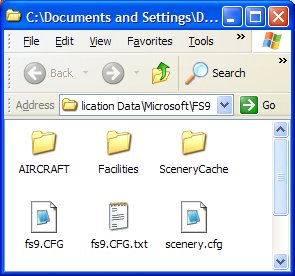
The icons will vary depending on which program the files are associated with. CFG files are associated with Notepad on my system.
Image

PS. When you find the correct fs9.cfg create a shortcut to it & paste it to your Desktop.

Re: FS9.cfg and FS9

PostPosted: Sun Jul 29, 2007 7:32 pm
by a1
So which one do i use?

Re: FS9.cfg and FS9

PostPosted: Sun Jul 29, 2007 8:24 pm
by Sir_Crashalot
FS9.cfg

Crash ;)

Re: FS9.cfg and FS9

PostPosted: Sun Jul 29, 2007 8:40 pm
by a1
FS9.cfg

Crash ;)


But whatever I change in the .cfg isn't showing up. Or do I have to do all the things that hager said to just use the .cfg?

Re: FS9.cfg and FS9

PostPosted: Sun Jul 29, 2007 9:36 pm
by Sir_Crashalot
What program do you use to open FS9.cfg (that's the one with the Outlook logo)? If you right click it you can open it with Notepad. I pressume you already do that?

Crash ;)

Re: FS9.cfg and FS9

PostPosted: Sun Jul 29, 2007 9:38 pm
by a1
I open it with Notepad.

Re: FS9.cfg and FS9

PostPosted: Sun Jul 29, 2007 10:15 pm
by Xyn_Air
Which changes are you making that aren't showing up?  Is it possible to show screen shots of the file you are openning and of the changes you are making?

Re: FS9.cfg and FS9

PostPosted: Mon Jul 30, 2007 12:53 am
by a1
No no. I mean changes about adding .dlls and stuff. When I enter it in the .cfg it has no effect but when i enter it in the Outlook thing it does something.

Re: FS9.cfg and FS9

PostPosted: Mon Jul 30, 2007 2:13 am
by commoner
...mm...this really isn't making too much sense........."messing around" with fs9.cfg is not something I would recommend....changes to it usually come about automatically as a result of doing work on other areas of the sim. Lots of things can be added manually to tweak the sim but you really can very quickly end up with an fs9 which won't work at all.

Be nice to know just what you are attempting to do .....be careful is my advice..VERY careful!      commoner  :-/ ;)

Re: FS9.cfg and FS9

PostPosted: Mon Jul 30, 2007 2:50 am
by Hagar
But whatever I change in the .cfg isn't showing up. Or do I have to do all the things that hager said to just use the .cfg?

What I suggested is a simple change to your Folder Options settings so you can recognise different file types by their extensions. It will take only a few seconds. Please try it.

I agree it would help to know what you're trying to do. I assume you're adding entries to the [OLDMODULES] section. Make sure you're editing the correct file. That's the one named fs9.CFG. The file named fs9.CFG.txt in my shot is a backup copy & editing it will obviously have no effect.

PS. I believe that CFG files are associated with Outlook by default. However, they cannot have the Outlook icon if you don't have Outlook installed.

Re: FS9.cfg and FS9

PostPosted: Mon Jul 30, 2007 3:23 am
by Hagar
No no. I mean changes about adding .dlls and stuff. When I enter it in the .cfg it has no effect but when i enter it in the Outlook thing it does something.

I now see the problem. You're editing the wrong file. This is how the files look in Windows Explorer with the default View settings.
Image

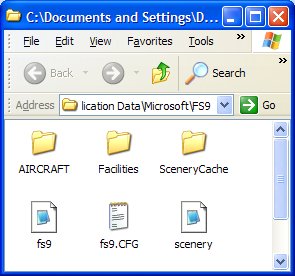
Now compare it with this, after changing the View setting to show the file extensions as I suggested. The file displaying as fs9.CFG in the first shot is actually the backup copy - fs9.CFG.txt.
Image

Re: FS9.cfg and FS9

PostPosted: Tue Jul 31, 2007 10:52 am
by uncleyuk
:D  You mentioned changing a .dll file? Or are you trying to add one?  They generally go in the Modules folder within the main sim folder.

Re: FS9.cfg and FS9

PostPosted: Tue Jul 31, 2007 11:13 am
by a1
I use it to add a module.