Page 1 of 1

Missing gauges

PostPosted: Wed Jul 04, 2007 4:53 pm
by gypsymoth
Installation:
Copy all gauges contained in the gauge folder (files with gau extension) into the FS9 gauge folder.
Copy all files contained in the panel folder into any ERJ aircraft of your choice.
Copy the "wav" files contained in the sound folder into the main FS sound folder (not the aircraft sound folder).
Copy the GaugeSound.dll file into the main Flight Simulator 9 folder and also into the Windows/System 32 folder.
Embraer ERJ-145 panel version 1 forFS2004. By Hector Molina

I have followed his directions to the letter.  I get the panel but no gauges.  I copied the panel into Mike Stone's Lancer (what a goer!!) but it should still work, shouldn't it?

Thanks,
TerryW.  

Re: Missing gauges

PostPosted: Wed Jul 04, 2007 10:35 pm
by garymbuska
Installation:
Copy all gauges contained in the gauge folder (files with gau extension) into the FS9 gauge folder.
Copy all files contained in the panel folder into any ERJ aircraft of your choice.
Copy the "wav" files contained in the sound folder into the main FS sound folder (not the aircraft sound folder).
Copy the GaugeSound.dll file into the main Flight Simulator 9 folder and also into the Windows/System 32 folder.
Embraer ERJ-145 panel version 1 forFS2004. By Hector Molina

I have followed his directions to the letter.  I get the panel but no gauges.  I copied the panel into Mike Stone's Lancer (what a goer!!) but it should still work, shouldn't it?

Thanks,
TerryW.  


If the Gauge folder that came with the down load had a folder inside of it and all of the gauges were inside that folder and you removed them than that is your problem. Anytime you find gauges inside of a folder other than a folder named gauges you need to leave them there and move the entire folder over to the FS9 gauge folder or they will not work the folder is what is referred to as a CAB file and must stay within the folder to work properly. I have seven folders within my FS9 gauge folder, and each folder has gauges within it. 8-)

Re: Missing gauges

PostPosted: Thu Jul 05, 2007 11:41 am
by gypsymoth
Hi Gary.  There was no folder in a folder.  I've been installing stuff for some time now & not had a problem like this before.   The instructions I pasted seem straightforward to me so I am at a loss to see why they don't appear!!   I copied the GaugeSound .dll as required too!  

Re: Missing gauges

PostPosted: Fri Jul 06, 2007 2:05 am
by commoner
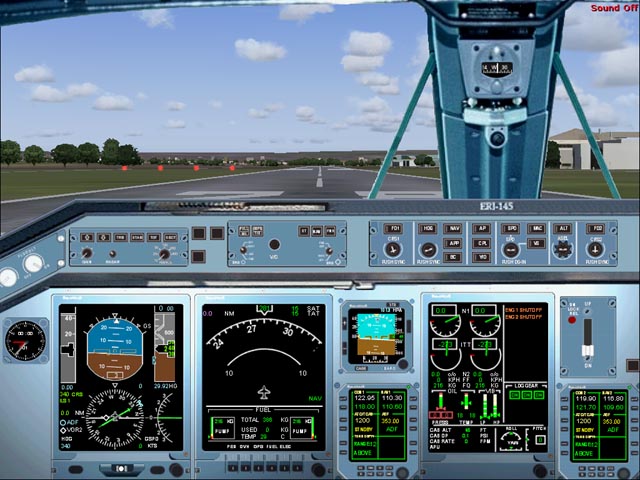
...mm...can't say why you are having trouble with this panel ......I have downloaded it to check and tried the simple install in a variety of aircraft...this is it in the Beech Baron no less ::)

Suggest you A. download it again, (preferably from a different source) in case you got a bad copy.

                   B. check that you really did follow the instructions (we all get a bit sloppy sometimes ;))

                       Otherwise nothing to offer..........commoner :-/ ;)


   Image                

Re: Missing gauges

PostPosted: Fri Jul 06, 2007 3:08 am
by gypsymoth
Thanks commoner.   I got it from here as most other things but am glad to say that after deleting & reinstalling it 4 timeslast night, it suddenly works!   I was careful to follow the correct procedure each time too!

I now have to sort a friend's missing gauges out. He started his fs9 last night & all sorts of panels have missing gauges.  He assures me he's not installed or deleted anything for 6 months.   I think I'll try copying & pasting my gauges folder for him which I have in a pen drive to see if that does the trick!!