Page 1 of 1

Newbie Problem

PostPosted: Tue May 22, 2007 12:47 pm
by Dan Morera
Hi guys , I'm new to FS9, well actually to all FS. I know how load a normal aircraft to my fs9 as long as it has only the usual 4 folders inside. But I have noticed that mane planes came with more stuff in the folder (after extracting), let me show you.

I downloaded this plane PA31


And inside of that folder there were these 2. (already extracted):
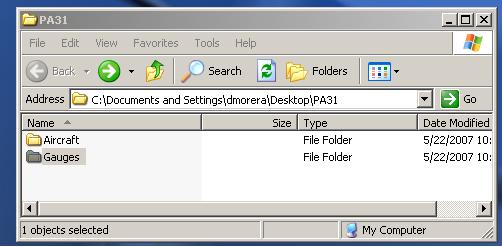
Image

Inside of Aircraft there was the actual plane, so I know I have to put this one on the  FS9 Aircraft folder.
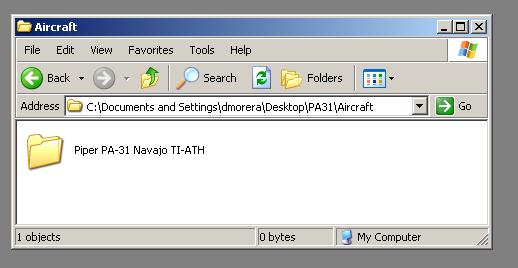
Image

But what About the folder for Guages? I have tried in a couple of planes to copy the contents to the "main" gauges folder in fs9 and when I do that, and go into FS9 and select the plane and click "fly now" it just closes on me. Or it doesn't show all the gauges in the panel (when it actually takes me flying).


And look at all of the other stuff that's inside the aircraft folder: do I need to do something with that? or just leave it alone?
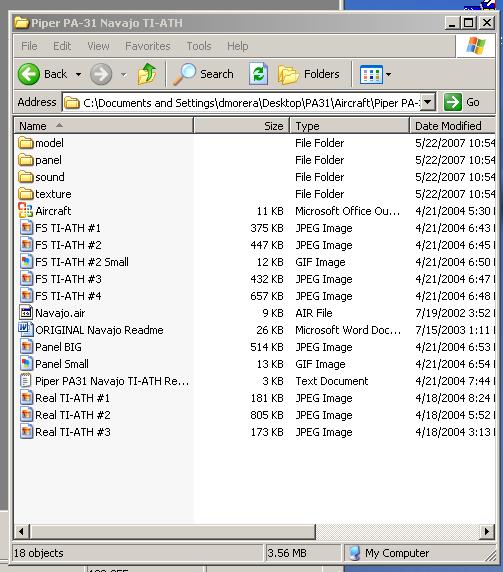
Image

Man I don't know what I'm doing wrong.
Thanks for you help guys

Dan

Re: Newbie Problem

PostPosted: Tue May 22, 2007 1:03 pm
by lilley
hey man!

well what you need to do is to copy all of the files of any kind from the inside of the guages folder into th guages folder in your FS9 default directory, then the normal folder into the aircraft folder in your directory.

dont mind all the other rubbish that is inside the folder i dont beleive, i never had, as long as the four main folders and the .cfg file are in there.  try it and see if that works for you  ;)

james
8-)

Re: Newbie Problem

PostPosted: Tue May 22, 2007 1:17 pm
by ozzy72
You can't beat this great tutorial written by our own webmaster Pete Daly http://www.simviation.com/acinstall.htm

Re: Newbie Problem

PostPosted: Tue May 22, 2007 1:31 pm
by Dan Morera
Thanks guys.

Is it common to find planes that just don't work? I read the tutorial by Pete Daly, and followed the steps. And still only a couple of planes have worked perfectly.

Even when I copy the files into the FS default gauges folder. Actually when I do that  (with a particular plane it will crash the FS9).

I'll keep trying and reading more. And downloading a lot more planes. Man I love this FS9.

Thanks again
Dan

Re: Newbie Problem

PostPosted: Tue May 22, 2007 1:41 pm
by ozzy72
Dan it could be you're doing what a lot of new guys do. Some of the files in the Gauges folder are zips and shouldn't be unzipped but left as is?

Re: Newbie Problem

PostPosted: Tue May 22, 2007 1:49 pm
by Dan Morera
Dan it could be you're doing what a lot of new guys do. Some of the files in the Gauges folder are zips and shouldn't be unzipped but left as is?


Hmm that sounds about right. So first just copy the Gauges as they are in the unzipped version (the one you actually download) and then extract the aircraft folder and install it as usual, right?

I'll give that a try as soon as I get home.

Thank you Ozzy

Dan

Re: Newbie Problem

PostPosted: Tue May 22, 2007 2:05 pm
by Hagar
Thanks guys.

Is it common to find planes that just don't work? I read the tutorial by Pete Daly, and followed the steps. And still only a couple of planes have worked perfectly.

Hi Dan. Unfortunately there's no common template for configuring files which makes it very difficult to cover everything in a tutorial. Everyone has their own favourite method so downloads can vary considerably. Keep trying. Like most things it's not difficult once you get the hang of it..

[quote]Even when I copy the files into the FS default gauges folder. Actually when I do that

Re: Newbie Problem

PostPosted: Tue May 22, 2007 3:12 pm
by Dan Morera
.... A module named FSSound.dll is a common cause of this problem & the fix involves a simple edit of fs9.cfg.


Thank you for bringing that up. You are right about that one, one of the problems I had was with that file, FS9 showed me an error about it so I went in and deleted it.

Do you have the edit for the fs9.cfg ? And where is the fs9.cfg located? (sorry to be such a pain  :-[ )


I'll give you the list of planes later today (as soon as I get home)

Dan

Re: Newbie Problem

PostPosted: Tue May 22, 2007 3:44 pm
by Hagar
.... A module named FSSound.dll is a common cause of this problem & the fix involves a simple edit of fs9.cfg.


Thank you for bringing that up. You are right about that one, one of the problems I had was with that file, FS9 showed me an error about it so I went in and deleted it.

Do you have the edit for the fs9.cfg ? And where is the fs9.cfg located? (sorry to be such a pain

Re: Newbie Problem

PostPosted: Tue May 22, 2007 4:50 pm
by Dan Morera
Got it, thank you Hagar. I'll try it tonight.

Dan