Shoreline graphics problem
 Posted: Wed Feb 07, 2007 10:44 am
I have recently upgraded my computer (bought a new system) and also stepped up to FS04.
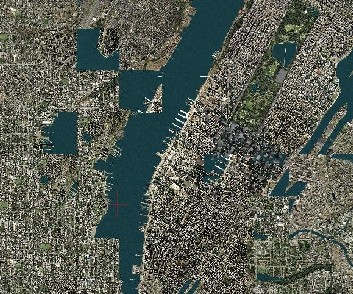
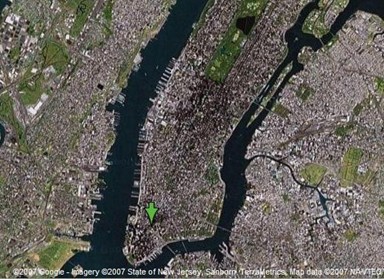
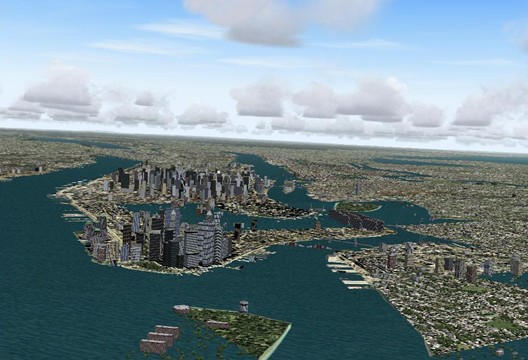
After several days of messing about with various settings I still can't get shorelines to display accurately. Bodies of water appear in the middle of cities. Pieces of land appear in the middle of the ocean. Bridges that should span rivers only span dry land, and sometimes end in the river instead.
And it all changes to a crazy quilt patchwork in the ctl-S view. The shoreline features are there in sort of big blocks, but all mixed up and in different sizes and in incorrect locations.
I have installed the MS patch for FS04.
I am running a Gateway PC with XP media center sp 2
AMD Athlon 64 X 2 at 2.21 ghtz
2 gig RAM
Nvidia GeForce 6100 graphics.
Ive tried the various available slider settings from both their minimums to their maximums, but always the program "paints" big blocks of scenery where they don't belong.
Anyone have any ideas?
Thanks
After several days of messing about with various settings I still can't get shorelines to display accurately. Bodies of water appear in the middle of cities. Pieces of land appear in the middle of the ocean. Bridges that should span rivers only span dry land, and sometimes end in the river instead.
And it all changes to a crazy quilt patchwork in the ctl-S view. The shoreline features are there in sort of big blocks, but all mixed up and in different sizes and in incorrect locations.
I have installed the MS patch for FS04.
I am running a Gateway PC with XP media center sp 2
AMD Athlon 64 X 2 at 2.21 ghtz
2 gig RAM
Nvidia GeForce 6100 graphics.
Ive tried the various available slider settings from both their minimums to their maximums, but always the program "paints" big blocks of scenery where they don't belong.
Anyone have any ideas?
Thanks
 *lol*
*lol* .
. ).
).